Quick Fix: Over-Extraction Is Likely the Culprit
Bitter pour over coffee usually means you've over-extracted the grounds, pulling out harsh compounds. The quickest fix is to grind coarser, lower your water temperature, or shorten your brew time. Start with one change at a time and taste the difference.
The Usual Suspects: What Makes Pour Over Bitter
Bitter flavors in pour over coffee typically come from over-extraction, where water pulls too many bitter compounds from the grounds. Common causes include a grind that's too fine, water that's too hot, or a brew time that drags on too long. Even your filter choice can play a role—thinner paper can lead to faster flow and less control.
If you're using a Hario V60, its large opening and thin paper filters can speed up extraction, making it easier to overdo it. With a Kalita Wave, the flat bottom and slower flow can also produce bitterness if your grind is too fine or your pour is too aggressive.
Step-by-Step Troubleshooting Guide
Start by checking your grind size. If your coffee tastes harsh and dry, grind a notch coarser. Next, check your water temperature—aim for 195-205°F (90-96°C). If you're not using a thermometer, let your kettle sit 30 seconds after boiling. Finally, time your brew: total contact time should be around 2:30 to 3:00 for a standard 12-ounce pour over. If it's running longer, adjust your grind or pour rate.
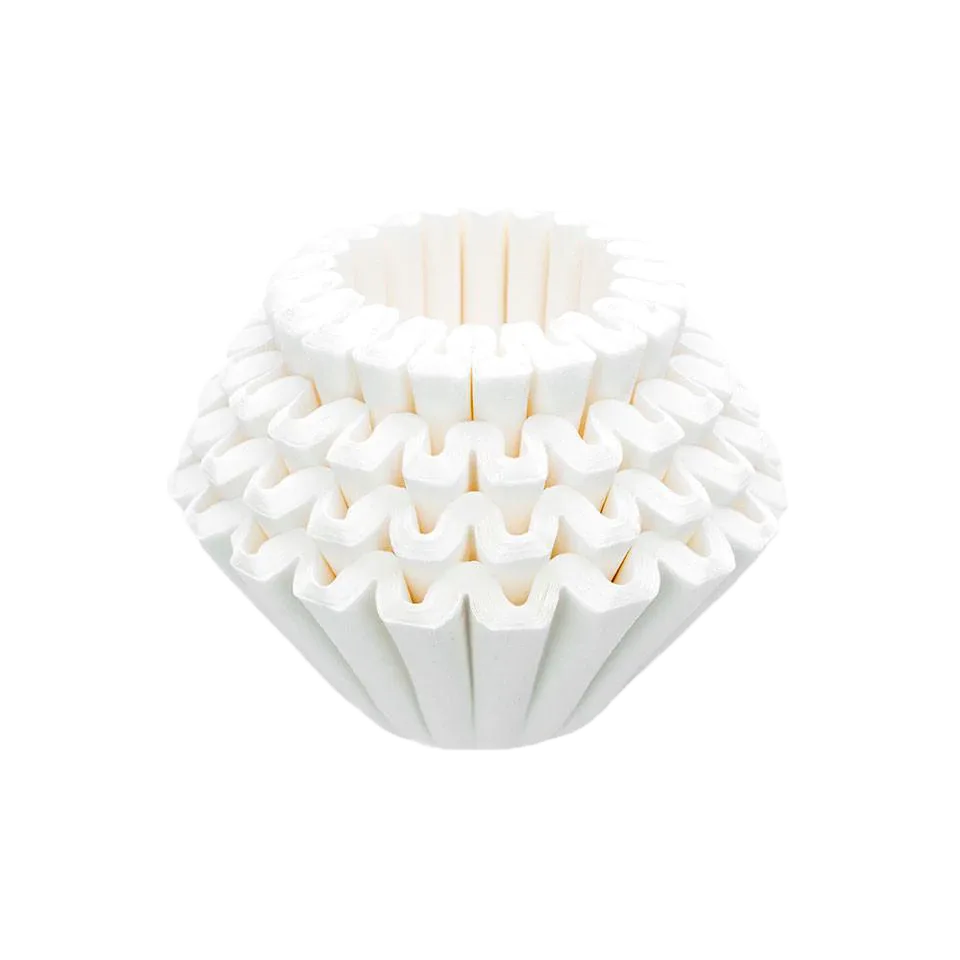
If bitterness persists after adjusting these variables, try a different filter. The Hario V60 paper filters are thin and designed for fast flow, which can exacerbate over-extraction if your technique is off. The Kalita #185 filters are thicker and keep the filter slightly suspended, slowing flow and giving you more forgiveness.
Diagnosis: Bitter Pour Over Coffee
- Symptom: Your coffee tastes harsh, dry, or ashy, with a lingering bitter aftertaste. This is almost always over-extraction.
- Likely Cause: Grind too fine, water too hot, brew time too long, or a filter that's too fast for your technique. Check one variable at a time.
- Corrective Action: Grind coarser, lower water temperature by 5-10°F, or shorten your total brew time by 15-30 seconds. If using a V60, consider switching to a Kalita Wave with its slower, more forgiving filter. Taste after each change. If still bitter, repeat.
- When to Stop: If you've adjusted grind, temperature, and time and still get bitterness, your coffee beans may be over-roasted. Try a lighter roast or a different origin. Not all bitterness is fixable with technique.
Gear That Helps You Dial In
- Hario V60 Coffee Filters: These cone-shaped thin paper filters fit a Hario V60-01 or V60-02 pourover brewer, known for its nuance and versatility. The 02 brewing option boasts a larger opening that allows for a faster brew. If you're using a V60, these filters are essential. The fast flow means you need to be precise with your grind and pour to avoid bitterness.
- Kalita Coffee Filters #185: Made of the finest, high-grade coffee filter paper, Kalita coffee filters ensure a proper extraction from your Kalita Wave brewer. The thoughtful design keeps the coffee filter slightly suspended above the bottom of the coffee brewer to help funnel water contact away from the outer wall of the dripper. The suspended design slows flow and reduces channeling, making the Kalita Wave more forgiving for beginners or anyone struggling with bitterness.