Quick Answer
Most tension problems are threading problems, not tension-dial problems. Rethread the machine with the presser foot up, confirm the bobbin is wound and seated correctly, and test on a scrap of your actual fabric before you touch the tension dial. Only adjust the upper tension in small increments after those basics check out.
You sit down to sew, press the pedal, and the first seam comes out with loops underneath or a tangled nest on top. It looks like a tension failure, but the tension dial is often innocent. Upper tension, bobbin tension, threading, needle size, and fabric weight all pull on the same stitch, so the real skill is reading the symptom before turning any dial.
This guide walks through the common sewing machine tension problems in the order you should check them. For each one you get the symptom, the likely cause, the corrective action, and the point where you should stop adjusting and change something else instead.
Start Here: Rule Out the Usual Suspects
Before adjusting sewing machine tension, run a five-point check. Raise the presser foot and rethread the top path from spool to needle, making sure the thread sits fully inside the tension discs. Confirm the bobbin is wound evenly, inserted in the correct direction, and threaded through the bobbin case slot. Install a fresh needle that matches your fabric, and use the same thread in the top and bobbin if possible. Finally, clean lint from the bobbin area and under the needle plate.
These steps resolve a large share of tension complaints because a thread sitting outside the discs or a bobbin inserted backwards mimics a tension fault exactly. Test on a doubled scrap of your project fabric, not on a scrap of something else. Fabric weight changes how a balanced stitch looks, so a stitch that seems loose on muslin may be correct on quilting cotton.
- Always thread with the presser foot up so the thread seats between the tension discs
- Change the needle every project or sooner if you hear a thumping sound
- Keep a labeled scrap of each project fabric for tension tests
Loops and Nests Under the Fabric
Symptom: the top side looks acceptable but the underside is a bird's nest of loops. Likely cause: the upper thread is not seated in the tension discs, often because the machine was threaded with the presser foot down. Corrective action: raise the foot, unthread the top path, and rethread slowly, checking that the thread passes between the discs and through every guide and the take-up lever.
If rethreading does not fix it, check the bobbin. A bobbin wound with uneven tension or inserted so it spins the wrong way can throw loops from below. Wind a fresh bobbin at a moderate, steady speed and reinsert it following the arrows on your bobbin case. If loops persist after both checks, then adjust the upper tension one number at a time and retest.
- Stop adjusting the dial once rethreading fixes the stitch
- If loops appear only on one fabric, the fabric or needle is the variable, not the tension
Tight Tension: Puckers, Breaks, and Pulled Seams
Symptom: the fabric puckers along the seam, the thread snaps repeatedly, or the bobbin thread is pulled up to the top surface. Likely cause: upper tension is too high for the thread and fabric combination. Corrective action: lower the upper tension in small steps and test after each change. A balanced stitch shows interlocking threads inside the fabric, with no loops on either side.
Thread and needle choice matter here. A heavier thread in a small needle creates drag that feels like tight tension, and a needle that is too large for fine fabric can pucker the seam on its own. If lowering tension does not help, switch to a needle and thread size suited to the fabric before adjusting further. Tight tension that resists correction may also mean lint packed between the tension discs, so clean that area.
- Change one variable at a time and keep a note of the starting dial position
- Puckering on fine fabric often points to needle size, not tension
Loose Tension: Weak Seams and Visible Loops on Top
Symptom: stitches look loose, the seam pulls apart easily, or small loops show on the top surface. Likely cause: upper tension is too low, or the bobbin thread is not seated in its case. Corrective action: confirm the bobbin is properly threaded through the case, then raise the upper tension gradually until the stitch balances. Test on the fabric you are actually sewing.
If the stitch stays loose at a normal setting, look at the bobbin case itself. A bobbin case with a bent or worn spring, or one packed with lint, cannot hold consistent tension no matter where the dial sits. Clean it thoroughly. If the problem continues after cleaning and a fresh bobbin, the bobbin case may need service rather than more dial adjustments.
- Loose stitches on stretchy fabric may need a stretch or ballpoint needle before tension changes
- Never keep tightening the upper dial to compensate for a damaged bobbin case
When the Stitch Looks Wrong Only in One Direction
Symptom: forward stitches look fine but reverse stitches loop, or the problem appears only when you sew over thick seams. Likely cause: the machine is struggling to form the stitch at that speed or thickness, not a tension fault. Corrective action: slow down, use the handwheel to ease over thick intersections, and consider a needle made for the fabric, such as a denim or topstitch needle for heavy layers.
A presser foot that does not glide smoothly can also drag the fabric and distort the stitch. For decorative work on plastic, vinyl, or leather, a foot with a non-stick sole reduces drag so the feed dogs move the fabric evenly. That is a mechanical fix, not a tension fix, and it is worth trying before you touch the dial.
- Reverse looping at speed often resolves with slower sewing, not tension changes
- Match the presser foot to the material before adjusting tension
Know When to Stop Adjusting
Tension dials are for fine balance, not for solving mechanical faults. Stop adjusting and look elsewhere when the stitch stays wrong after a clean rethread, a fresh bobbin, and a new needle; when the dial feels loose, gritty, or has no effect; when the bobbin case shows wear; or when the machine skips stitches entirely. Skipped stitches usually point to needle, timing, or hook issues rather than tension.
If you have tested on the same fabric, with the same thread, and the stitch still will not balance within a few small dial changes, return the dial to its marked neutral position and have the machine serviced. Continuing to turn the dial can stretch the tension spring and turn a simple fix into a repair.
- Note your machine's default tension number so you can always return to it
- Skipped stitches, loud noises, or a dead dial mean service, not more adjustment
Tension Diagnosis Chart: Symptom, Cause, Action, Stop Point
- Loops and nests on the underside: The upper thread is almost always outside the tension discs. Raise the presser foot, rethread the entire top path, and check the bobbin direction. Stop here if the stitch balances. Only adjust the upper dial if rethreading and a fresh bobbin do not fix it.
- Puckered seam or thread breaking: Upper tension is too high for the thread and fabric, or the needle is too large for fine fabric. Lower tension one step at a time and test. If puckering continues after lowering tension and changing the needle, clean the tension discs or have the machine serviced.
- Loose stitch or loops on top: Upper tension is too low, or the bobbin thread is not seated in its case. Reseat the bobbin, then raise tension gradually. If the stitch stays loose at a normal setting, inspect the bobbin case for wear or lint instead of raising tension further.
- Problem only on thick seams or reverse: The machine is straining at that thickness or speed. Slow down, use the handwheel at intersections, and choose a needle suited to the material. Do not change tension for a fault that appears only in one direction or at one spot.
- Distortion on vinyl, leather, or plastic: The foot is dragging the material. Switch to a foot with a non-stick sole, such as an open embroidery foot, before touching the dial. If the stitch improves with the right foot, tension was never the problem.
- Skipped stitches or a dead dial: Skipped stitches point to needle, timing, or hook issues, and a dial with no effect suggests a stretched spring or mechanical fault. Stop adjusting and book service. Return the dial to its neutral mark first.
Tools That Help With Tension Testing and Stitch Quality
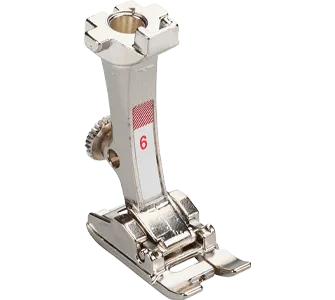
- #6 BERNINA Embroidery Foot: The BERNINA #6 Embroidery Foot has a wide groove underneath that accommodates dense embroidery and satin stitches and glides smoothly over thread buildup. If your loops appear only during dense decorative or satin stitching, this foot reduces drag and thread buildup so you can judge whether the real issue is tension or the foot.
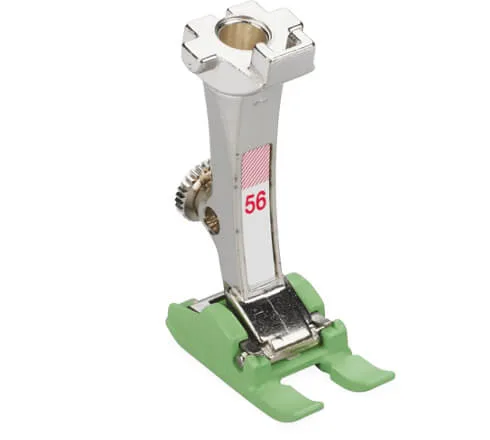
- #56 BERNINA Open Embroidery Foot Non-Stick Sole: The #56 BERNINA Open Embroidery Foot has a non-stick sole and an open shape for a clear view of the sewing area, and it is designed for plastic, vinyl, leather, or similar materials. When stitches distort only on slick or sticky materials, a non-stick foot often fixes the feed and stitch quality without any tension change.
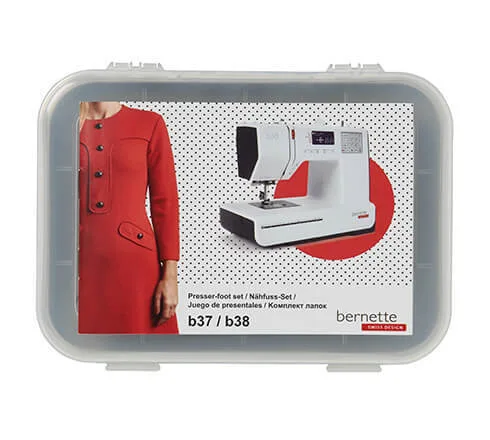
- bernette Quilting feet kit (6 pcs) b37/b38: The bernette quilting feet kit contains six feet for decorative quilting and for sewing smoothly on leather and other materials. Having the right foot on hand lets you test stitch quality across different techniques before deciding the tension dial is the problem.
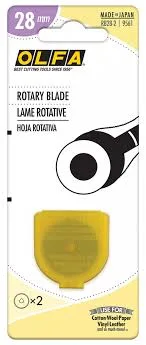
- OLFA Rotary Blade 28mm: The OLFA 28mm replacement blade is a high-carbon steel blade that fits OLFA 28mm rotary cutters and is suited to curves, small quilt blocks, and detailed shapes. Clean fabric edges from a sharp blade give you consistent test scraps, so you can compare tension results without ragged edges confusing the picture.
Tension problems reward patience over force. Rethread with the foot up, use a fresh bobbin and needle, test on your real fabric, and change the dial only in small steps. When the stitch still will not balance, the fix is usually a different foot, needle, or a service visit, not another turn of the dial.