Quick answer
Most laser rangefinder errors come from three sources: environmental interference (fog, rain, bright sun), target characteristics (small or low-reflectivity objects), and user technique (unsteady hold or wrong mode). Before assuming your unit is defective, check these factors—they fix the majority of false readings.
Environmental Factors That Skew Readings
Fog, rain, snow, and even heavy dust scatter the laser beam before it reaches the target. The rangefinder may pick up a closer object—like a raindrop—and report a much shorter distance. Bright sunlight can wash out the return signal, especially on low-contrast targets. If you consistently get erratic numbers in these conditions, switch to Fog mode if available, or wait for clearer weather.
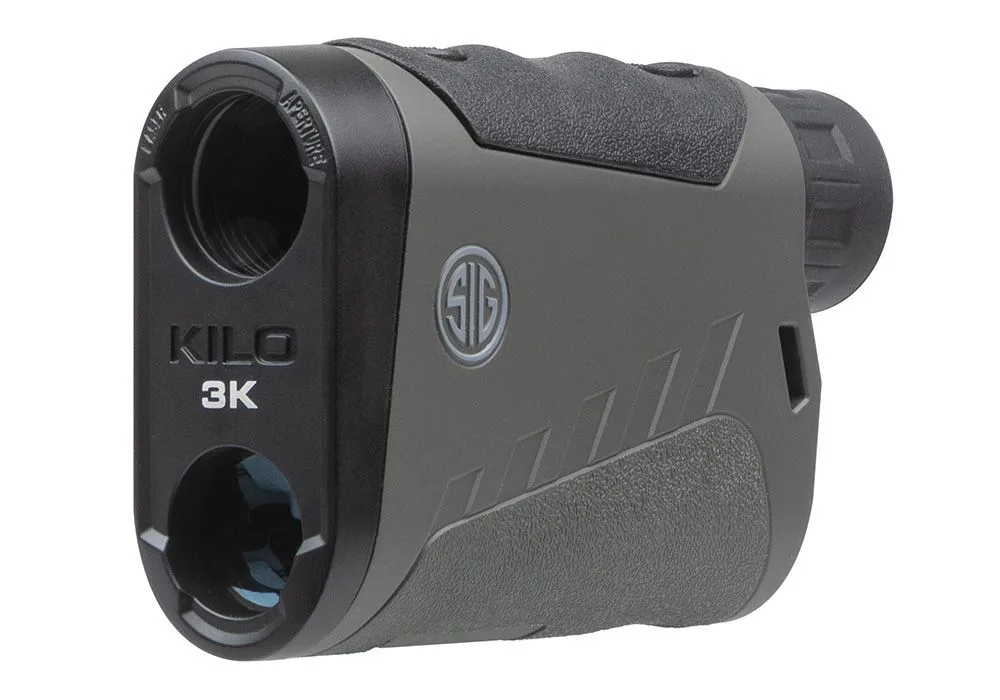
Temperature and barometric pressure changes affect the speed of light slightly, but modern units like the SIG KILO3K 6X22MM Laser Range Finder include onboard environmental sensors that adjust calculations in real time. This feature minimizes atmospheric errors, but only if the sensors are unobstructed and clean.
Target Characteristics That Confuse the Laser
Not all targets reflect equally. A dark, matte surface—like a black animal hide or a shaded rock—absorbs much of the laser energy, returning a weak signal. The rangefinder may then lock onto a brighter object behind or in front of the intended target. Small targets, such as a fence post at 500 yards, may simply be too narrow for the beam to hit squarely.
The SIG KILO3K offers multiple modes to handle these situations: Best mode prioritizes the strongest return (ideal for reflective targets), Last mode picks the farthest object (useful when shooting past brush), and Extended Range mode boosts sensitivity for low-reflectivity targets. Choosing the wrong mode for your target is a common user error.
User Technique and Setup Mistakes
A shaky hold is one of the most frequent causes of inconsistent readings. Even a slight wobble can move the beam off a small target at long range. Brace the rangefinder against a solid surface, use a tripod, or rest your elbows on your knees. Also, ensure the eyepiece diopter is adjusted so the display is sharp—a blurry reticle makes it hard to confirm aim.
Dirty lenses scatter light and reduce transmission. Clean both objective and eyepiece lenses with a microfiber cloth. The SIG KILO3K's SpectraCoat anti-reflection coatings help maintain clarity, but physical debris still blocks the beam. Finally, check that the battery is fresh; low voltage can cause erratic readings or failure to power on.
Diagnosis: Is It Your Rangefinder or the Conditions?
- Symptom: Reading jumps between two distances: Likely cause: The beam is hitting two different objects (e.g., foreground brush and your intended target). Corrective action: Switch to Last mode to force the farthest return, or use Best mode if the nearer object is more reflective. If switching modes fixes the jump, your unit is fine. If it persists on a clear, unobstructed target, consider service.
- Symptom: No reading at all on a visible target: Likely cause: Target is too small, too dark, or too far for the current mode. Corrective action: Try Extended Range mode, brace the unit, and aim at a brighter part of the target. Clean the lenses. If you still get no reading after these steps, the rangefinder may need repair—especially if other targets work fine.
- Symptom: Reading is consistently short by a fixed amount: Likely cause: The unit is in First mode and picking up a closer object, or the environmental sensors are blocked. Corrective action: Check that the sensor ports are clean. Switch to Best or Last mode and compare. A consistent offset that changes with mode suggests a settings issue. If the offset remains across all modes, the unit may need calibration.
Product spotlight
- SIG KILO3K 6X22MM Laser Range Finder: Onboard Environmental Sensors for Real-time Calculations; 5 modes: First, Best, Last, Fog, and Extended Range; Red OLED display for daytime and low light use; Lumatic Display; Lightwave DSP Technology for fastest and longest distance engine. These features directly address the most common causes of rangefinder errors: environmental sensors correct for atmospheric changes, multiple modes let you match the target type, and the bright OLED display helps you hold steady in low light.