Start with the simplest explanation: the connection
A charger that suddenly stops working is often a charger that is no longer making contact. Before you assume the part has failed, check the two ends of the charging path: the wall outlet and the point where the charger meets the vacuum.
The Wyze Cordless Vacuum - Charger is listed as compatible with the Wyze Cordless Vacuum and described as plug-and-use. That means there is no pairing step or software setup to troubleshoot. If charging has stopped, the useful questions are physical: Is the charger fully seated at the vacuum? Is the outlet live? Has the charger or its cable been moved, pinched, or stored in a way that puts stress on the connection? The supplied information does not include cable length, connector type, or voltage, so use the charger that came with your vacuum and avoid guessing at third-party substitutes.
A connection check you can do in a few minutes
Work through these in order. Each step isolates one part of the charging path so you are not replacing a charger that was never the problem.
- Confirm the outlet works: Plug something else you know works into the same outlet. If that device also fails, the problem is upstream of the vacuum and charger.
- Reseat the charger at the vacuum: Disconnect and reconnect the charger at the vacuum, checking that it sits fully in place. A partial connection can look normal while delivering no charge.
- Inspect the charger and cable for visible damage: Look for cuts, crushed spots, bent contacts, or a housing that has separated. Damage at either end is a reason to stop using the charger rather than keep testing it.
- Try a second outlet on a different circuit: If the first outlet is controlled by a switch or shared with a heavy load, moving to another outlet rules out a simple power interruption.
- Recheck with the vacuum in the same position: If charging worked on a shelf and stopped after the vacuum was moved, the connection at the vacuum is the first thing to revisit.
What the Wyze Cordless Vacuum - Charger is built for
-
Wyze Cordless Vacuum - Charger: Compatible with the Wyze Cordless Vacuum for seamless charging. Compatibility is stated for the Wyze Cordless Vacuum specifically. If you are charging a different vacuum model, the charger is not confirmed to fit or work.
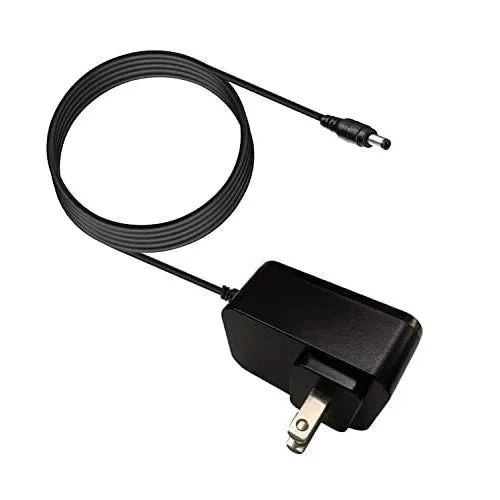
Wyze Cordless Vacuum - Charger
-
Wyze Cordless Vacuum - Charger: Simple plug-and-use operation for convenience. There is no setup or pairing procedure to reset, so troubleshooting stays physical: outlet, cable, and connection at the vacuum.
-
Wyze Cordless Vacuum - Charger: Compact design for easy storage and accessibility. A compact charger is easy to tuck away, but storage is also where cables get bent or pinched. Check how and where it is stored before assuming failure.
When the charger is the likely culprit
If the outlet is live, the charger is fully seated, and there is no visible damage, but the vacuum still does not charge, the charger becomes the leading suspect. The supplied record describes the charger as delivering reliable power to maintain battery life, but it does not include electrical specifications, a fuse, an indicator light, or a reset procedure. Without that information, there is no supported in-unit repair to recommend. Replacement is the practical path.
One caution before you buy: the supplied information does not state whether the charger is sold with a cable, what connector it uses, or whether it is compatible with any vacuum other than the Wyze Cordless Vacuum. Match the replacement to your exact vacuum model rather than assuming a similar-looking charger will work.
Replace the charger or keep troubleshooting?
Use what you have already observed to decide whether to keep testing or order a replacement.
- Keep troubleshooting: The outlet was never confirmed live, the charger was not fully reseated, or the vacuum was recently moved. These are connection issues until proven otherwise.
- Replace the charger: The outlet is confirmed working, the charger seats fully, there is no visible damage, and charging still does not happen. The charger is the remaining variable you can change.
- Stop and inspect before either: You see cuts, crushed cable, bent contacts, or a separated housing. Do not keep using a damaged charger to test it further.
Charging habits that protect the connection
The supplied information does not include charging times, battery-care instructions, or storage temperatures, so treat these as general habits rather than manufacturer steps. Keep the charger in a spot where the cable is not pulled tight or bent sharply against the vacuum. Use the same outlet and position each time so a charging problem is easier to spot early. When you store the vacuum, coil the cable loosely rather than wrapping it tightly around the charger body.
If you are replacing the charger anyway, the Wyze Cordless Vacuum - Charger is the part matched to the Wyze Cordless Vacuum in the supplied catalog. Confirm your vacuum model before ordering, and keep the old charger out of use once you have decided it is the failed part.