If you're a gamer who demands precision, you know that the condition of your mouse feet can make or break your aim. Glorious G-Floats are renowned for their ultra-smooth glide, but even the best mouse skates accumulate dirt, dust, and skin oils over time. A clean set of G-Floats not only feels better but also performs better, ensuring consistent tracking and effortless movement.
In this guide, we'll walk you through the best way to clean your Glorious G-Floats mouse feet without damaging them. You'll learn the tools you need, step-by-step instructions, and essential maintenance tips to extend their lifespan. By the end, your mouse will glide like new again, giving you the edge in those clutch moments.
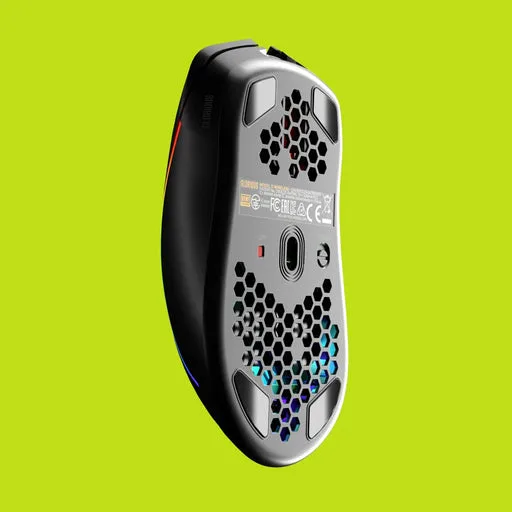
Glorious G-Floats mouse feet
Why Clean Mouse Feet Matter
Mouse feet, also known as mouse skates, are the contact points between your mouse and the mousepad. Over time, they pick up microscopic particles from your desk and pad, which can create friction and cause inconsistent glide. This is especially noticeable in fast-paced FPS games where even a slight drag can throw off your aim.
Regular cleaning of your mouse feet ensures that your mouse maintains its original smoothness and responsiveness. It also prevents premature wear, saving you money in the long run. For Glorious G-Floats, which are made from pure PTFE, keeping them clean is key to preserving their signature low-friction feel.
- Improves glide consistency for better aim
- Reduces friction and drag
- Prevents dust and dirt from scratching your mousepad
- Extends the lifespan of your mouse feet
Tools You'll Need
Before you start cleaning, gather the following items. Most of these you likely already have at home. Avoid using harsh chemicals or abrasive materials, as they can damage the PTFE surface of your G-Floats.
You'll need a soft, lint-free microfiber cloth, isopropyl alcohol (70% or higher), a cotton swab, and a small bowl of lukewarm water. Optionally, you can use a gentle dish soap for stubborn grime. Remember to never use paper towels, as they can leave fibers behind.
- Microfiber cloth
- Isopropyl alcohol (70% or higher)
- Cotton swabs
- Lukewarm water
- Mild dish soap (optional)
Step-by-Step Cleaning Process
Start by unplugging your mouse or turning it off to avoid accidental clicks. Turn the mouse upside down and inspect the G-Floats. If you see visible dirt or buildup, gently brush the surface with a dry microfiber cloth to remove loose particles.
Next, dampen a corner of your microfiber cloth with isopropyl alcohol. Gently wipe the mouse feet in a circular motion, applying light pressure. For stubborn spots, use a cotton swab dipped in alcohol to reach tight corners. Avoid soaking the feet, as excess liquid can seep into the mouse's interior.
After cleaning, let the mouse feet air dry for a few minutes. Once dry, buff them with a clean, dry microfiber cloth to restore their shine. If you used dish soap, rinse the cloth with water and wipe again to remove any residue, then dry thoroughly.
- Always use light pressure to avoid scratching the PTFE
- Never use acetone or nail polish remover
- Clean your mousepad simultaneously for best results
How Often Should You Clean G-Floats?
The frequency of cleaning depends on your environment and usage. If you game daily in a dusty room, you may need to clean your mouse feet every two weeks. For most users, a monthly cleaning is sufficient to maintain optimal performance.
Pay attention to how your mouse feels. If you notice increased friction or a gritty sensation, it's time to clean. Regular maintenance not only keeps your glide smooth but also extends the life of your G-Floats, delaying the need for replacements.
- Heavy gamers: every 2 weeks
- Casual users: once a month
- Clean immediately if you spill liquids on your mousepad
Extending the Lifespan of Your Mouse Feet
Cleaning is just one part of mouse feet maintenance. To get the most out of your Glorious G-Floats, consider using a high-quality mousepad with a smooth surface. Rough or textured pads can wear down PTFE faster.
Additionally, avoid applying excessive pressure on your mouse. Let it glide naturally; pressing down creates unnecessary friction. Finally, store your mouse in a clean, dust-free area when not in use. If you're using a wired mouse like the https://minimalhomelyai.shop/products/glorious-model-o-2-mini-wired-mouse-for-small-hands-306017Glorious Model O 2 Mini Wired Mouse for Small Hands or the Glorious Model O 2 Wired Gaming Mouse, ensure the cable doesn't drag and cause uneven wear.
- Use a smooth, clean mousepad
- Avoid pressing down on the mouse
- Store your mouse in a dust-free environment
- Consider replacing feet when the PTFE becomes visibly worn
Keeping your Glorious G-Floats clean is a simple yet crucial step in maintaining peak gaming performance. With regular care, you'll enjoy a smooth glide and improved aim for months. If you're due for a replacement, check out the Glorious Model O 2 Wireless Gaming Mouse for a fresh pair of G-Floats and wireless freedom.