Quick Answer
Take it slow, prep the inner frame, and test the transformation before applying decals. Careful nub removal and dry-fitting will keep your Real Grade GaoGaiGar looking sharp.
Why the RG GaoGaiGar Needs a Different Approach
Unlike a standard Gunpla, the RG GaoGaiGar is a transformable kit that combines multiple Gao machines. That means joints and panel lines have to work harder, and the plastic is under more stress during transformation. You need to be extra careful with nub removal on moving parts, because a poorly cleaned gate can cause friction or stress marks.
The RG line is known for its advanced inner frame and high articulation, but that also means smaller parts. If you're used to building Master Grade kits, you'll notice the parts are tighter and more delicate. Patience is key—rushing a step often leads to broken pegs or loose joints.
Trade-Off: Detail vs. Durability
The RG GaoGaiGar is packed with surface detail and gimmicks, which makes it look incredible on the shelf. But those same details can be fragile. When you're sanding or cutting, work away from the part, not toward it, to avoid snapping a fin or a small protrusion.
Also, because the kit uses metal parts for some connections, you'll want to be gentle when fitting them. Metal-on-plastic can wear down over time, so test the fit before you push too hard.
Step-by-Step Assembly Guide
- Prep Your Workspace and Tools: Lay out all runners, grab a sharp hobby knife, nippers, and a glass file or sanding sticks. Make sure you have good lighting and a clean mat. Check that your nippers are sharp—dull blades crush plastic and leave stress marks.
- Cut Parts with a Two-Stage Approach: Cut each part from the runner leaving a small nub, then trim closer with a knife. For visible areas, sand with a fine grit to smooth the surface. On clear or colored parts, use a glass file to avoid cloudy marks.
- Build the Inner Frame First: Follow the manual to assemble the inner frame before adding armor. This lets you test articulation and identify tight joints early. If a joint feels too tight, gently sand the peg or use a tiny drop of silicone oil—never force it.
- Dry-Fit the Armor and Transformation: Before gluing or painting, dry-fit armor pieces to check alignment. Test the transformation sequence once to see how parts move together. If something doesn't fit, re-check the manual—often a part is reversed or not fully seated.
- Finish with Panel Lining and Decals: Apply panel liner to recessed lines, then clean up with a cotton swab. Use the included decals, but place them after the liner is dry. Use a soft cloth or your finger to press decals down firmly; avoid sliding them once they're set.
- Pose and Display: Once assembled, carefully pose the kit. Support heavy weapons or wings with an action base if needed. Avoid leaving the kit in a dynamic pose for weeks—joints can loosen over time.
Kit Spotlight
-
[Pre-Order] The King of Braves GaoGaiGar RG GaoGaiGar: This Real Grade kit transforms and combines each Gao machine into different combinations, and includes design gimmicks unique to the RG line. The combination gimmick means you'll be handling the kit a lot during assembly, so following the manual's order and testing joints early will prevent stress and breakage.
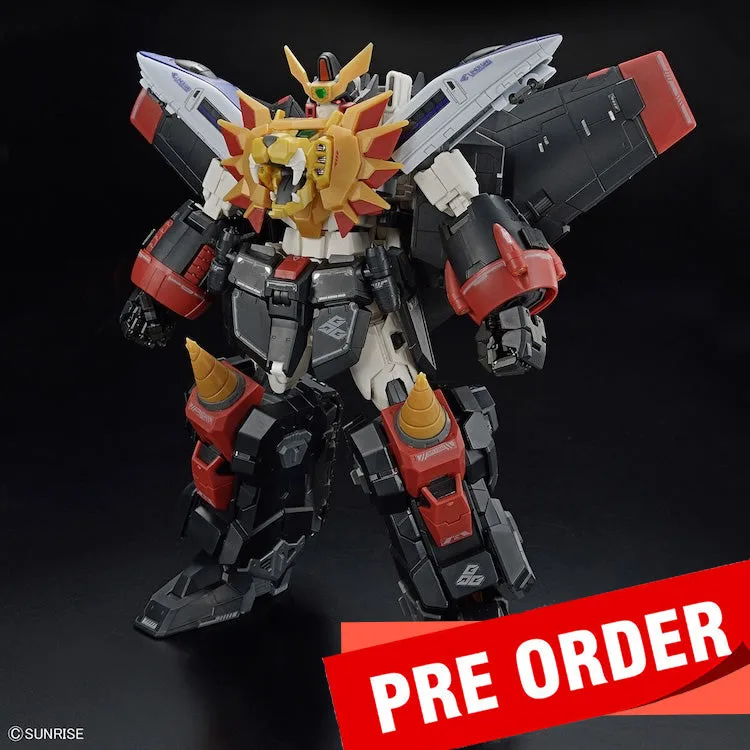
[Pre-Order] The King of Braves GaoGaiGar RG GaoGaiGar