Getting Started with Your Canon EOS M6 Mark II Kit
The Canon EOS M6 Mark II is a compact mirrorless camera that packs a 32.5 MP APS-C sensor and 4K video into a body weighing just 408 grams. If you've just unboxed the kit with the EF-M 15-45mm f/3.5-6.3 IS STM lens, these first steps will help you get shooting quickly without missing key setup details.
Initial Hardware Setup
Before you power on, take a few minutes to prepare the camera and lens.
- Attach the lens: Align the white dot on the EF-M 15-45mm lens with the white dot on the camera body. Gently twist the lens until it clicks into place. The lens provides a 24-72mm equivalent focal length range and features Optical Image Stabilizer for sharper handheld shots.
- Insert a battery: The camera comes with a battery and charger. Insert a fully charged battery into the compartment on the bottom of the camera.
- Add a memory card: The EOS M6 Mark II accepts SD, SDHC, and SDXC cards (card not supplied). Insert a compatible card into the slot on the side of the camera.
- Attach the neck strap: Thread the supplied neck strap through the strap mounts on the camera body. This helps prevent drops during your first outings.
Power On and Initial Settings
Press the power button and use the 3-inch tilting 180° touchscreen to navigate menus. Set the date, time, and your preferred language. The camera's built-in Wi-Fi and Bluetooth allow easy image sharing, but you can configure connectivity later.
Understanding the Kit Lens Capabilities
The EF-M 15-45mm f/3.5-6.3 IS STM lens is a versatile standard zoom. Its three aspherical elements help control chromatic aberrations and distortion. The STM stepping motor delivers fast, quiet autofocus, and the Optical Image Stabilizer reduces camera shake by up to 3.5 stops. At the wide end, you get a 24mm equivalent field of view; at the telephoto end, 72mm equivalent. This range covers everyday scenes, landscapes, and portraits.
Key Specifications at a Glance
-
Canon EOS M6 Mark II Kit with EF-M 15-45mm f/3.5-6.3 IS STM Lens Kit: The camera features a 32.5 megapixel APS-C sensor with a maximum image resolution of 6960 x 4640 pixels. This high resolution gives you plenty of cropping flexibility and detail for large prints.
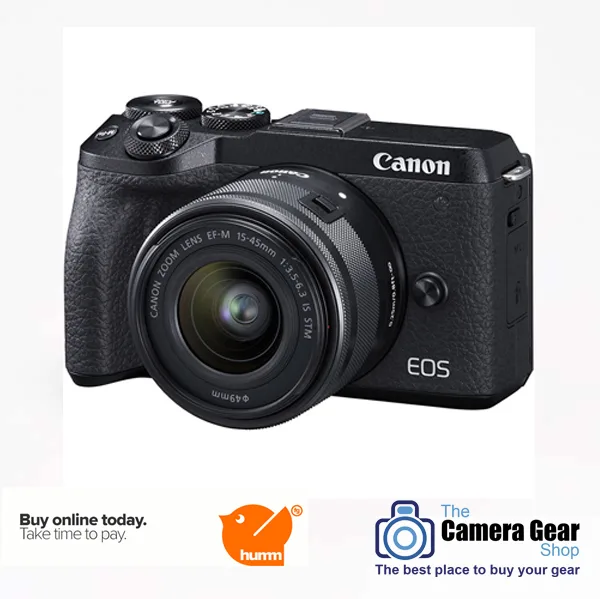
Canon EOS M6 Mark II Kit with EF-M 15-45mm f/3.5-6.3 IS STM Lens Kit
-
Canon EOS M6 Mark II Kit with EF-M 15-45mm f/3.5-6.3 IS STM Lens Kit: Continuous shooting up to 14 fps with AF and AE tracking, plus a 30 fps RAW burst mode. Ideal for capturing fast action or fleeting expressions without missing a frame.
-
Canon EOS M6 Mark II Kit with EF-M 15-45mm f/3.5-6.3 IS STM Lens Kit: 4K video recording at 30p from the full width of the sensor, and up to 120 fps in Full HD. You can shoot high-quality video with a cinematic look and smooth slow motion.
-
Canon EOS M6 Mark II Kit with EF-M 15-45mm f/3.5-6.3 IS STM Lens Kit: ISO speed range from 100 to 25600 (expandable to 51200). Good low-light performance for indoor or evening shooting without a flash.
Setting Up for Your First Shots
The camera offers several exposure modes: Program, Aperture Priority, Shutter Priority, Manual, and Picture Modes. For your first day, try Aperture Priority (Av) to control background blur while the camera sets shutter speed. White balance can be left on Auto, or you can use Preset, Custom, or White Balance Bracketing for tricky lighting. Metering modes include Evaluative, Partial, Center Weighted, and Spot—Evaluative works well for general scenes. Focus modes are One-shot AF, Continuous AF, and Manual. For still subjects, One-shot AF is reliable.
Flash and Built-in Options
The camera has a built-in flash with Auto, Red-eye reduction, and Fill-in modes. For more creative control, you can attach an external flash to the hot shoe. The vari-angle touchscreen makes it easy to review images and change settings on the fly.
What's in the Box
Your kit includes the Canon EOS M6 Mark II body (black), the EF-M 15-45mm f/3.5-6.3 IS STM lens, front and rear lens caps, a battery, a battery charger, and a neck strap. A memory card is not supplied, so you'll need to purchase one separately.