Quick answer
Set up your complete photography video studio light kit by assembling the background support stand first, then the light stands and softboxes, and finally positioning the lights for even illumination.
Why setup order matters
Assembling components in the right order saves time and prevents damage. Starting with the background stand gives you a stable reference point for placing lights and positioning your subject.
Common trade-off: softbox assembly time
Softboxes take the longest to assemble because each has four light sockets and bulbs. If you are short on time, you can set up one softbox first and add the others later, but this will create uneven light until all three are in place.
Step-by-step setup instructions
- Assemble the background support stand: Extend the crossbar to 10 feet and lock it. Raise the vertical poles to 8 feet and tighten the knobs. Drape your chosen backdrop (white, black, or green) over the crossbar and let it hang evenly to the floor. Check that the backdrop does not touch the floor to avoid wrinkles in your shot.
- Set up the three light stands: Extend each light stand to 6.5 feet and lock the sections. Place them in a triangle around your subject: one left, one right, and one behind or above the camera. Keep the stands stable by spreading the legs fully. Avoid placing a stand where a person might trip over a leg.
- Attach the 4-light socket bars and softboxes: Screw each 4-light socket bar onto a light stand. Insert four 45W daylight bulbs into each socket bar. Then attach the softbox frame over the bulbs and secure the fabric. Repeat for all three softboxes. Handle bulbs by the base only to avoid leaving oils on the glass.
- Position the lights for even coverage: Angle the left and right softboxes at 45 degrees toward your subject, about 3–4 feet away. Place the third softbox above or behind the camera for fill or backlight. Turn on all bulbs and check for harsh shadows. If shadows are too dark, move the lights closer or adjust the angles.
- Test with a quick photo or video: Place your subject in front of the backdrop. Take a test shot or record a short clip. Review the lighting on a monitor or camera screen. Adjust light distance or height as needed. Use a gray card or white paper to set white balance for accurate colors.
What comes in the kit
-
Complete Photography Video Studio Light Kit: This kit includes a 10' wide by 8' tall background support stand, three light stands (extend to 6.5 ft), three 4-light socket bars, three 16"x24" softboxes, twelve 45W 5500K daylight bulbs, three backdrops (white, black, green), and a carrying case. Everything you need for a basic three-point lighting setup with interchangeable backgrounds is included, so you don't need to buy additional gear to get started.
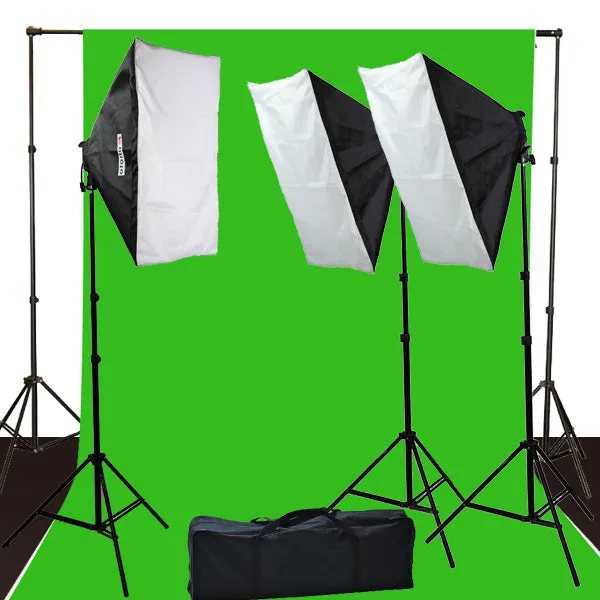
Complete Photography Video Studio Light Kit


