Quick Answer
Corepad Grips for the Lamzu Atlantis Mini give you a secure, sweat-resistant hold that improves aim stability. Follow the step-by-step installation process below to get the best fit and longest-lasting adhesion.
Why Grips Matter on a Small Mouse
The Lamzu Atlantis Mini is a compact mouse, which means precise finger placement is crucial. Without grips, sweaty hands or a glossy surface can cause your fingers to slip, especially during intense gaming moments. Corepad Grips add texture and absorb moisture, giving you consistent control.
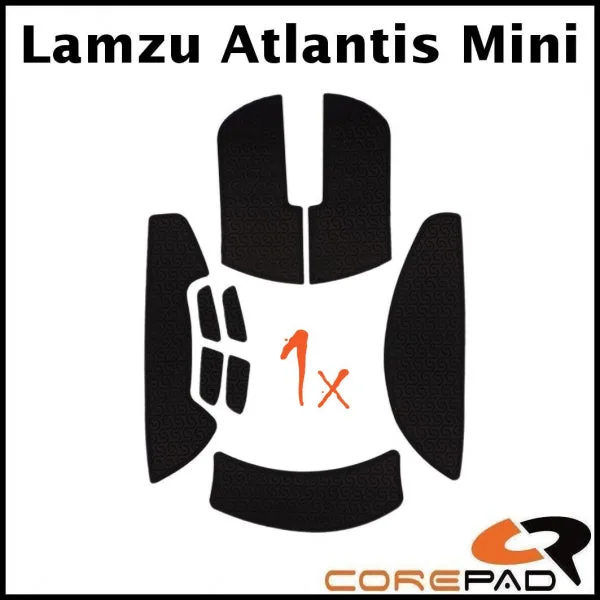
These grips are designed specifically for the Atlantis Mini, so the cutouts align perfectly with the mouse's curves and buttons. This ensures full coverage without interfering with clicks or side buttons.
What to Expect from the Adhesive
Corepad Grips use a strong adhesive that bonds firmly to the mouse shell. However, the adhesive can become more difficult to remove over time. To avoid residue or damage, it's recommended to replace the grips every 3-5 months. This keeps the adhesive fresh and easy to peel off when you want to change them.
If you plan to keep the grips on for longer, be prepared for a more stubborn removal. Using a little heat from a hairdryer can soften the adhesive, but always test on a small area first.
Installation Steps
- Clean the mouse surface: Wipe the Lamzu Atlantis Mini with a microfiber cloth and isopropyl alcohol to remove oils and dust. Let it dry completely. A clean surface ensures the adhesive bonds firmly.
- Peel and align the grip: Carefully peel the first grip piece from the backing. Align it with the corresponding area on the mouse, starting from the edge and pressing down gradually. Avoid touching the adhesive with your fingers; use tweezers if needed.
- Press and smooth out air bubbles: Use a soft cloth or your fingertip to press the grip firmly, working from the center outward to push out any air bubbles. Bubbles can cause peeling; re-press after a few minutes if needed.
- Repeat for all pieces: Apply the remaining grip pieces in the same manner, ensuring each aligns with the mouse's contours and doesn't overlap edges or buttons. Check that side buttons and scroll wheel remain unobstructed.
- Wait before heavy use: Allow the adhesive to set for at least 30 minutes before gaming. This helps the grips stay in place during intense sessions. Patience now prevents shifting later.
Product Facts
-
Corepad Grips - Lamzu Atlantis Mini: Corepad recommends replacing the grips every 3-5 months to avoid potential issues with adhesive removal from your mouse. This ensures the adhesive stays manageable and prevents sticky residue from building up on your Lamzu Atlantis Mini.
Corepad Grips - Lamzu Atlantis Mini