Quick Answer
The Crown-Pro™ crown molding tool simplifies cutting crown molding by eliminating compound-angle calculations. It holds the molding at the correct spring angle so you can make accurate cuts with a standard miter saw.
Why the Crown-Pro™ Tool Makes Crown Molding Easier
Cutting crown molding usually means dealing with compound miter angles—tilting the saw blade and adjusting the miter at the same time. The Crown-Pro™ tool eliminates that by holding the molding at the correct spring angle, so you only need to set the miter angle on your saw.
The tool works with crown molding up to 5-1/2 inches wide and can be locked at any spring angle between 30 and 60 degrees. That covers most standard crown molding profiles, but if your molding has a spring angle outside that range, the Crown-Pro™ won't work for it—a limitation worth checking before you start.
What You Need to Know Before You Start
Before you begin, make sure your miter saw is calibrated and that you have a sharp blade with enough teeth for fine trim work. The Crown-Pro™ tool's included Angle Finder helps you determine the spring angle of your molding, so you can set the tool correctly.
The tool's base locks at the correct spring angle and features eight non-slip rubber feet to keep it stable during cuts. This stability is critical for accuracy—any movement can ruin the cut and waste material.
How to Cut Crown Molding with the Crown-Pro™ Tool
- Determine the spring angle: Use the included Angle Finder to measure the spring angle of your crown molding. Then lock the Crown-Pro™ tool's base to that angle (between 30° and 60°). If your molding's spring angle is outside 30-60°, the tool won't work—check before you start.
- Set up the tool on your miter saw: Place the Crown-Pro™ tool on your miter saw table, ensuring the non-slip rubber feet are in full contact. Position the tool so the molding will sit at the correct angle against the saw fence. Make sure the tool is stable and doesn't rock; any movement will affect cut accuracy.
- Position the crown molding: Place the crown molding into the tool, with the back of the molding flat against the tool's reference surfaces. The tool holds the molding at the correct spring angle, so you don't need to tilt the saw blade. Double-check that the molding is fully seated—gaps can lead to incorrect angles.
- Set the miter angle: For inside corners, set the miter saw to 45° (left or right depending on the corner). For outside corners, you'll typically use 45° as well, but always test on scrap first. The Crown-Pro™ eliminates the need for compound miter settings. Always make a test cut on scrap molding to confirm the angle before cutting your actual piece.
- Make the cut: With the molding securely held in the tool, lower the saw blade smoothly and make the cut. Avoid forcing the blade—let it do the work to prevent tear-out. If the cut isn't clean, check the blade sharpness and ensure the molding is firmly held.
Crown-Pro™ Features
-
Crown-Pro™: Works with crown molding up to 5-1/2" (138mm) wide and locks at any spring angle between 30-60°. This covers most standard crown molding profiles, so you can use one tool for a wide range of trim projects.
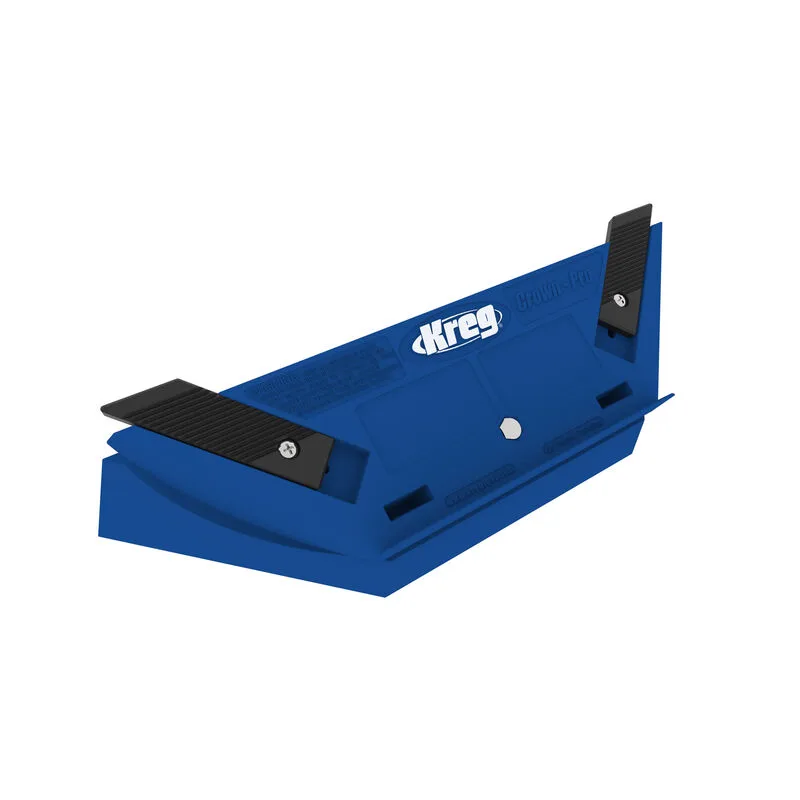
Crown-Pro™
-
Crown-Pro™: Included Angle Finder ensures accurate results. You can quickly determine the spring angle of your molding, reducing setup errors and wasted cuts.
-
Crown-Pro™: 8 non-slip rubber feet guarantee a solid foundation. Stability during cuts prevents the tool from shifting, which helps you make precise, repeatable cuts.