Quick Answer
Attach the DJI 15.5mm Wide-Angle Lens for Mavic 3 before takeoff for a 108° field of view, and use the DJI Neutral Density Filter Set (ND4-32) to control exposure in bright conditions.
Why Lens and Filter Setup Matters for the Mavic 3
The Mavic 3 camera is capable of capturing stunning video and photos, but its default lens limits your creative options. A wide-angle lens expands your field of view for sweeping landscapes, while ND filters let you use slower shutter speeds for cinematic motion blur without overexposing the image. Getting the setup right is crucial because improper installation can lead to gimbal errors or soft footage.
Step-by-Step Mavic 3 Lens and Filter Setup
- Power Off and Prepare the Drone: Ensure the Mavic 3 is powered off and placed on a flat surface. Remove the gimbal cover carefully to access the camera lens. Forgetting to power off can cause the gimbal to fight against your installation, potentially damaging the motor.
- Attach the Wide-Angle Lens: Align the DJI 15.5mm Wide-Angle Lens with the Mavic 3's camera lens. Gently screw it on clockwise until it is snug. Do not overtighten. Overtightening can misalign the lens and cause vignetting or focus issues. Hand-tighten only.
- Calibrate the Gimbal: Power on the Mavic 3 and open the DJI Fly app. Go to the gimbal settings and select 'Auto Calibration'. Wait for the gimbal to complete its self-check. Skipping calibration after attaching a new lens can result in tilted horizons or unstable footage.
- Select the Right ND Filter: Check the lighting conditions. For bright sunny days, use the ND32 filter. For overcast or partly cloudy conditions, start with ND4 or ND8. Using too strong an ND filter in low light will make your footage too dark, forcing the camera to raise ISO and introduce noise.
- Install the ND Filter Over the Lens: Hold the ND filter by its edges and gently push it onto the wide-angle lens until it clicks into place. Ensure it is fully seated. A loose filter can cause vibrations or fall off mid-flight. Double-check the fit before takeoff.
- Test and Adjust Camera Settings: Take a test shot or short video. Check the exposure and sharpness in the app. Adjust shutter speed and ISO as needed to get a balanced exposure. If the image is blurry, the lens or filter may be dirty or not seated properly. Clean with a microfiber cloth and reinstall.
Product Facts
-
DJI 15.5mm Wide-Angle Lens for Mavic 3: Precise optical design increases Mavic 3's FOV to 108° with a 15.5mm equivalent focal length, offering wider camera angles. This lens is ideal for capturing expansive landscapes or tight spaces where you need more in the frame.
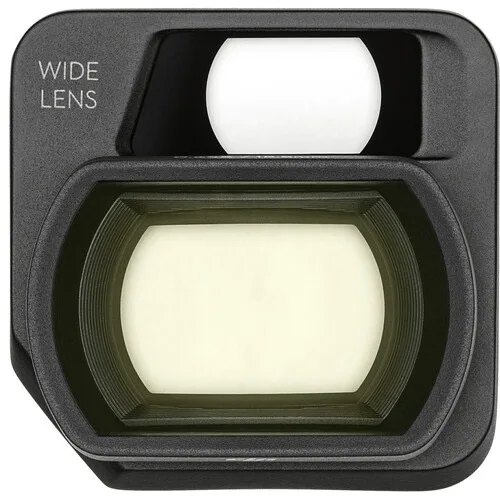
DJI 15.5mm Wide-Angle Lens for Mavic 3
-
DJI Neutral Density Filter Set for Mavic 3 (4-Pack, ND4-32): This set includes ND4, ND8, and ND32 filters. These high-quality, light reducing ND filters reduce the amount of light coming into the sensor, giving you more control of the camera's aperture, exposure time, and sensor sensitivity settings. Use ND filters to achieve a cinematic 1/50s shutter speed in bright daylight, reducing motion judder in your videos.
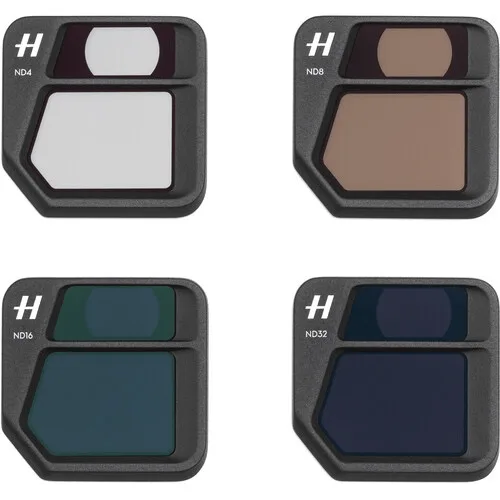
DJI Neutral Density Filter Set for Mavic 3 (4-Pack, ND4-32)