Quick answer
To install a Galaxy A15 screen protector without bubbles, clean your screen thoroughly, align the protector carefully, and use a firm, steady motion to press it down from the center outward.
Why bubbles happen and how to prevent them
Bubbles usually form from dust particles trapped under the glass or from uneven pressure during application. A well-lit, dust-free workspace is your best defense. Also, the curved edges of the Galaxy A15 screen can make alignment tricky, so take your time positioning the protector before pressing it down.
Step-by-step bubble-free installation
- 1. Prepare your workspace: Wash your hands to remove oils. Work in a well-lit, low-dust room. Lay out the screen protector, cleaning cloth, dust removal stickers, and alignment frame if included. Even one speck of dust can cause a bubble. Use the dust removal stickers to lift any visible particles before applying the glass.
- 2. Clean the screen thoroughly: Use the included wet wipe to remove grease, then dry with the microfiber cloth. Finish with a dust removal sticker to pick up any remaining lint or dust. Skip this step and you'll likely trap dust under the glass. Recheck the screen under bright light from multiple angles.
- 3. Align the protector before peeling: Hold the protector over the screen without removing the backing. Use the speaker grille, camera cutout, or edges to align it perfectly. Once satisfied, peel the backing off. Misalignment is the most common mistake. If you press the glass down off-center, it's very hard to reposition without creating bubbles.
- 4. Press from center outward: Lower the protector onto the screen starting from the center. Let it touch the glass and use your thumb or a squeegee to push air toward the edges in firm, smooth strokes. If a bubble appears, lift the nearest edge of the glass slightly and press again. Never push a bubble across the protector — it can scratch the oleophobic coating.
- 5. Remove the top protective film: Peel off the outer protective layer from the tempered glass. Check for any remaining small bubbles. If you see one, gently lift the edge and press again. Small bubbles near the edges often disappear on their own within 24 hours as the adhesive settles. Wait a day before trying to fix them.
What you'll need
-
Galaxy A15 Tempered Glass Screen Protectors (2-Pack) — Screen Protection: This 2-pack of tempered glass screen protectors is precision-cut for the Galaxy A15 and includes two protectors. Having a spare gives you a second chance if the first installation goes wrong, and the precision cut ensures a perfect fit without interfering with cases or ports.
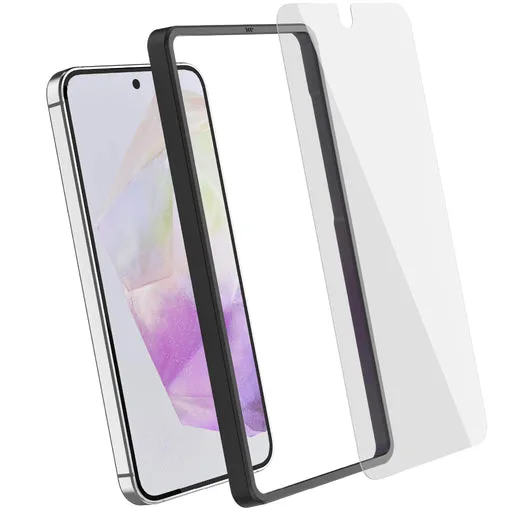
Galaxy A15 Tempered Glass Screen Protectors (2-Pack) — Screen Protection