Quick answer
Install the Vanquish H10 Interior and Driver Set by first dry-fitting the molded black interior tray, then mounting the driver figure, applying the included decals, and securing everything without pinching wires.
Why the H10 Interior and Driver Set matters for your build
The VPS10515 set replaces the bare cockpit of your H10-platform crawler with a detailed interior and driver figure. It includes a decal sheet for instrument panels and side consoles, so you get a finished look without painting. Because the parts are molded in black, they work with any body color and hide shadows from servo wiring.
One trade-off: the interior tray is a single-piece design that covers the upper chassis rails. If you have aftermarket electronics mounted high, you may need to relocate them or trim the tray slightly.
Step-by-step installation
- Dry-fit the interior tray: Place the molded black interior tray into the body shell without any adhesive or screws. Check that the tray sits flush against the side walls and that the front edge clears the steering servo horn. If the tray rocks or lifts, trim the rear tabs with a hobby knife—do not force it.
- Mount the driver figure: Push the driver figure into the seat recess until the pegs click. The figure faces forward; if you need it angled for a scale look, shave the peg slightly with a file. A loose figure rattles on rough terrain. Add a dab of thick CA glue to the peg base if it does not grip.
- Apply the decals: Cut each decal from the sheet using sharp scissors, dip in warm water for 15 seconds, slide onto the interior dashboard and side panels, then blot with a soft cloth. Let dry for 30 minutes. Decals applied over dusty plastic lift at the edges. Wipe the interior with isopropyl alcohol first.
- Route wires before final install: Lay the receiver and servo wires along the chassis channels, then lower the interior tray into place. Use small zip ties to bundle excess wire away from the driver figure and seat area. Pinched wires cause intermittent servo glitches. Run the wires under the tray, not over it.
- Secure the interior set: Use the original body-mount screws or small self-tapping screws through the interior tray’s pre-drilled holes into the chassis tabs. Tighten until snug, not tight enough to crack the plastic. Over-tightening can warp the tray and misalign the driver figure. Stop as soon as the tray does not shift.
What you get
-
H10 Interior and Driver Set: VPS10515 H10 Interior and Driver Set Molded Black. Replacement interior components parts set for the H10 Platform. Includes decal sheet. Compatible with VPS09010A and VPS09010B. The set fits both H10 chassis variants out of the box, and the included decals let you detail the dashboard and side panels without needing aftermarket printing.
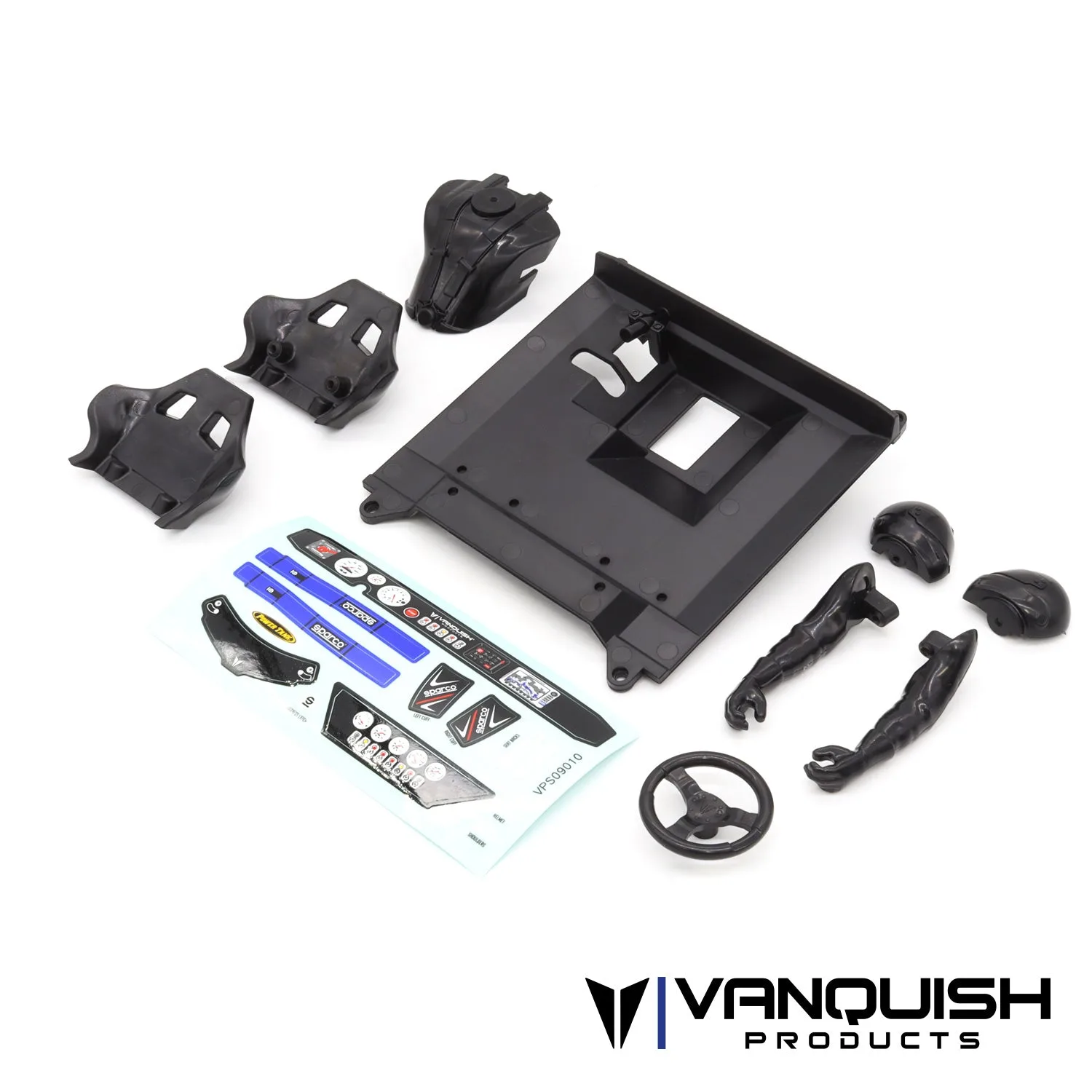
H10 Interior and Driver Set