Quick answer
If your monitor or projector only has a VGA input, you need an HDMI to VGA adapter like the Belkin HDMI to VGA + 3.5mm Audio Adapter. If both your laptop and display have HDMI ports, a direct HDMI cable gives you the best video quality and simpler setup.
Why the connection type matters
Many older monitors, projectors, and presentation systems still rely on VGA connectors, while modern laptops and graphics cards have moved to HDMI or USB-C. Choosing the wrong adapter can leave you with no image or missing audio.
The main distinction is signal type: HDMI carries digital video and audio, while VGA is analog video only. An HDMI to VGA adapter must convert the digital signal to analog and handle audio separately.
Audio: a common hidden difference
A standard HDMI cable passes both video and audio through a single connection. With a VGA cable, there is no audio path. That is why many HDMI to VGA adapters include a separate 3.5mm audio jack—like the Belkin adapter—so you can still get sound when connecting to a VGA display or projector.
If your setup uses external speakers or a presentation system with its own audio input, the 3.5mm port gives you flexibility. Without it, you would need a separate audio cable routed from your laptop’s headphone jack.
Video quality and resolution limits
HDMI supports high-definition resolutions up to 4K and beyond. VGA, by its analog nature, typically maxes out at 1080p for reliable image quality. The Belkin HDMI to VGA adapter supports up to 1080p, which is adequate for presentations, classroom projectors, and older office monitors.
If you need higher resolutions or plan to use a modern 4K monitor, a direct HDMI connection is the better choice. VGA adapters are not designed for ultra-high-definition content.
HDMI to VGA Adapter vs Direct HDMI: Decision guide
- Use an HDMI to VGA adapter when…: Your display or projector has only a VGA input. The Belkin adapter converts the digital signal to analog and adds a 3.5mm jack for audio. Check if your display supports audio through a separate input or if you need to connect external speakers.
- Use a direct HDMI cable when…: Both your laptop and monitor have HDMI ports. This gives you the best video quality, built-in audio, and a single-cable connection. HDMI cables are usually more affordable and do not require separate power or audio cables.
- Consider a USB-C to HDMI adapter if…: Your laptop uses USB-C for video output. That scenario works well with modern monitors but cannot connect to VGA without an additional adapter. For VGA-only displays, a USB-C to HDMI cable followed by an HDMI to VGA adapter adds complexity. A single HDMI to VGA adapter is simpler.
Product highlights
-
HDMI to VGA + 3.5mm Audio Adapter, M/F, 1080p: HDMI male to VGA female adapter with a 3.5mm audio port, supporting video resolutions up to 1080p. This adapter lets you connect a modern laptop or tablet to older VGA projectors and monitors without losing audio—ideal for classrooms, boardrooms, and home offices.
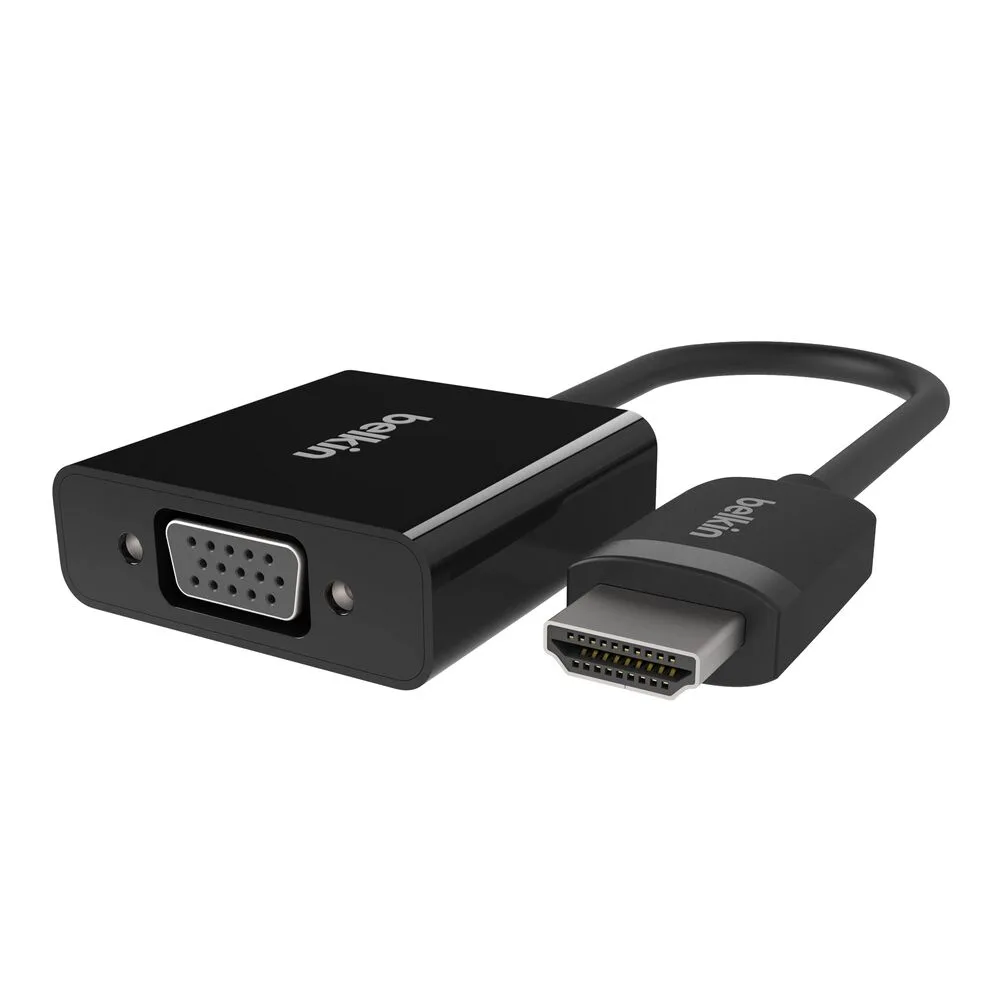
HDMI to VGA + 3.5mm Audio Adapter, M/F, 1080p
Which connection should you choose?
Best for
- Connecting a laptop to an older VGA monitor or projector that lacks HDMI
- Presentations in classrooms, boardrooms, or conference centers with legacy VGA equipment
Not for
- Users with modern HDMI displays who want the simplest, highest-quality connection