Quick answer
Assemble the MODEROID DX-SCALE Evangelion Test Type-01 Luminous Set Edition by carefully snapping parts together, installing the magnetic-switch light-up head, and using the blacklight stands to activate the glow sections.
What makes this kit different
The DX-SCALE version of Evangelion Test Type-01 includes a light-up head with an integrated lighting unit and two freestanding blacklight stands. Some armor sections glow under blacklight, so you need to plan the stand placement before final assembly.
Assembly steps
- Prepare your workspace and tools: Clear a flat, well-lit surface. Have a pair of side cutters and a hobby knife ready. Separate the runners by part number using the instruction sheet. Do not twist parts off the runner; cut carefully to avoid stress marks.
- Snap-fit the torso and head: Follow the manual to assemble the chest, shoulders, and neck joint. Insert the light-up head unit before closing the torso halves, ensuring the magnetic switch is accessible. Test the light-up head before sealing the torso – you cannot adjust the switch later.
- Build the arms and legs: Snap-fit each limb section by section. Pay attention to orientation markers – the left and right parts are not interchangeable. Leave the hands and feet for last. If a joint feels too tight, sand the peg slightly; forcing it can cause white stress marks.
- Attach the blacklight stands: Assemble the two freestanding blacklight stands and place them on either side of the completed kit. Angle the lights to illuminate the glow panels on the armor. Keep the stands at least 2 inches away from the kit to avoid overheating the plastic.
- Final pose and display: Pose the kit by adjusting the ball joints and ratchet joints. Use the magnetic switch to turn the head light on or off. Position the kit so the blacklight hits the glow sections evenly. If the kit does not stand steadily, adjust the stand angle or use a clear display base.
Kit highlights
-
Rebuild of Evangelion - MODEROID DX-SCALE Evangelion Test Type-01 Luminous Set Edition Model Kit: Includes a light-up head part with an integrated lighting unit that illuminates both eyes, controlled by a magnetic switch. You can turn the eyes on or off without disassembling the head, making display adjustments easy.
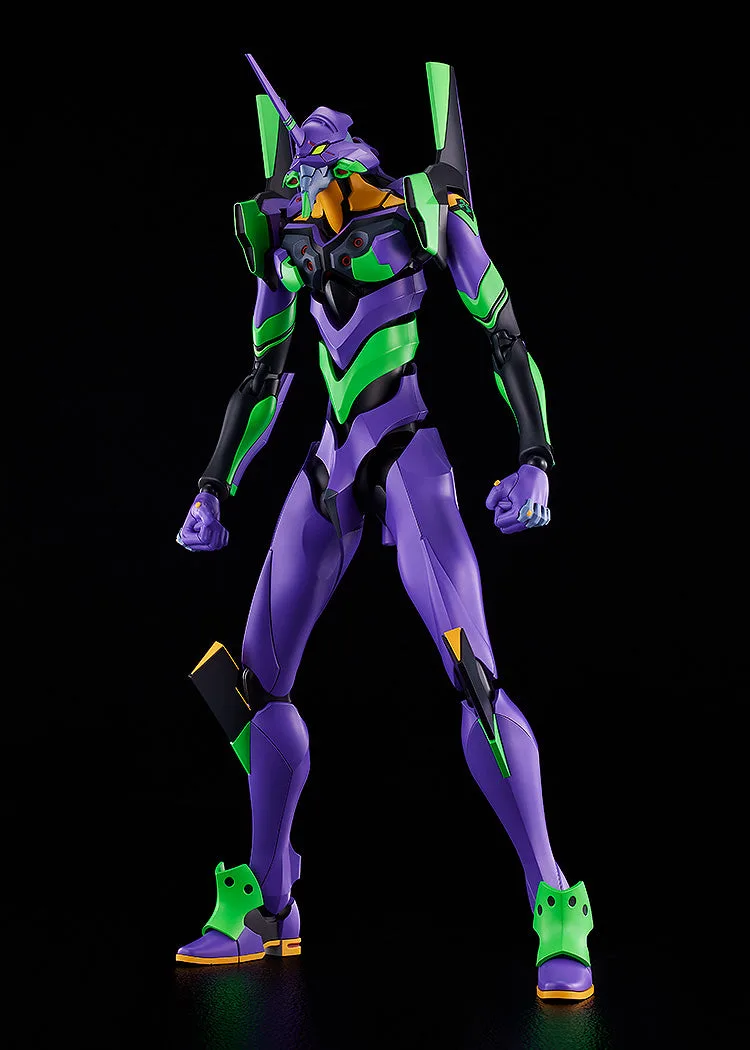
Rebuild of Evangelion - MODEROID DX-SCALE Evangelion Test Type-01 Luminous Set Edition Model Kit
-
Rebuild of Evangelion - MODEROID DX-SCALE Evangelion Test Type-01 Luminous Set Edition Model Kit: Two freestanding blacklight stands are included, and some armor sections glow when exposed to blacklight. Position the stands to hit the glow panels evenly for the best luminous effect.