Quick Answer
To choose the right GameCube HDMI adapter, first identify whether your console has a digital AV port (models DOL-001) or only analog output (DOL-101). For digital models, a quality HDMI adapter that taps the digital signal gives the best image. For analog-only models, consider a component cable or a line doubler like the OSSC Pro, but avoid cheap unshielded cables.
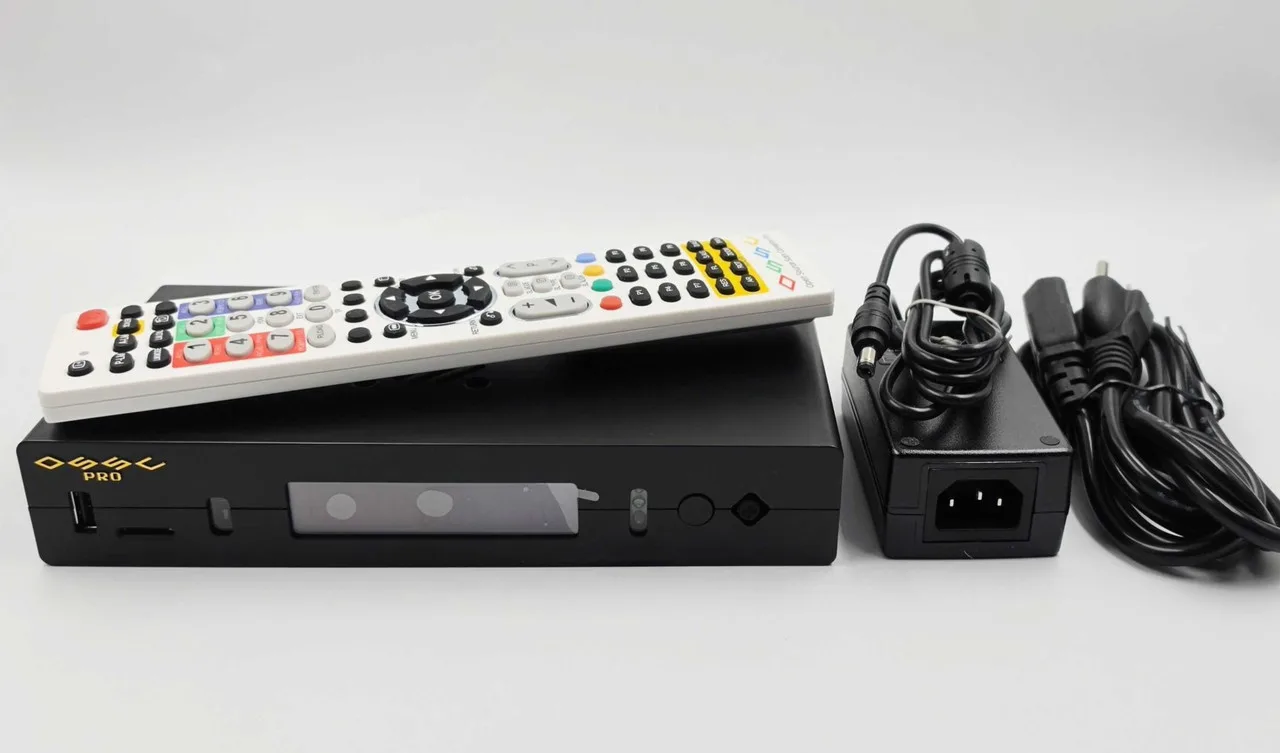
OSSC Pro
The GameCube is a beloved console, but its video output can be confusing. With several adapter options on the market, it's easy to get lost in technical jargon. This guide cuts through the noise to help you pick the right HDMI solution for your setup.
We'll explain the key differences between digital and analog output, compare HDMI vs. component, and give you concrete decision rules. We'll also highlight a couple of products that can genuinely improve your image quality without breaking the bank.
Know Your GameCube Model: Digital vs. Analog
The first step is to check the back of your GameCube. Early models (DOL-001) have a digital AV port that outputs a pure digital signal, which is ideal for HDMI adapters. Later models (DOL-101) removed this port, leaving only analog composite and S-video options. If you have a DOL-101, your HDMI options are limited to upscalers that process analog signals.
Why does this matter? Digital output preserves the original resolution without extra conversion, so it often looks sharper. Analog output requires conversion, which can introduce noise or softness. Knowing your model helps you narrow down which adapters will work at all.
- Check the model number on the bottom of your console: DOL-001 has digital out, DOL-101 does not.
- If you have a DOL-101, consider a component cable or an upscaler like the OSSC Pro with the Legacy AV In card.
HDMI vs. Component: What’s the Difference?
HDMI adapters for the GameCube typically convert the digital signal to HDMI, providing a single cable for both video and audio. Component cables, on the other hand, carry analog video over three cables and require a separate audio connection. Both can deliver 480p, but the signal path differs.
HDMI is generally more convenient and often yields a cleaner image because it avoids digital-to-analog conversion. However, not all HDMI adapters are equal: cheap ones may introduce lag or artifacts. Component cables, like the HD Retrovision YPbPr Component Cable for Wii, can be used with a GameCube via a Wii, but not directly. For GameCube, you need a dedicated component cable or a Wii with component out.
- If you own a Wii, you can play GameCube games on it and use a quality component cable like the HD Retrovision for Wii/Wii U, which is fully shielded to reduce interference.
- HDMI adapters that tap the digital port are the best choice for DOL-001 owners.
Upscalers: When to Consider Them
If your TV doesn’t handle 480p well, or if you have a DOL-101, an upscaler can improve the image. Devices like the OSSC Pro take analog signals and line-double them to higher resolutions, which can look great on modern displays. The OSSC Pro even has an expansion card, the Legacy AV In, that adds composite and S-video inputs, making it versatile for multiple retro consoles.
Upscalers add cost and complexity, but they offer flexibility if you own multiple systems. If you only play GameCube, a dedicated HDMI adapter might be simpler and cheaper.
- Upscalers are great if you have a DOL-101 or want to connect several old consoles.
- The OSSC Pro with Legacy AV In lets you plug in older systems that only output composite or S-video.
Decision Rules for Choosing Your Adapter
- Check your model: Look for DOL-001 (digital port) or DOL-101 (no digital port). This determines your best option. If you have DOL-001, prioritize digital HDMI adapters. If DOL-101, focus on component or upscalers.
- Set your budget: HDMI adapters for digital models range from budget to premium. Expect to pay more for quality and features like scanline generation. If budget is tight, consider a component cable for a Wii instead of a pricey HDMI adapter.
- Consider your TV: Modern TVs may not handle 480p well. If you see lag or blur, an upscaler like the OSSC Pro can help. If your TV struggles with low resolutions, invest in an upscaler rather than a simple adapter.
Products That Help
- YPbPr Component Cable for Wii and Wii U - HD Retrovision: HD Retrovision Nintendo Wii/WiiU YPbPr Component Cable Get the best analog video & audio out of your Wii or Wii U using this high-quality fully shielded cable HD Retrovision cables are properly engineered and constructed; don't settle for cheap unshielded cables which result in poor video quality and audio interference issues Supports all available Wii & Wii U YPbPr video resolutions up to and including... If you play GameCube games on a Wii, this cable gives you clean 480p output without interference. It's a solid alternative to HDMI if you prefer analog.
- Legacy AV In for OSSC Pro: Legacy AV In Adapter for OSSC Pro - Expand your OSSC pro to accept S-video and composite video inputs with this new upgrade card!Now your OSSC Pro can accept S-Video and composite video with this new expansion card. This add-on card will allow you to connect both composite video and S-Video directly to your OSSC Pro, allowing for many more older systems to be connected to the device without expensive and... For DOL-101 owners who want to upscale composite or S-video from their GameCube, this card makes the OSSC Pro a versatile hub for retro consoles.
Who Should Buy What
Best for
- GameCube owners with DOL-001 who want the simplest, highest-quality HDMI connection.
- Retro gamers who already own an OSSC Pro and need to connect multiple analog consoles.
Not for
- DOL-101 owners who expect a plug-and-play HDMI adapter; they should look at component or upscalers instead.
- Casual players who are fine with composite video on a CRT TV and don't want to spend extra.
Choosing the right GameCube HDMI adapter comes down to your console model, your TV, and your budget. Start by checking the back of your console, then decide whether you need a simple adapter or a more flexible upscaler. With the right choice, you'll enjoy your GameCube library in crisp, clean video.