Quick answer
Choose a wireless mouse with a vertical ergonomic design, silent clicks, and adjustable DPI to reduce wrist strain and support carpal tunnel relief.
Why vertical design matters for carpal tunnel
A vertical mouse keeps your hand in a natural handshake position, which reduces pressure on the median nerve. This posture can help alleviate symptoms of carpal tunnel syndrome by minimizing wrist extension and forearm tension.
Standard flat mice force your wrist to twist, which can aggravate existing pain. Switching to a vertical model may provide noticeable relief during long work sessions.
Silent clicks and battery life trade-offs
Silent click switches reduce noise and finger fatigue, making them ideal for shared workspaces. However, they often have a slightly softer tactile feel, which some users may find less satisfying.
Rechargeable models with long battery life (like the TECKNET Ergonomic Wireless Mouse with a 600mAh battery lasting up to 2 months) eliminate the need for frequent battery changes. The trade-off is that you must remember to charge it every few weeks.
Steps to choose a wireless mouse for carpal tunnel relief
- Check the grip angle: Look for a mouse with a vertical or angled design (around 45–60 degrees) that keeps your hand in a neutral handshake position. This reduces wrist extension and median nerve compression. Avoid flat mice that force your wrist to twist.
- Prioritize silent clicks: Choose a mouse with silent click switches to reduce finger impact and noise. Silent buttons require less force to press, which can lower repetitive strain on your finger tendons. Test the click feel if possible — some silent switches feel mushy.
- Look for adjustable DPI settings: Select a mouse with multiple DPI levels (e.g., 800–4800 DPI) so you can adjust cursor speed without moving your wrist excessively. Lower DPI reduces small wrist flicks, while higher DPI lets you work with minimal arm movement. Start at a lower DPI and increase gradually to find your comfort zone.
- Confirm rechargeable battery: Opt for a rechargeable model with at least a few weeks of battery life. A built-in battery (like the TECKNET 600mAh) charges in 1.5 hours and lasts up to 2 months, saving you from constant battery swaps. Set a monthly charge reminder to avoid unexpected downtime.
- Verify wireless stability: Choose a 2.4GHz wireless mouse for reliable, low-latency connection without Bluetooth pairing issues. This ensures consistent cursor control, which is important when you're making precise movements. Avoid Bluetooth-only mice if you experience interference in your workspace.
Product facts
-
TECKNET Ergonomic Wireless Mouse, Rechargeable Mouse Wireless Silent for Carpal Tunnel Right Hand, 2.4GHz USB Vertical Mouse Wireless for Laptop, 5 Adjustable 4800 DPI, Computer, MacBook, Desktop: Ergonomic Vertical Design — Features a natural handshake posture that reduces wrist strain and shoulder tension during long-term use. This design directly targets carpal tunnel discomfort by keeping your wrist in a neutral position, reducing pressure on the median nerve.
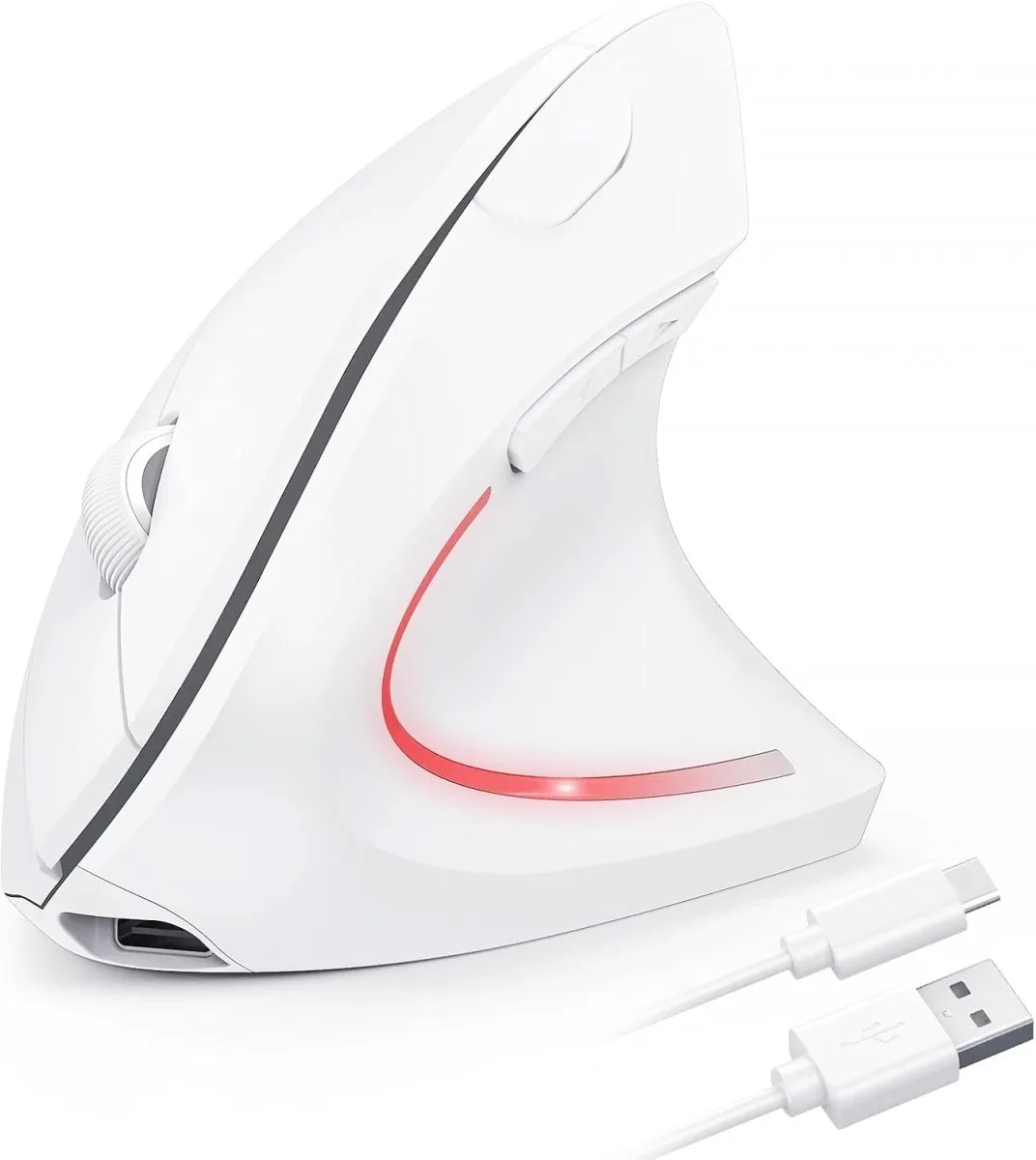
TECKNET Ergonomic Wireless Mouse, Rechargeable Mouse Wireless Silent for Carpal Tunnel Right Hand, 2.4GHz USB Vertical Mouse Wireless for Laptop, 5 Adjustable 4800 DPI, Computer, MacBook, Desktop
-
TECKNET Ergonomic Wireless Mouse, Rechargeable Mouse Wireless Silent for Carpal Tunnel Right Hand, 2.4GHz USB Vertical Mouse Wireless for Laptop, 5 Adjustable 4800 DPI, Computer, MacBook, Desktop: Rechargeable & Long-Lasting — Built-in 600mAh battery fully charges in 1.5 hours via Type-C and lasts up to 2 months per charge. Long battery life means less downtime and fewer interruptions, so you can focus on work without worrying about power.