Quick answer
Clean your memory card wallet by gently wiping the interior with a dry microfiber cloth and storing it in a cool, dry place away from direct sunlight. Regular maintenance prevents dust buildup that can transfer to your SD cards.
Why cleaning your memory card wallet matters
Your memory card wallet may seem low-maintenance, but dust and debris can accumulate inside the slots and on the velcro closure. Over time, that grit can scratch card contacts or clog the fabric, reducing the wallet's ability to protect your SD cards. A quick clean every few months keeps your memory card organizer working like new.
The Memory Card Wallet - Bulk Packaging uses a velcro closure and padded interior—both areas that trap lint and dust if neglected. Regular care helps maintain the secure fit and padding that keep your cards safe.
How to clean and store your memory card wallet
- Remove all memory cards: Take every card out of the wallet and set them aside in a clean, static-free surface. This lets you access every slot and prevents accidental damage during cleaning. Common mistake: leaving cards inside while cleaning can push dust deeper into the slots.
- Shake out loose debris: Hold the wallet upside down over a trash can and gently shake it to dislodge loose dust, lint, or crumbs. Pay extra attention to the velcro closure area and the corners of each slot. Checkpoint: if you see stubborn particles, skip to step 3 instead of rubbing them in.
- Wipe interior with a dry microfiber cloth: Use a clean, dry microfiber cloth to wipe the inside of each slot and the velcro strip. For the velcro, dab lightly to lift lint—avoid pressing hard, which can fray the hooks. Do not use water, alcohol, or cleaning sprays, as moisture can damage the padding or warp the fabric. Common mistake: using wet wipes or liquids can cause mold or degrade the padding over time.
- Let it air out: Leave the wallet open in a dry, room-temperature spot for 10–15 minutes to let any residual moisture evaporate. This step is essential even if you only used a dry cloth, because humidity from your hands can linger. Checkpoint: never store the wallet while it feels damp—moisture invites mildew.
- Store in a cool, dry place: Close the wallet and place it in a drawer, camera bag pocket, or shelf away from direct sunlight, heat vents, and high humidity. Avoid leaving it in a car or near a window. Proper storage keeps the velcro secure and the padding effective. Common mistake: storing in a hot car can soften the padding and weaken the velcro adhesive.
- Clean the memory cards too: Before reinserting your SD cards, wipe their contacts with a dry microfiber cloth or a lint-free swab. This prevents any dust from your cards from re-contaminating the freshly cleaned wallet. Checkpoint: if card contacts look smudged, a gentle dry wipe is enough—never use liquid cleaners.
Product facts
-
Memory Card Wallet - Bulk Packaging (brand may vary): Holds 3+ memory cards with a secure velcro closure and light padding for protection. The velcro closure and padded slots are the areas most prone to dust buildup, so focusing your cleaning there keeps the wallet protective.
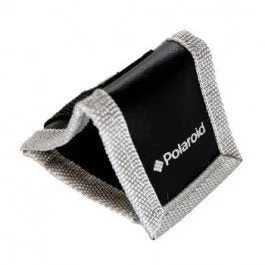
Memory Card Wallet - Bulk Packaging (brand may vary)