Quick Answer
Set up your NECA Studios Monsterizer by inserting batteries, testing the light and sound effects, then positioning it with compatible retro glow figures for maximum visual impact.
Why Light-Up Effects Matter for Your Diorama
The Monsterizer’s flashing lights, illuminated electrodes, and creaking gears create a dynamic focal point that transforms a static shelf into a scene of mad science. Unlike standard diorama pieces, the light-up effects draw the eye and add a theatrical layer that works especially well in low-light rooms or evening viewing.
Pairing with Retro Glow Figures
This diorama is designed to work with NECA’s line of retro glow-in-the-dark monster figures. The glowing figures react to the Monsterizer’s lights, making the whole display feel cohesive. For best results, place the figures on the platform or near the electrodes so the glow effect is visible without being washed out by direct overhead light.
Step-by-Step Setup Guide
- 1. Insert Batteries and Test the Effects: Open the battery compartment on the base of the Monsterizer. Install fresh batteries (type specified in the manual). Turn on the switch to verify the lights flash, electrodes illuminate, and the gear sound activates. If any effect is weak, replace batteries before placing the unit in your display. Always test with new batteries to avoid having to disassemble your display later.
- 2. Choose the Right Display Location: Place the Monsterizer on a stable, level surface away from direct sunlight or heat sources. For best light-up visibility, position it in a darker area of your shelf or room. Avoid placing it near other bright electronics that could distract from the effect. A darker backdrop (like a black shelf liner) makes the lights pop more.
- 3. Arrange Retro Glow Figures Around the Monsterizer: Position your NECA retro glow-in-the-dark monster figures on the platform or directly in front of the electrodes. Leave enough space so the figures don’t block the light. Experiment with poses that suggest they are being “Monsterized” – arms raised or leaning toward the electrodes. Overcrowding the platform hides the light effects; two or three figures work best.
- 4. Optimize Ambient Lighting: Turn off or dim overhead lights to let the Monsterizer’s lights and the glow figures shine. If you need some ambient light, use a small LED strip aimed away from the display. This preserves the dramatic contrast without making the figures hard to see. A single warm accent light behind the shelf can add depth without competing with the effects.
- 5. Maintain and Store Properly: Dust the Monsterizer gently with a soft brush. Remove batteries if you plan to store the unit for more than a month to prevent leakage. Keep the original packaging for safe transport or storage. Battery leakage can damage the electronics; always remove batteries during long storage.
Product Spotlight
-
NECA Studios Monsterizer with Light-Up Effects: Lights flash, electrodes illuminate, and gears creak as you “Monsterize” the famous monsters of filmland. The multi-sensory effects make this diorama a centerpiece that stands out even among other collectibles.
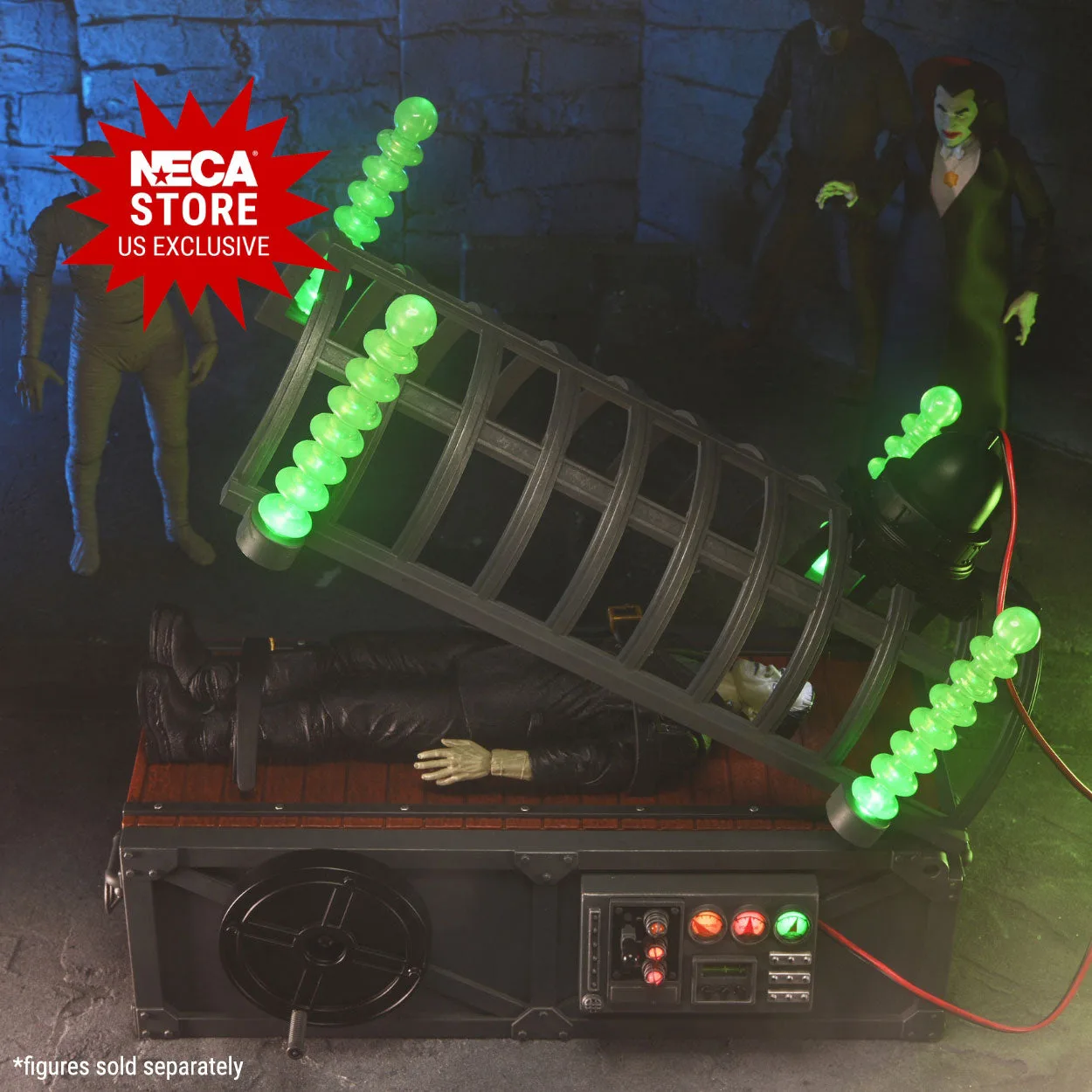
NECA Studios Monsterizer with Light-Up Effects