Quick Answer
To maximize visibility, place your counter display at eye level near the checkout or high-traffic zones, use clear signage, and keep it well-stocked and clean.
Why Placement Matters More Than the Display Itself
Even the most attractive counter display won't sell if shoppers don't see it. The right location can double the chances of a purchase, while a poor spot can hide your product entirely. Think about how customers move through your store—where they pause, where they queue, and where they naturally look.
Checkout counters are prime real estate because customers are already waiting. But don't overlook other high-traffic areas like near the entrance or beside fitting rooms. The key is to place the display where it interrupts the customer's path without blocking movement.
Signage and Stocking: The Hidden Drivers of Visibility
A display that's half-empty or cluttered sends a signal that the product isn't popular or important. Keep it fully stocked and tidy to maintain a sense of abundance and quality.
Clear signage that highlights the product's benefit or a special offer can stop a customer in their tracks. Use the display's QR code or a simple sign to guide customers to more information, like a size chart, to reduce friction.
Trade-Offs: Counter Space vs. Foot Traffic
Placing a display near the entrance may capture early attention, but it can also slow down the flow of customers entering the store. Checkout counters offer captive audiences but may have limited space. Weigh the trade-off between visibility and convenience.
If you have multiple locations or products, consider rotating displays to different spots periodically to refresh customer interest and test which placements perform best.
Counter Display Setup Steps
- Choose the Right Location: Place the display on a counter that is at eye level (about 42-48 inches from the floor) and in a high-traffic area like the checkout or near the entrance. Avoid spots where customers might bump into it. Check that the display doesn't obstruct the cashier's view or customer flow.
- Position the Display for Easy Access: Turn the display so the front faces the main customer path. Ensure that products are within arm's reach and that the QR code is visible. If the display is near a queue, angle it slightly toward the waiting area. Test from a customer's perspective—can they see the product name and grab an item without stretching?
- Keep It Stocked and Clean: Refill the display regularly, at least once a day or after each rush. Wipe down the surface to keep it dust-free. Remove any damaged or unsold items promptly. Set a daily restocking reminder to maintain a full and fresh appearance.
- Use Signage to Draw Attention: Add a small sign or tent card that highlights a key benefit or a limited-time offer. Make sure the text is legible from a few feet away. Use the QR code to link to more details, like a size chart or product page. Ensure the signage matches your brand's style and doesn't clutter the display.
- Monitor and Adjust: Track which placements generate the most sales. Ask staff for feedback and observe customer interactions. Move the display to a different spot if it's not performing well. Review placement performance monthly and rotate displays to keep them fresh.
Product Facts
-
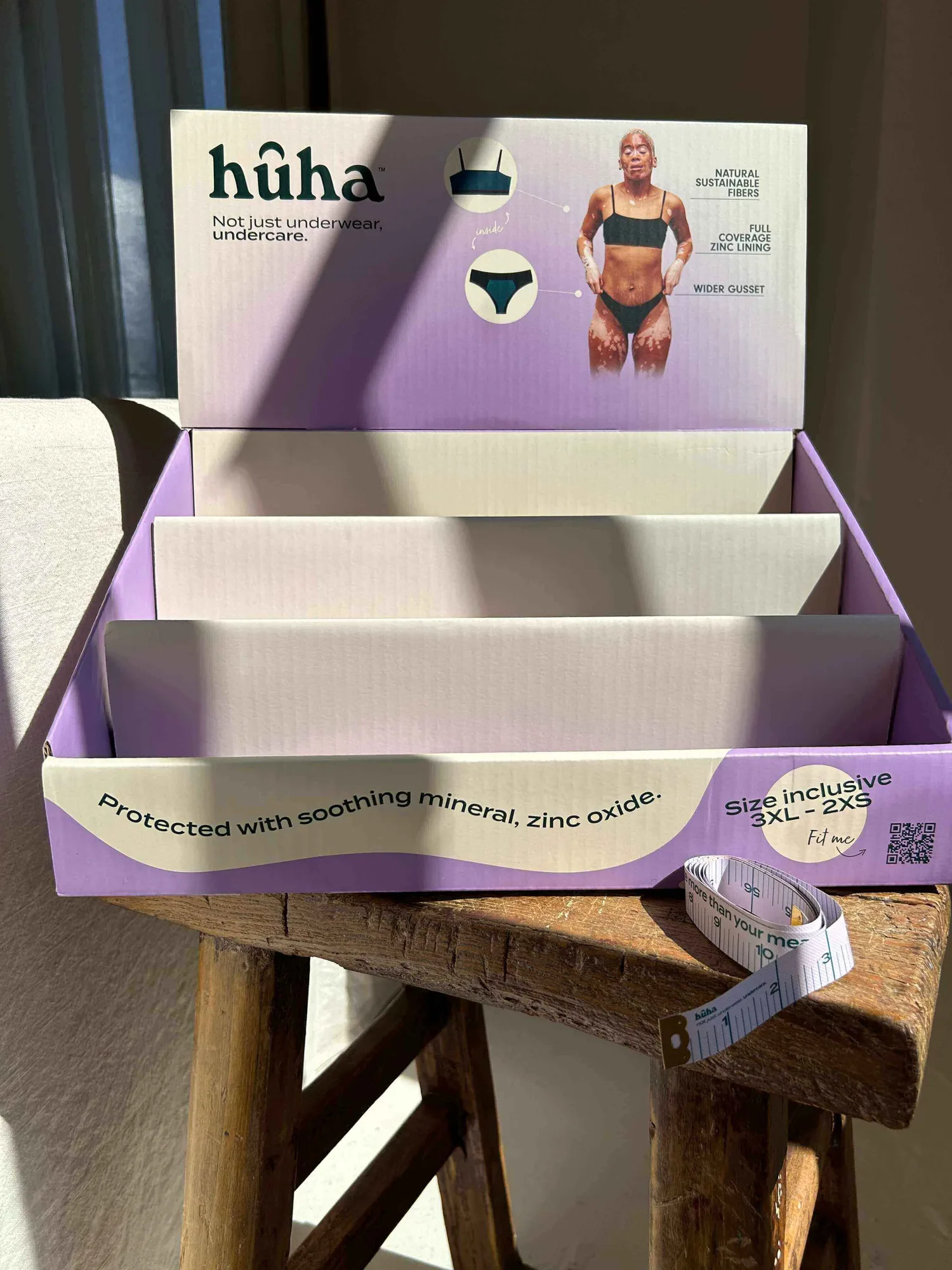
Retail Counter Display: The Huha Counter is a cardboard counter display that holds up to 27 pairs of units and includes a QR code linking to the Huha size chart. This compact display lets you showcase a full product range without taking up floor space, and the QR code helps customers find the right size quickly, reducing purchase hesitation.
Retail Counter Display