Quick Answer
Adjust the shoulder straps to distribute weight evenly, then attach each camera to the harness clips, and fine-tune the hip positioning so both bodies sit at the same height for balanced carrying.
Why Proper Fit Matters
A poorly adjusted harness can cause neck strain, limit your movement, or make cameras swing uncomfortably. The PRO 2N1 Arca compatible Dual Camera Harness spreads weight across both shoulders, so correct fit is key to enjoying all-day comfort and quick access.
Common Mistakes to Avoid
Avoid attaching cameras before adjusting the harness—this makes fine-tuning difficult. Also, do not leave straps too loose; they should follow your torso without pinching. If you have a backpack on, adjust the harness over it to avoid pressure points.
Step-by-Step Fitting Process
- 1. Loosen All Straps: Start with all shoulder and hip straps fully loosened. Put the harness on over your clothing or jacket as you would wear it during shooting. Check that no straps are twisted before tightening.
- 2. Adjust Shoulder Straps: Pull the shoulder straps down evenly until the harness feels snug but not tight. The padded sections should rest on your shoulders, not your neck. The sternum strap (if present) should be at chest level. If the harness slides forward, tighten the straps slightly more.
- 3. Position the Hip Pads: Slide the hip pads so they sit on your hip bones, not on your waist. Tighten the hip strap to keep the pads secure but comfortable. This prevents the harness from riding up. The hip pads should not dig into your stomach; adjust height if needed.
- 4. Attach the First Camera: Clip one camera body to the left or right harness clip. Let it hang naturally and check that the clip is fully engaged. Repeat for the second camera on the opposite clip. Ensure both clips click audibly and the camera is secure before letting go.
- 5. Balance the Cameras: With both cameras attached, walk a few steps. If one side pulls down, adjust the shoulder strap on that side slightly tighter. Both cameras should hang at roughly the same height and not swing excessively. If cameras swing into each other, shorten the straps or reposition the hip pads.
- 6. Test Quick Access: Practice lifting each camera to your eye and returning it to the harness. Adjust the strap length on the clips if the camera sits too high or too low for your reach. The camera should be at hip level, not bouncing against your thigh.
Product Details
-
PRO 2N1 Arca compatible Dual Camera Harness - Black: The Vanguard PRO 2N1 STRAP is a professional dual camera harness designed for photographers who need to carry and use up to two professional cameras throughout demanding, fast-moving assignments. This means the harness is built for heavy gear and active shooting, so adjusting it properly ensures you get the intended stability and weight distribution.
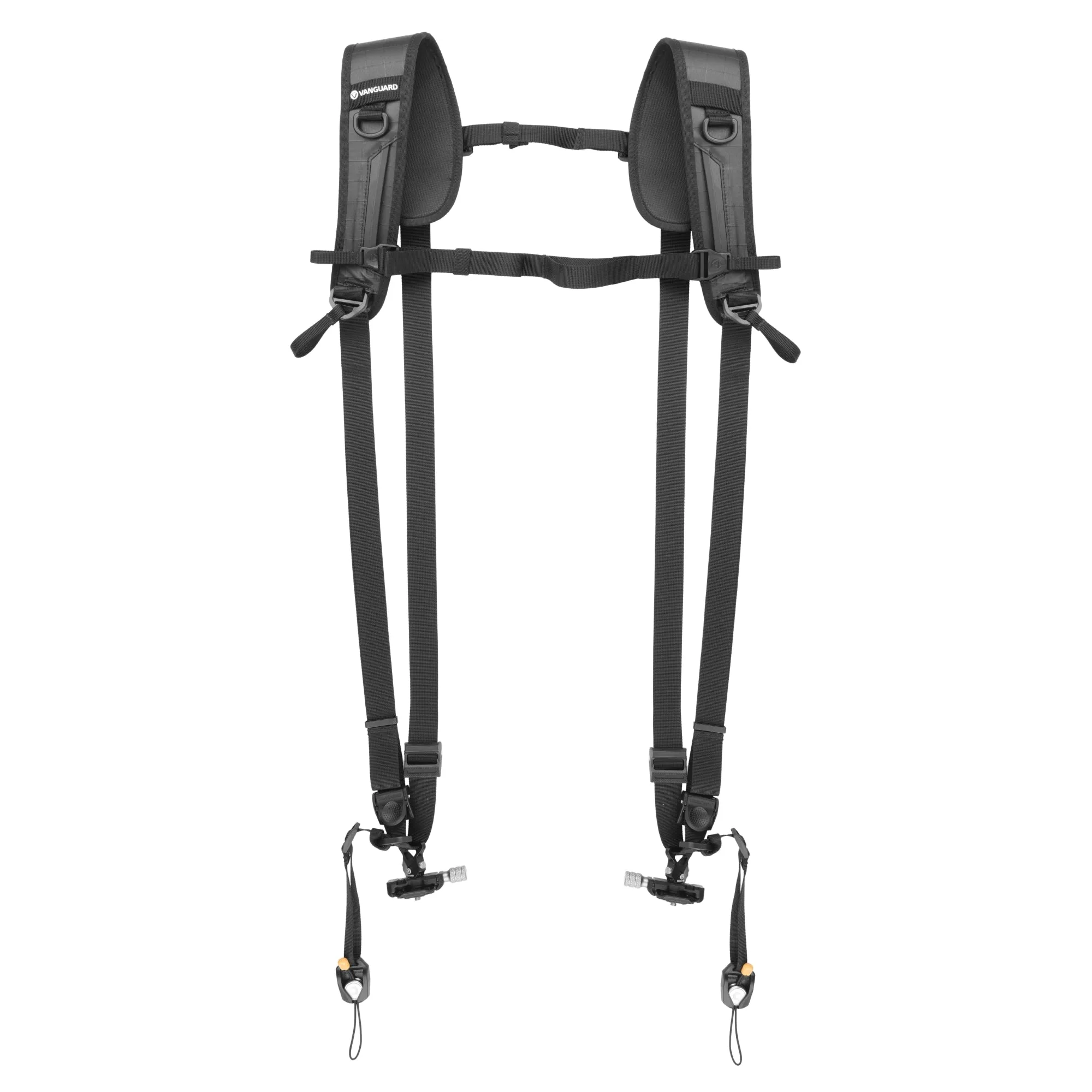
PRO 2N1 Arca compatible Dual Camera Harness - Black