Quick Answer
If your mouse glides unevenly, feels scratchy, or makes a gritty sound, the fix is almost always to replace the skates rather than repair them. Clean the feet first to rule out trapped debris, then install a fresh set of PTFE skates such as Corepad Skatez or Jade Speed Skates.
You sit down to warm up, move your mouse across the pad, and feel it: a rough, scratchy drag that wasn't there last week. Scratched or worn mouse skates are one of the most common reasons a mouse suddenly feels inconsistent, and the good news is that the fix is cheap and takes about ten minutes.
This guide walks you through the diagnosis: what the symptom actually feels like, what likely caused it, what you can do right now, and the point where replacement becomes the smarter move than repair.
Symptom: What Scratched or Worn Skates Actually Feel Like
Worn mouse skates rarely fail all at once. The first sign is usually a faint gritty or sandy sensation when you start a swipe, especially on cloth pads. You might notice the cursor jumping slightly during micro-adjustments, or the mouse catching when you push it diagonally. On a hard pad, the sound changes from a soft whoosh to a dry scrape.
A quick visual check helps confirm it. Flip the mouse over and look at the feet under a light. Deep grooves, flat spots, or a visible lip at the edge of the skate all point to wear. Compare the front and back feet: if one is noticeably thinner or more polished than the other, that foot is taking more friction than it should.
- Run a fingernail lightly across the skate surface. A healthy PTFE skate feels slick and even; a worn one feels ridged or catches.
- Check for a lip or burr at the leading edge, which is the most common source of a scratchy glide.
Likely Cause: Why Mouse Skates Wear Down
PTFE is soft by design, which is what makes it glide. That softness also means it slowly abrades against your mousepad. The main accelerators are dust and grit trapped on the pad, a rough or dirty surface, and downward pressure from a heavy hand or a palm grip that presses the mouse into the pad. A single grain of sand under a skate can carve a visible scratch in a session.
Pad choice matters too. Cloth pads are gentler on skates but hold more dust, while hard plastic pads are easier to wipe clean but can be more abrasive over time. If your mouse feet wore out much faster than you expected, the pad surface and your cleaning routine are the first places to look, not the skates themselves.
- Wipe your mousepad weekly with a damp lint-free cloth and let it dry fully before use.
- Store your mouse on the pad or a clean surface, not loose in a bag where the feet can pick up grit.
Corrective Action: Clean First, Then Decide
Before you order anything, clean the skates and the pad. Use a cotton swab lightly dampened with isopropyl alcohol to wipe along the edge of each skate, then dry it. Clean the pad thoroughly and test again. If the scratchy feeling disappears, you had debris, not damage, and no replacement is needed.
If the roughness remains after cleaning, measure the damage. Skates are consumable, and a set that has been used heavily for months is simply due for replacement. Replacing mouse skates is a straightforward job: peel the old feet off, clean the adhesive residue with alcohol, and press on a fresh set. Corepad Skatez use high-quality 3M adhesive and come as two sets per pack, so you get a spare for the next swap.
- Work in a well-lit area and keep the old skates nearby so you can match the shape and orientation.
- Press each new skate firmly for a few seconds, then let the adhesive settle before gaming.
When to Replace Instead of Repair
There is no reliable way to sand, polish, or re-surface a worn PTFE skate back to its original glide. Any DIY repair changes the thickness and flatness of the foot, which is exactly what determines how the mouse sits on the pad. Once a skate has a deep groove, a flat spot, or a rolled edge, replacement is the correct call.
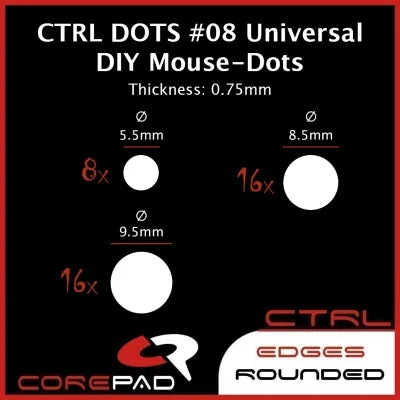
The same applies when only one or two feet are worn. Replacing the full set keeps the mouse level. If you are unsure whether your model has a dedicated replacement available, universal DIY dots are a practical fallback: Corepad Skatez CTRL #8 Universal DIY Dots let you cut and place feet on almost any mouse, and their heat-treated surface is designed to feel a little slower and easier to control than standard Corepad Skatez PRO.
- Replace all feet at once, even if only one looks bad, to keep the mouse sitting flat.
- If you cannot find skates made for your exact model, universal dots are the safer choice over trimming old feet.
Diagnosis: Match the Symptom to the Fix
- Scratchy glide that appeared suddenly: Most often trapped dust or a single grit particle under the skate. Clean the skate edge and the pad with isopropyl alcohol, dry both, and retest. If the glide returns to normal, no replacement is needed.
- Consistent rough drag across the whole pad: Usually a worn or flattened skate surface, sometimes paired with a dirty cloth pad. Clean first, then inspect for flat spots or a rolled edge. If the roughness survives cleaning, replace the full set of skates.
- Visible groove, flat spot, or rolled edge: Physical damage to the PTFE. There is no safe way to sand or polish it back to a flat, even surface. Replace the skates. Choose model-specific feet if available, or universal DIY dots if not.
Replacement Options Worth Knowing
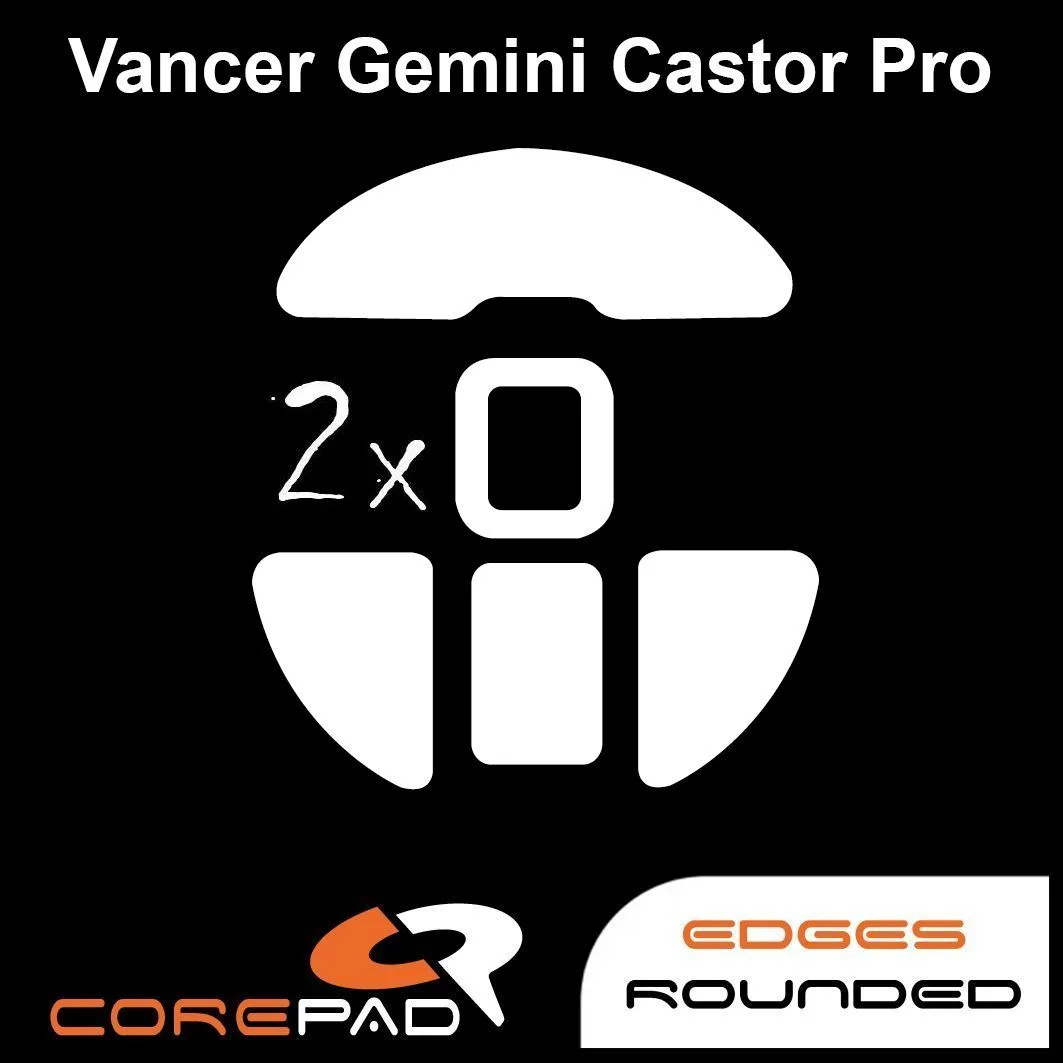
- Corepad Skatez - Vancer Gemini Castor Pro Wireless: 1 pack contains 2 sets of Skatez, made from 100% pure PTFE with high-quality 3M adhesive and a 0.75mm thickness. Two sets per pack means one replacement now and a spare for later, and the 3M adhesive makes re-seating straightforward.
- Corepad Skatez CTRL #8 - Universal DIY Dots (0.75mm thick): The special heat treatment creates a uniformly smooth and flat surface, making CTRL easier to control and a little slower than Corepad Skatez PRO. A good pick if you want a more controlled glide or if no model-specific skate exists for your mouse.
- Jade Speed Skates - Razer Viper V2 Pro: Made of pure PTFE with one-piece molding and rounded curved edges, suitable for cloth and plastic mouse pads but not glass pads. Rounded edges reduce the chance of catching on the pad, but glass pad owners should choose a different option.
Scratched or worn mouse skates are a wear item, not a permanent part. Clean first to rule out debris, replace the full set once the surface is genuinely damaged, and keep a spare pack on hand so a rough glide never costs you a session.