Quick answer
Installing a LensCoat on the Nikon 400mm f/2.8 AFS II takes about 15 minutes and requires patience to align the clear windows over the controls and distance scale. Start with the lens hood, work from the front to the rear, and use gentle stretching to avoid wrinkles.
Why fit matters for the AFS II model
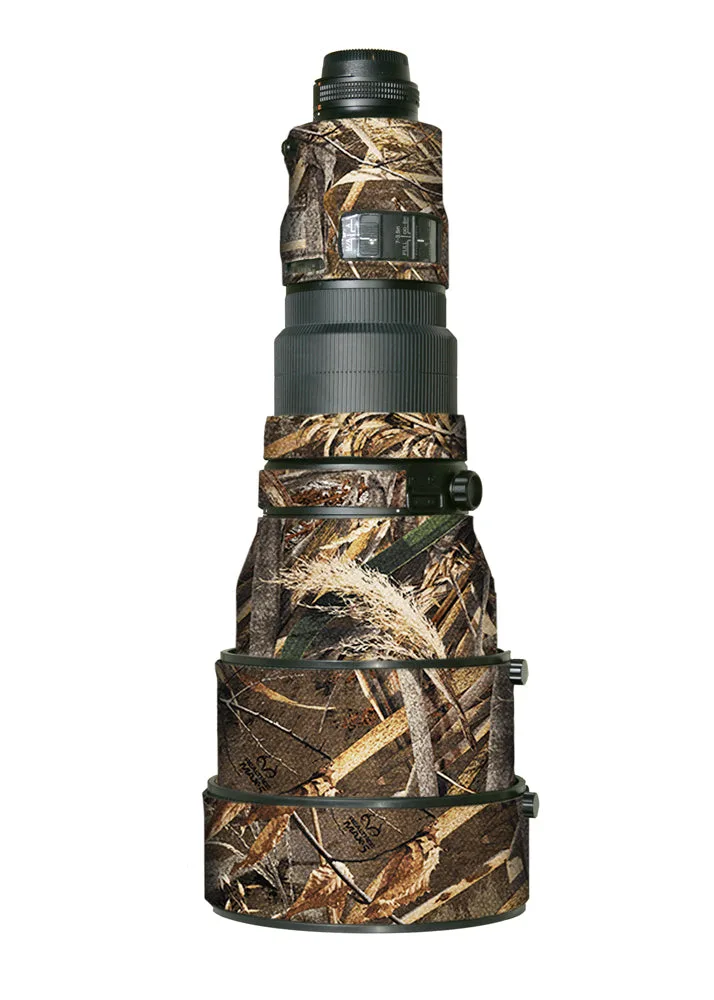
The Nikon 400mm f/2.8 AFS II has a distinct body shape with protruding controls and a distance scale window. A LensCoat designed specifically for this model—like the LensCoat® Nikon 400 AFS II—includes pre-cut openings for those features, so you don't have to trim anything yourself. Using a generic cover would leave those areas exposed or require risky cutting.
Because the AFS II is an older lens, the rubber and paint can be more prone to scuffs. A snug cover not only protects the barrel but also helps preserve resale value by preventing scratches and dings during field use.
Common mistake: stretching too fast
LensCoat material is durable neoprene, but it can tear if you pull it too aggressively over sharp edges like the tripod collar or lens hood bayonet. Work slowly, especially around the control windows, and use your fingertips to ease the material into place rather than yanking it.
Installation steps
- 1. Prepare the lens and cover: Remove the lens hood, tripod collar, and any accessories. Lay the LensCoat flat with the interior facing up. Check that the clear plastic windows are positioned to match the left side of the lens (when looking from the rear). If the windows face the wrong side, the cover won't align with the controls.
- 2. Start at the front of the barrel: Slide the front opening of the LensCoat over the lens barrel, aligning the seam with the bottom of the lens. Gently pull the cover rearward, keeping it centered. Do not force it—if it sticks, lift and reposition rather than pulling harder. Pulling too hard can tear the seam or stretch the material unevenly.
- 3. Align the control windows: Once the cover is halfway on, locate the clear plastic windows. Position them directly over the auto-focus controls and the distance scale. Press the material flat around the edges of the windows so they stay transparent and unobstructed. A window that shifts during installation will block the controls or scale—check alignment before proceeding.
- 4. Work the cover over the tripod collar area: The thickest part of the lens is around the tripod collar. Use both hands to stretch the neoprene evenly over this section. If the cover has a cutout for the collar foot, make sure that opening lines up before you push the material past it. Rushing this step can cause the cover to bunch up behind the collar, leaving wrinkles.
- 5. Secure the rear edge: Pull the remaining material over the rear of the lens. The edge should sit flush against the lens mount ring. Smooth out any wrinkles by running your fingers from front to back. Reinstall the tripod collar and lens hood. A loose rear edge can catch on camera bodies or lens cases—tuck it firmly.
What you need
-
LensCoat® Nikon 400 AFS II: LensCoat® for the Nikon 400 f/2.8 AFS II includes clear plastic windows over the auto focus controls and the distance scale. You don't need to cut or modify the cover—the windows are already positioned so you can see and operate the controls without removing the coat.
LensCoat® Nikon 400 AFS II