Quick answer
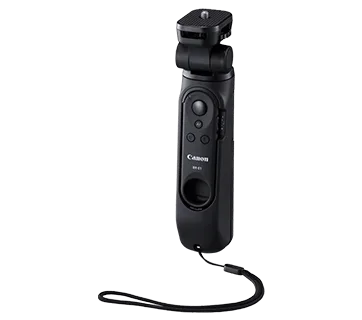
To pair the HG-100TBR Tripod Grip with your Canon camera, first attach the grip, then enable Bluetooth on the camera and put the included BR-E1 remote into pairing mode. The remote controls zoom, AF, and shutter from a distance, and the grip converts into a table-top tripod for self-recording or self-portraits.
Before you start: check compatibility and charge up
The HG-100TBR works with Canon cameras that support the BR-E1 remote, but not every model has the same menu layout. Check your camera's manual for a Bluetooth remote option. The BR-E1 remote runs on a CR2032 coin battery, so insert a fresh one before pairing. If your camera lacks Bluetooth remote support, you can still use the grip as a stable table-top tripod, but the wireless shutter and zoom functions won't work.
Step 1: Attach the grip and confirm the remote is ready
Screw the HG-100TBR into your camera's tripod socket until snug, but don't overtighten. The grip is designed for one-handed shooting and can transform into a table-top tripod by folding out its legs. Slide the BR-E1 remote out of its holder and make sure the battery is inserted correctly. A common mistake is leaving the remote in its slot, which blocks the pairing button.
Step 2: Enable Bluetooth on your Canon camera
Go to your camera's menu and find the wireless communication settings. Select Bluetooth function and set it to On. If you've previously paired other devices, clear old connections to avoid conflicts. On some models, you'll need to enable 'Remote control' or 'Smartphone' mode. The exact wording varies, so look for a Bluetooth icon or a remote control option.
Step 3: Put the BR-E1 remote into pairing mode
Press and hold the pairing button on the BR-E1 until its LED blinks rapidly. This usually takes about 3 seconds. Then, on your camera, select 'Pair with remote' or a similar option. The camera will search for the remote. When the model name appears, confirm the pairing. If the LED stops blinking and stays lit, pairing succeeded. If it blinks slowly, repeat the process.
Step 4: Test the remote functions and adjust settings
Once paired, the BR-E1 can control zoom, AF, and shutter. Test each button: half-press the shutter to focus, full-press to shoot. Use the zoom lever if your lens supports power zoom. If the remote doesn't respond, check that the camera's drive mode isn't set to a timer or that the remote isn't in a low-power state. For video, you may need to enable remote shooting in the menu.
Step 5: Switch to table-top tripod mode for self-recording
Fold out the HG-100TBR's legs to convert it into a table-top tripod. Place it on a stable surface and adjust the angle. This mode is ideal for self-recording or self-portraits, especially when paired with the BR-E1 for hands-free shutter control. A common mistake is forgetting to lock the legs; make sure they click into place. For vlogging, you can hold the grip in one hand and use the remote in the other for smooth transitions.
Pairing steps at a glance
- Attach the grip and prepare the remote: Screw the HG-100TBR into the camera's tripod socket and remove the BR-E1 from its holder. Insert a fresh CR2032 battery. Checkpoint: The grip should be snug but not overtightened.
- Enable Bluetooth on the camera: In the camera menu, turn on Bluetooth and clear any old pairings. Look for 'Bluetooth function' or a remote control option. Mistake to avoid: Skipping this step if you've paired other devices before.
- Pair the BR-E1 remote: Hold the remote's pairing button until the LED blinks rapidly, then select 'Pair with remote' on the camera. Confirm the connection. Checkpoint: The LED should stop blinking and stay lit when paired.
- Test remote functions: Press the shutter halfway to focus, fully to shoot. Try the zoom lever if your lens supports it. For video, enable remote shooting in the menu. If nothing happens, check the drive mode and battery level.
- Switch to table-top tripod mode: Fold out the legs until they lock. Place on a stable surface for self-recording or self-portraits. Mistake to avoid: Forgetting to lock the legs, which can cause the camera to tip.
Product facts
- HG-100TBR Tripod Grip: The Canon Tripod Grip HG-100TBR offers easy grip for shooting in one hand, allowing more freedom of creative expression. Able to transform into a table-top tripod to hold your camera in place for self-recording or self-portraits. The accompanied detachable wireless remote control BR-E1 allows users to operate the camera's zoom, AF and shutter from a distance. This means you can switch between handheld vlogging and stable table-top shots without carrying a separate tripod, and control key functions remotely.