Quick Answer
Place your LOTR enamel pins on a sturdy area of the notebook cover, such as the lower corner or along the spine, and use a backing pad to prevent dents. Check the pin's post length and the notebook's thickness before pushing through.
Why Pin Placement Matters
Enamel pins add a personal touch to your Moleskine notebook, but where you place them affects both the look and the longevity of the cover. A pin placed too close to the edge can cause the cover to bend, while one in the middle may interfere with writing if the notebook lies flat.
The Moleskine cover is sturdy but not rigid, so the pin's post can leave a small indentation on the inside. Choosing a spot that gets less handling, like the back cover or a corner, reduces wear and keeps the front clean.
Trade-Off: Front vs. Back Cover
The front cover is the most visible spot, making it ideal for showcasing your favorite pin from the set. However, it also gets the most contact with surfaces and hands, which can loosen the pin over time.
The back cover is a safer choice if you want to avoid damage to the front design or if you prefer a more subtle look. It still personalizes the notebook without sacrificing durability.
If you choose the front, pick a spot away from the spine and edges, and consider using a rubber backing to keep the pin secure.
Step-by-Step Pin Placement Guide
- Choose the right spot: Select a location on the cover that is at least 1 inch from the edges and spine. Avoid areas that will be bent or folded. A lower corner is a popular choice because it's visible but less handled. Check that the spot doesn't interfere with the notebook's closure or any existing elastic band.
- Test the pin post length: Before pushing the pin through, compare the post length to the cover thickness. If the post is too long, it may protrude inside and catch on pages. If too short, it won't secure properly. Most enamel pins have a post length of about 10-12mm, which works for standard Moleskine covers. If the post is too long, you can add a small piece of felt or a rubber spacer on the inside to protect the pages.
- Push the pin through carefully: Hold the notebook flat and push the pin from the outside in. Apply even pressure to avoid bending the cover. If the cover resists, use a pin with a sharper point or pre-poke a small hole with a needle. Do not force the pin; a bent pin is harder to remove and can damage the cover.
- Secure the backing: Attach the rubber or metal backing that comes with the pin. Press it firmly until it's snug, but not so tight that it dents the cover. If the backing is loose, replace it with a new one to prevent the pin from falling off. Check the backing regularly, especially if you carry the notebook in a bag.
- Test the notebook function: Open and close the notebook to ensure the pin doesn't catch on the elastic band or the pages. Also, lay the notebook flat to see if the pin causes any bulk that might make writing uncomfortable. If the pin interferes, move it to a different spot and follow these steps again.
Product Facts
-
Personalization Pins - Il Signore degli Anelli Set da 2: This set includes two detailed enamel pins: the Leaf of Lorien and the One Ring with the Black Speech of Mordor engraved, designed for fans of the legendary film trilogy. These pins are made for personalizing your Moleskine notebook, so they match the aesthetic and are sized appropriately for a notebook cover.
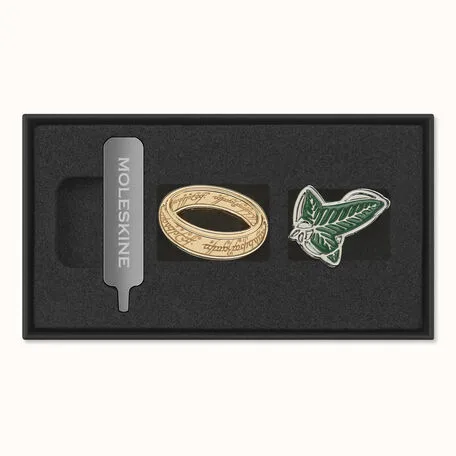
Personalization Pins - Il Signore degli Anelli Set da 2