Quick Answer
Start with your GPU's recommended wattage, then add 20-30% headroom for power spikes and future upgrades. For most modern high-performance GPUs, an 850W ATX 3.1 unit like the NZXT C850 Gold ATX 3.1 is the practical choice because it includes the 12V-2x6 connector and spike resistance that top-tier cards need.
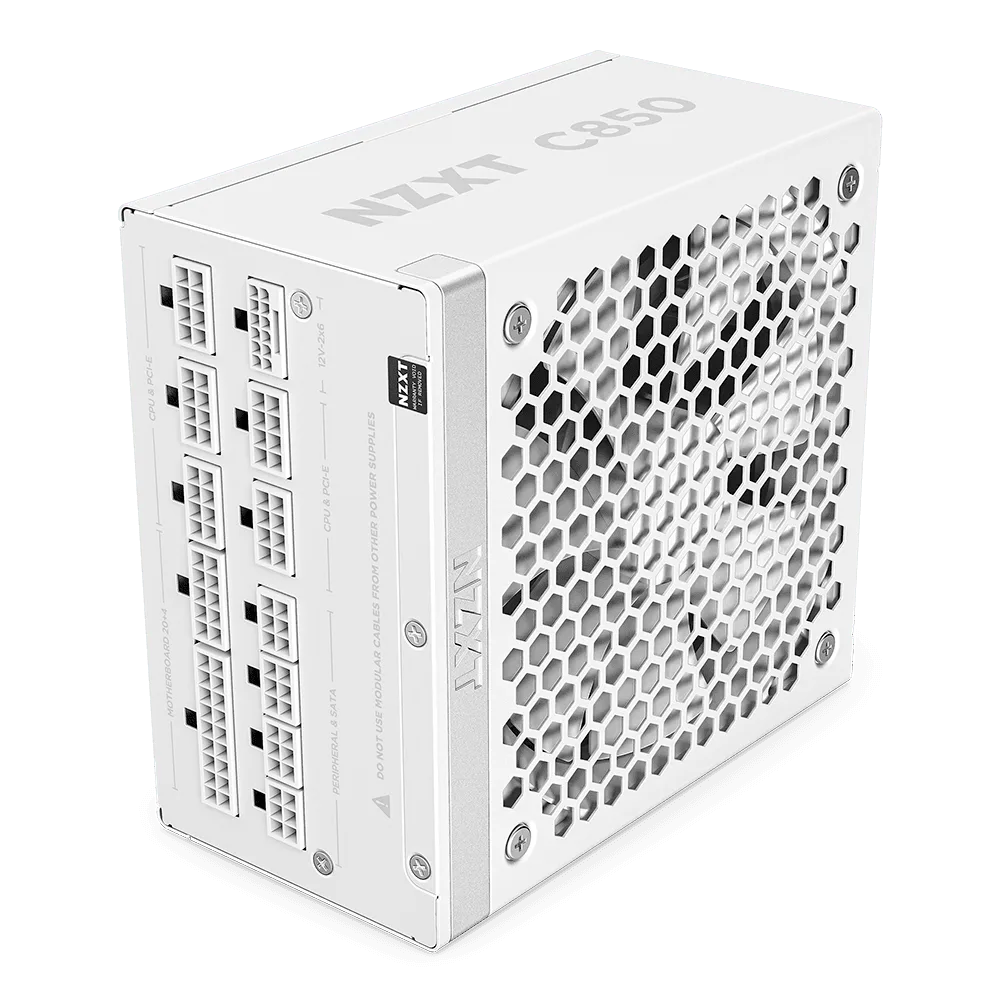
C850 Gold ATX 3.1
Your power supply is the one component that touches every other part of your build, and it is the easiest to get wrong. Too little wattage and your GPU may throttle or shut down under load; too much and you overspend on capacity you never use. The right answer depends on the graphics card you are actually running, not on a generic wattage chart.
This guide walks through the decisions that matter: wattage headroom for your GPU, connector type, ATX 3.1 compliance, and physical fit inside your case. It focuses on NZXT power supplies because they are designed around the same high-performance GPUs you are likely pairing them with, and it gives you clear rules so you can choose with confidence.
Start With Your GPU, Not a Wattage Chart
Every GPU has a recommended system power requirement, usually listed on the manufacturer's spec page. That number assumes a typical build with a mainstream CPU, a few drives, and some fans. If your CPU is a high-core model or you run multiple storage drives and RGB, you are already above the baseline. Use the GPU recommendation as your floor, not your target.
The practical rule is to add 20-30% headroom above the GPU's recommended system wattage. Headroom does more than cover a future upgrade: it keeps the PSU in its most efficient range and gives the unit room to absorb transient spikes that modern GPUs produce. For a card that recommends a 700W system, an 850W unit is a sensible landing spot.
- Check the GPU manufacturer's recommended system power first.
- Add 20-30% for CPU, drives, fans, and transient spikes.
- Round up to the nearest common wattage rather than down.
Why ATX 3.1 and the 12V-2x6 Connector Matter
ATX 3.1 is the current power supply standard, and it exists largely because of how modern GPUs behave. High-end cards can pull brief power spikes far above their rated wattage. An ATX 3.1 unit is built to handle those excursions without shutting down or stressing the rest of your system. If you are buying a PSU for a current-generation GPU, this is the standard to look for.
The 12V-2x6 connector is the other half of that story. It replaces the older 12VHPWR connector and is designed to deliver up to 600 watts over a single cable to cards like the NVIDIA GeForce RTX 50 Series. A native 12V-2x6 connection means fewer adapters, cleaner cable routing, and one less point of failure. If your GPU uses this connector, choose a PSU that provides it natively.
- ATX 3.1 handles GPU power spikes that older standards may not.
- 12V-2x6 delivers up to 600W to modern high-end GPUs.
- Native connectors beat adapter cables for reliability and cable management.
Match Wattage to the GPU Tier You Actually Own
A mid-range GPU paired with a mainstream CPU is comfortable on a 650W to 750W unit. A high-end card like an RTX 5080 or similar, especially with a power-hungry CPU, belongs on an 850W unit or higher. The jump between tiers is not linear because GPU transient spikes scale faster than average power draw. Buying one tier up from the minimum is usually cheaper than replacing a PSU later.
If you are unsure, look at the connector rather than the wattage alone. A GPU that needs a 12V-2x6 cable is telling you it expects ATX 3.1-level power delivery. Matching that expectation is more important than chasing a higher number on the box.
- Mid-range GPU and CPU: 650W-750W is usually enough.
- High-end GPU with a strong CPU: start at 850W.
- If the GPU uses 12V-2x6, prioritize ATX 3.1 compliance over raw wattage.
Check Physical Fit Before You Buy
Power supply length varies, and a long unit can collide with drive cages or cable routing channels in smaller cases. Measure the PSU bay in your case and compare it to the unit's dimensions before ordering. This is especially important in compact builds where every millimeter counts.
Cable clearance matters too. A modular PSU lets you attach only the cables you need, which reduces clutter and improves airflow. If your case has a shallow cable-management channel behind the motherboard tray, modularity is not a luxury, it is a practical requirement. Check the depth of that channel against the bend radius of the cables you plan to route.
- Measure your case's PSU bay length and compare to the unit's specs.
- Modular cabling is worth it in compact or airflow-focused builds.
- Leave room behind the motherboard tray for cable bends.
Efficiency, Noise, and Fan Behavior
Efficiency ratings tell you how much power is wasted as heat. A Gold-rated unit wastes less than a Bronze-rated one at the same load, which means lower electricity costs and less heat inside the case. The difference is small at low loads but adds up over years of daily use, especially in a gaming PC that runs for hours at a time.
Fan behavior is the other half of the experience. A larger fan spinning slowly moves the same air with less noise than a small fan spinning fast. Fluid dynamic bearing fans are a common choice for this reason: they run quietly and last longer than sleeve bearings. If you game with open-back headphones or a microphone, PSU noise is worth paying attention to.
- Gold efficiency reduces waste heat and long-term energy cost.
- A larger, slower-spinning fan is usually quieter than a small fast one.
- Fluid dynamic bearings are a durability and noise advantage.
Decision Rules: Match Your GPU to the Right NZXT PSU
- GPU recommends 600W-700W system power: Choose an 850W ATX 3.1 unit. This covers transient spikes and leaves room for a future GPU upgrade without replacing the PSU. The NZXT C850 Gold ATX 3.1 is the practical default here.
- GPU uses a 12V-2x6 connector: Require native 12V-2x6 support and ATX 3.1 compliance. Do not rely on adapter cables for a 600W connection. Native connector means fewer failure points and cleaner routing.
- Building in a compact case: Measure the PSU bay length and the cable-management channel depth before buying. Prefer a modular unit so you only route the cables you need. Fit problems are the most common reason a good PSU gets returned.
- Buying a prebuilt instead of building: Match the prebuilt's GPU tier to the PSU rules above. A 1440p-class machine and a 4K-class machine do not have the same power profile. Use the GPU, not the case size, as your starting point.
NZXT PSU Options That Fit These Rules
- C850 Gold ATX 3.1: Compliant with the ATX 3.1 standard and includes a durable, heat-resistant 12V-2x6 connector that pumps up to 600 watts to NVIDIA GeForce RTX 50 Series graphics cards. It uses a 135 mm fluid dynamic bearing fan and is designed for maximum performance with minimal noise. This is the straightforward match for a high-end GPU build: native 12V-2x6, spike resistance, and a quiet 135 mm fan. If your GPU recommends around 700W system power, this is the unit to start with.
- Player Two: Hits the sweet spot for 1440p gaming with an Intel Core Ultra 7 270K Plus CPU and NVIDIA GeForce RTX 5070, plus 32GB of DDR5 memory. If you are buying a prebuilt rather than building, this is the tier where an 850W ATX 3.1 PSU is the right pairing. It shows the GPU class that benefits from the connector and headroom described above.
- Player Three: Delivers immersive 4K gaming with an AMD Ryzen 7 9800X3D CPU and NVIDIA GeForce RTX 5080 (16GB), plus 32GB of DDR5 memory. This is the high end of the range. An RTX 5080 class GPU is exactly why ATX 3.1 and a native 12V-2x6 connector matter, and why 850W is a floor rather than a ceiling for this kind of build.
Who Should Choose Which
Best for
- Gamers pairing a high-end GPU with a strong CPU who need ATX 3.1 headroom and a native 12V-2x6 connector
- Builders who want quiet operation and a durable fluid dynamic bearing fan
- Anyone planning a GPU upgrade within the next few years who does not want to replace the PSU again
Not for
- Budget builds with a low-power GPU where a smaller, cheaper unit would be sufficient
- Very small form factor cases that cannot physically fit a standard ATX power supply
- Users who need a specific wattage or connector not offered in the current NZXT lineup
Pick your GPU first, add 20-30% headroom, and require ATX 3.1 with a native 12V-2x6 connector if your card uses one. For most modern high-performance builds, the NZXT C850 Gold ATX 3.1 is the unit that satisfies all three rules without overspending on capacity you will never use.