Quick Answer
Assemble the 8' H x 10' W background stand, attach the included 6x9 ft chroma key green screen muslin using the rod pocket and clamps, then position lights to eliminate shadows for a clean key.
Why the 8x10 Stand Size Matters
The stand in this kit extends to 8 feet high and 10 feet wide, giving you a full-body backdrop for standing subjects. The actual chroma key green screen muslin measures 6x9 feet, which fits the frame with some slack—enough to cover most seated or head-and-shoulders shots without touching the floor. If you need a floor-to-ceiling backdrop, you may want a larger muslin or a separate floor drop.
Muslin vs. Wrinkle-Free Backdrops
Cotton muslin is lightweight, portable, and non-reflective, but it wrinkles easily. The included muslin is made of top-grade cotton with fully stitched edges and a 3-inch rod pocket. Wrinkles can cause uneven lighting and make chroma keying harder. Plan to steam or iron the fabric before use—this is normal for muslin backdrops and not a defect.
Step-by-Step Assembly Guide
- Unpack and Lay Out the Stand: Remove the stand components from the carrying bag. Identify the two T-stands (base legs), the two vertical poles, and the crossbar. Lay them on the floor in order of assembly. Check that all pieces are present before starting. Missing a locking knob is a common frustration.
- Assemble the T-Stands and Vertical Poles: Extend each T-stand leg fully and lock the wing nuts. Insert one vertical pole into each T-stand and tighten the collar. Adjust the height to about 7 feet for easier access while attaching the backdrop. Do not extend the poles to full height yet—working at a lower height prevents the stand from tipping during assembly.
- Attach the Crossbar and Raise the Stand: Slide the crossbar through the top of each vertical pole and secure with the provided pins or knobs. Then raise both poles to the desired height (up to 8 ft) and lock them. Ensure the stand is level and the legs are spread wide for stability. A common mistake is raising the stand unevenly, causing the crossbar to sag. Raise both sides in small increments.
- Mount the Green Screen Muslin: Slide the 3-inch rod pocket of the muslin over the crossbar. Center the fabric and let it hang down. Use the three included backdrop clamps to attach the bottom edge to the vertical poles or crossbar ends for tension. Do not over-tighten the clamps—cotton muslin can tear if pulled too taut. A slight drape is fine.
- Remove Wrinkles and Position Lighting: Steam or iron the muslin on a low setting before use. Position your key light at a 45-degree angle to the subject, and place a fill light or reflector on the opposite side to avoid shadows on the green screen. Uneven lighting is the #1 cause of poor chroma key results. Keep the backdrop at least 3 feet behind the subject to prevent green spill.
What's in the Kit
-
Photo Video Studio 8' x 10' Chroma Key Green Screen Backdrop Supporting Stand Kit with 5' x 7' Cotton Chromakey Green Screen Muslin Backdrop and 3 Clamps H804-57G3C: Lightweight and non-reflective material with 3 FREE BACKDROP CLAMPS. Made of top-grade cotton and non-pollutant textile. 3" rod pocket and fully stitched edges. Includes a convenient storage bag. The cotton muslin is easy to carry and store, and the rod pocket lets you slide it onto the crossbar without extra hardware—just use the clamps to secure the bottom for tension.
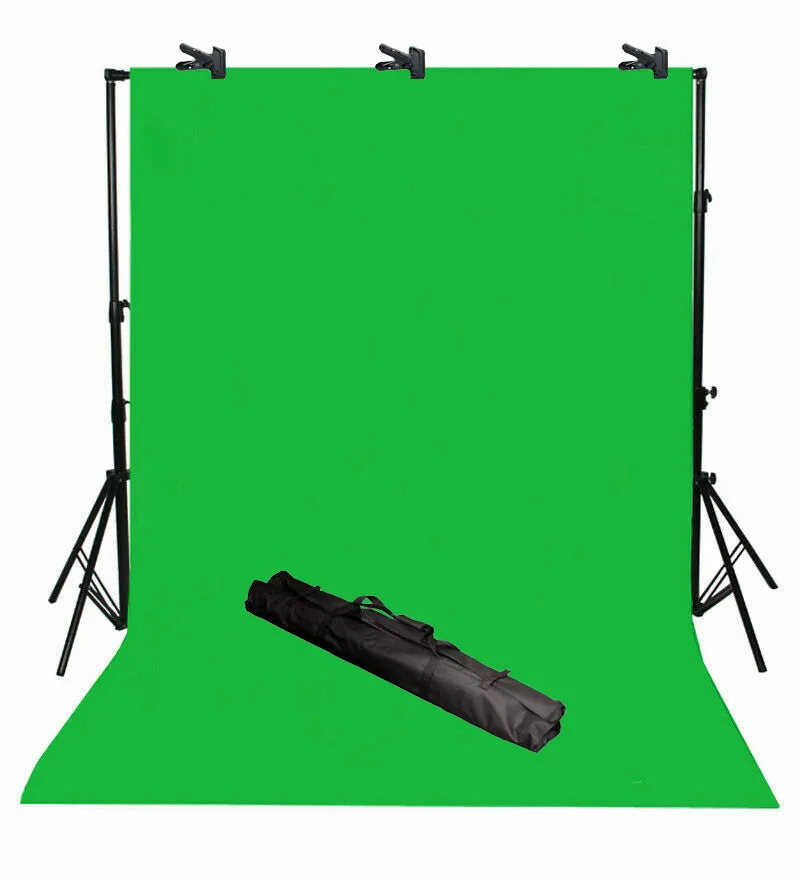
Photo Video Studio 8' x 10' Chroma Key Green Screen Backdrop Supporting Stand Kit with 5' x 7' Cotton Chromakey Green Screen Muslin Backdrop and 3 Clamps H804-57G3C