Quick Answer
Assemble your background stand by laying out all parts, setting up the uprights, attaching the crossbar, and hanging your backdrop. Always secure the legs and sandbags before use to prevent tipping.
Why Proper Setup Matters
A correctly assembled background stand not only looks professional but also prevents accidents. A poorly secured backdrop can fall mid-shoot, damaging equipment or causing injury. Taking a few extra minutes to set up correctly saves time and hassle later.
Different kits have unique assembly details. For instance, some systems use a one-piece telescoping crossbar, while others have a multi-section crossbar that snaps together. Understanding your specific kit's design ensures a stable setup.
Common Setup Mistakes to Avoid
One frequent mistake is not fully extending and locking the legs, leading to instability. Another is hanging a backdrop without smoothing out wrinkles, which shows up in photos and videos. Also, forgetting to use sandbags on windy locations can cause the stand to topple.
Always check that the crossbar is securely attached to the uprights before hanging any backdrop. A crossbar that isn't properly seated can slip and drop your backdrop mid-shoot.
Step-by-Step Setup Process
- Lay out all components: Unpack your background stand kit and lay out all parts: uprights, crossbar, backdrop(s), and carry bag. Check that nothing is missing or damaged before you begin. Familiarize yourself with each piece to avoid confusion later.
- Set up the uprights: Extend each upright to your desired height and lock the leg spread. Ensure the legs are fully opened and the locks are tight to provide a stable base. Always lock the legs before proceeding; a loose leg can cause the stand to collapse.
- Attach the crossbar: Place the crossbar onto the top studs of the uprights. For telescoping crossbars, extend to the needed width and tighten the locking mechanism. For multi-section crossbars, snap sections together securely before mounting. Double-check that the crossbar is firmly seated on both uprights to prevent it from slipping.
- Hang the backdrop: Drape the backdrop over the crossbar, centering it. Smooth out wrinkles by gently pulling the fabric taut. Use clamps if your kit includes them to secure the backdrop in place. A wrinkle-free backdrop reduces post-production work, especially for chroma key setups.
- Add weight for stability: Place sandbags on the stand legs, especially if shooting outdoors or in windy conditions. This prevents the stand from tipping over during your shoot. Never skip sandbags; they are a simple safety measure that protects your gear and subjects.
Product Facts
-
Savage Economy Background Kit 5x9’ (White, Black, and Chroma Green Backdrops): The Savage Economy Background Kit features two adjustable uprights and a one-piece telescoping crossbar that fits over the top studs on the uprights. This design simplifies assembly, as the crossbar slides directly onto the uprights without needing extra connectors, and the telescoping feature lets you adjust the width to fit your space.
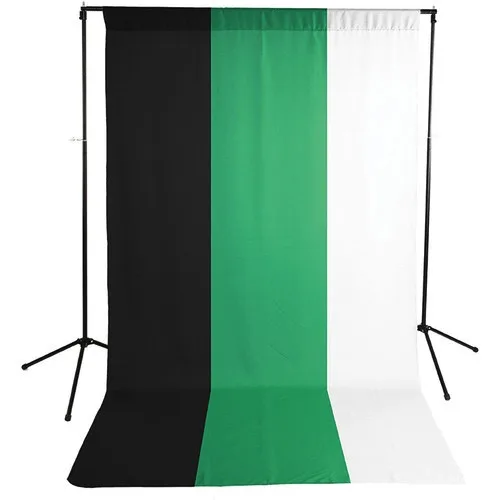
Savage Economy Background Kit 5x9’ (White, Black, and Chroma Green Backdrops)
-
Promaster 12' x 12' Heavy Duty Background Kit: The ProMaster Heavy Duty Background Kit includes air-cushioned stands and a 4-section crossbar that snaps together and can be configured to fit different widths. Air-cushioned stands provide extra stability and prevent sudden drops, while the modular crossbar offers flexibility for various backdrop sizes, making it ideal for both studio and location shoots.
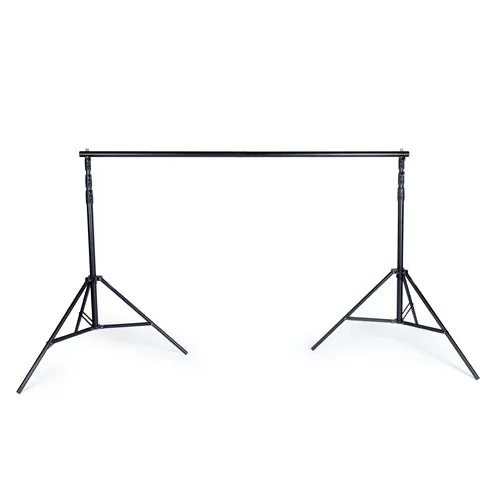
Promaster 12' x 12' Heavy Duty Background Kit


