Quick Answer
Set up the Godox UB-165S by attaching it to a studio light stand, sliding the light source along the shaft to focus the beam, and adjusting the umbrella angle for your desired soft-to-crisp light quality.
Why the UB-165S Differs from Standard Umbrellas
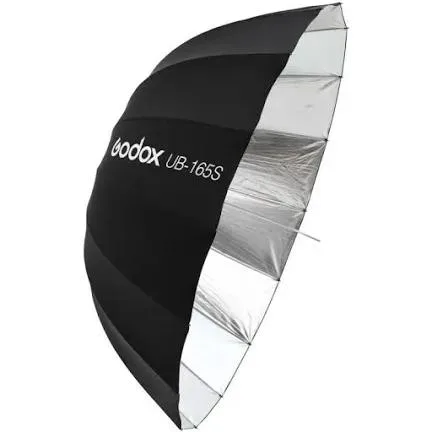
Unlike a typical shoot-through or reflective umbrella, the Godox UB-165S has a deep parabolic shape and a silver interior. This design produces a sharper falloff—light transitions from bright to dark more abruptly—giving you more control over the background and subject separation. It also allows you to "focus" the light by moving the flash head along the umbrella shaft, which is not possible with flat umbrellas.
Choosing the Right Light Source
The UB-165S works best with a bare-bulb studio strobe or a speedlite with a removable reflector. A standard speedlite with its built-in reflector will work, but you may not achieve the full focusing range. For maximum flexibility, use a strobe that lets you slide the umbrella mount along a rail or adjust the position of the light head relative to the umbrella shaft.
Step-by-Step Setup Guide
- 1. Attach the umbrella to a light stand: Insert the UB-165S shaft into a standard umbrella mount on your light stand or light head bracket. Tighten the locking screw to prevent the umbrella from rotating or slipping. Position the stand where you want the light to fall. Make sure the umbrella is securely locked—a loose umbrella can fall or shift during a shoot.
- 2. Mount your studio light on the umbrella shaft: Slide your flash head or strobe onto the umbrella shaft. If your light has a built-in umbrella mount, use it; otherwise, use a bracket that holds both the light and the umbrella. The light should be positioned near the deep end of the umbrella, not at the handle. Placing the light too close to the handle reduces focusing ability and may cause uneven illumination.
- 3. Focus the light by sliding the flash along the shaft: Move the light head forward (toward the umbrella rim) for a narrower, more focused beam with harder shadows. Move it backward (toward the handle) for a wider, softer spread. Test with a modeling light or test flash to see the effect on your subject. Sliding the light changes the beam angle—experiment until you get the desired contrast and falloff.
- 4. Adjust the umbrella angle and distance: Tilt the umbrella so the light bounces off the silver interior toward your subject. Start with the umbrella at 45 degrees to the subject and adjust from there. Move the whole stand closer for softer light or farther for harder light. The umbrella angle affects catchlights and shadows—small adjustments make a big difference.
- 5. Lock all adjustments and test your exposure: Tighten every knob and screw on the stand, umbrella mount, and light bracket. Take a test shot and review the highlights and shadows. Adjust power or position as needed. A loose connection can shift the light mid-session, ruining consistency across a series of shots.
Product Details
-
Godox UB-165S umbrella (New): The Godox UB-165S features a deep silver interior that creates a soft but crisp output with sharp falloff. This design gives you the ability to control light spread and create dramatic separation between subject and background, unlike a standard umbrella.
Godox UB-165S umbrella (New)