Why a USB-C to USB Female Adapter for Camera Tethering?
Modern computers increasingly use USB-C ports, while many cameras and older tethering cables still rely on USB-A connections. A USB-C to USB-A female adapter cable bridges that gap, letting you use your existing TetherPro USB cables with a USB-C laptop or desktop without needing a separate dongle or new cable set.
The TetherPro USB-C to USB Female Adapter (15' / 4.6m) is built specifically for this scenario. It gives you extra reach when combined with your current cables, and its high-visibility orange jacket helps avoid tripping hazards on set. Keep in mind this cable is designed for data transfer only—it is not intended for charging devices.
TetherPro USB-C to USB Female Adapter at a Glance
-
Tether Tools TetherPro USB-C to USB Female Adapter 15' (4.6m) Cable Orange: The TetherPro USB-C to USB-A Female Adapter allows you to utilize your existing USB cables with your new USB-C port on your computer. At 15’ / 4.6m, this cable gives photographers added reach when combined with their existing cables. This means you don't have to replace your entire tethering cable collection when switching to a USB-C computer—just add this adapter to keep your workflow consistent.
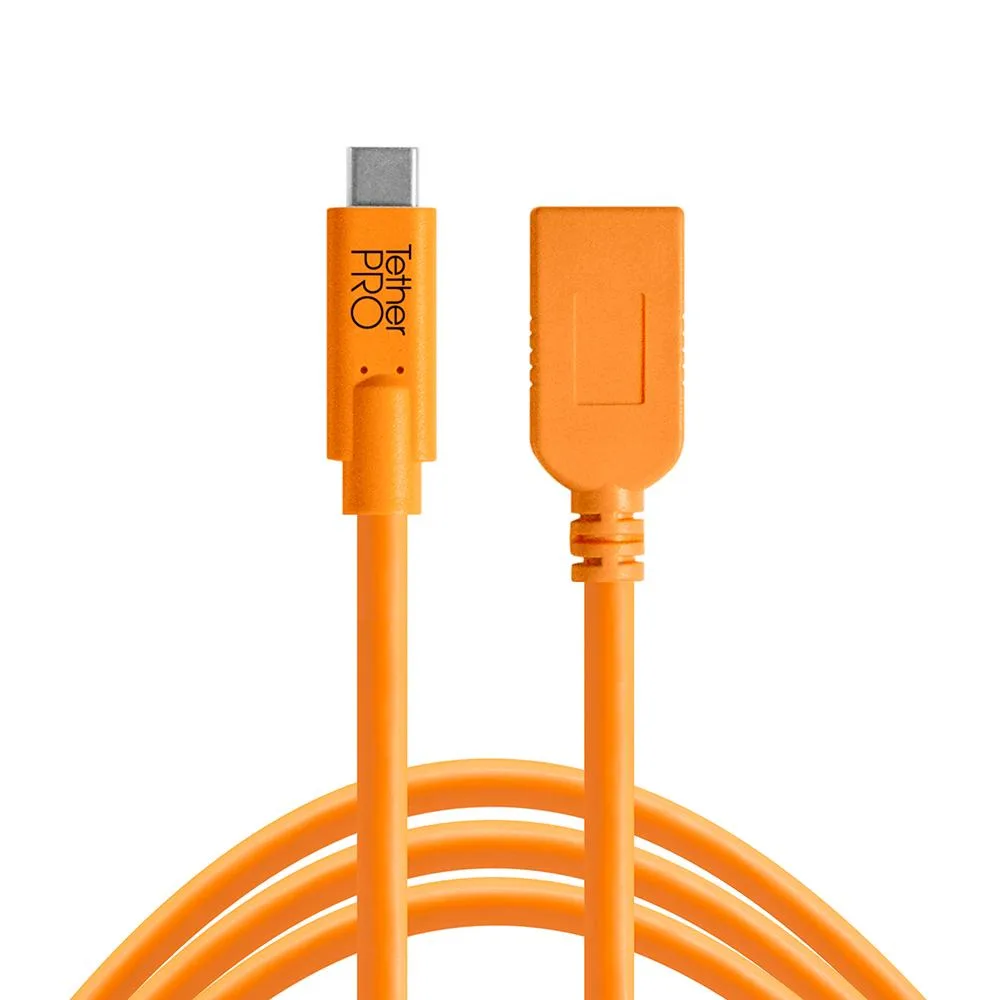
Tether Tools TetherPro USB-C to USB Female Adapter 15' (4.6m) Cable Orange
-
Tether Tools TetherPro USB-C to USB Female Adapter 15' (4.6m) Cable Orange: TetherPro USB cables are constructed to the highest USB specifications and incorporate all of the latest technology ensuring consistent and reliable conductivity, and the fastest and most reliable transfers. High-quality shielding reduces signal noise and transmission errors, which is critical when transferring large RAW files during a tethered shoot.
-
Tether Tools TetherPro USB-C to USB Female Adapter 15' (4.6m) Cable Orange: Available in high-visibility orange and non-reflective black. The orange option makes the cable easy to spot on a busy set, while the black variant blends into darker studio environments.
Setting Up Your Tether with the USB-C Adapter
The following steps assume you have a camera with a USB or USB-C output, a compatible tethering cable (such as a TetherPro USB cable), and a computer with a USB-C port. The adapter cable is used between your computer and your existing cable.
- Connect the adapter to your computer: Plug the USB-C end of the TetherPro USB-C to USB Female Adapter into your computer's USB-C port. The female USB-A port on the adapter is now ready to accept your existing tether cable.
- Attach your existing TetherPro USB cable: Insert the USB-A end of your current TetherPro cable into the adapter's female port. Ensure a firm connection to avoid data dropouts during a shoot.
- Connect the cable to your camera: Depending on your camera model, use the appropriate cable (e.g., Mini-USB, Micro-USB, or USB-C) to link the TetherPro cable to your camera. Confirm the connection is secure.
- Launch your tethering software: Open your preferred capture software (such as Capture One, Lightroom, or manufacturer's utility). The computer should recognize the camera. If not, check cable connections and camera settings (ensure USB tethering is enabled).
Compatibility and Important Notes
This adapter is designed for data transfer only, so do not use it for charging batteries or powering devices. Its 15-foot length gives you freedom to move around the studio, but remember that the total reach is the sum of this cable plus your existing tether cable.
The TetherPro USB-C to USB Female Adapter is built to the highest USB specifications with full shielding to minimize signal interference. However, not all cameras or software combinations are guaranteed to work—test your setup before a critical shoot. The supplied information does not specify supported operating systems or camera models, so verify compatibility with your gear.
If you need a longer run, consider combining multiple TetherPro cables; the adapter's female port accepts standard USB-A connections. For a cleaner look, the non-reflective black variant is available, though the high-visibility orange is easier to spot on set.