Quick Answer
If your Accuquilt GO! die cutter is jamming, cutting unevenly, or struggling to cut, the most common fixes are cleaning the cutting mat, adjusting the fabric stack, and checking the die for wear. For persistent problems, contact Accuquilt support or replace worn parts. Always start with the simplest solution before disassembling anything.
Even the most reliable tools can act up from time to time. The Accuquilt GO! die cutter is a workhorse in many quilting studios, but when it starts skipping cuts or jamming, it can bring your project to a halt. The good news: most issues have simple fixes you can handle at home without special tools or technical know-how.
This guide walks you through the most common Accuquilt GO! problems, from fabric jams to uneven cuts, and gives you clear steps to diagnose and resolve them. We'll also tell you when it's time to stop troubleshooting and call in professional help or order a replacement part.
Fabric Jams and Stuck Dies
A jammed die is often the first sign of trouble. If your fabric gets stuck under the die or the roller won't turn smoothly, turn off the machine and unplug it before investigating. Gently lift the die and remove any fabric that's caught. Check the cutting mat for debris or fabric fibers that might be blocking the path.
One common cause of jams is overloading the die with too many layers of fabric. The GO! system is designed to cut through a specific number of layers depending on the die and fabric type. If you've stacked more than recommended, the machine has to work harder, which can lead to jams. Reduce the stack to the suggested thickness and try again.
- Always unplug the cutter before clearing a jam.
- Keep the cutting mat clean and free of lint.
Uneven or Incomplete Cuts
If your shapes come out with ragged edges or some areas aren't cut through, the first thing to check is the cutting mat. Over time, the mat develops grooves that can affect cut quality. Rotate the mat to a fresh area or replace it if it's heavily worn. Also, make sure the mat is properly aligned with the die.
Another culprit is a dull or damaged die. Dies eventually lose their sharpness, especially if you cut through thick materials like denim or multiple layers of batting. Inspect the die's cutting edges for nicks or bends. If you see damage, it's time to replace the die. A clean cut is essential for accurate piecing, so don't try to push a worn die.
- Rotate your cutting mat regularly to extend its life.
- Test on scrap fabric after changing mats or dies.
Cutter Won't Roll Smoothly
If the roller feels stiff or skips, the issue may be with the machine's internal gears or rollers. First, check if the die is seated correctly. Remove the die and roll the cutter without it to see if the problem persists. If it rolls smoothly without a die, the issue is likely with the die alignment or the cutting mat.
If the roller is still stiff, inspect the machine for any visible debris or thread wrapped around the rollers. Clean the rollers with a soft cloth. Avoid using lubricants unless the manual specifically recommends them, as they can attract lint and cause more problems. If the roller remains stiff after cleaning, there may be an internal mechanical issue that requires professional service.
- Check the die is fully seated before rolling.
- Clean the rollers regularly with a dry cloth.
Die Not Cutting Through Fabric
When the die doesn't cut all the way through, it's often because the fabric stack is too thick or the die is not sharp enough. Start by reducing the number of fabric layers. For most dies, two to three layers of quilting cotton are ideal. If you're using thicker fabrics like flannel or fleece, you may need to cut fewer layers.
Also, ensure you're applying even pressure as you roll. If you roll too quickly or unevenly, some areas may not get enough pressure. Roll slowly and steadily, applying consistent downward pressure. If you've tried these adjustments and the die still doesn't cut through, the die may be dull and need replacement.
- Use a steady, even pressure when rolling.
- For thick fabrics, cut fewer layers at a time.
Diagnosis Guide: When to Fix vs. When to Replace
- Symptom: Fabric jams: Check for overloading the die with too many layers. Reduce the stack and clear any debris from the mat. If jams persist, inspect the die for damage and consider replacing it.
- Symptom: Uneven cuts: Rotate the cutting mat to a fresh area or replace it. Inspect the die for dull or damaged edges. If the mat is new and the die is sharp, but cuts are still uneven, contact Accuquilt support.
- Symptom: Roller not moving smoothly: Remove the die and roll without it to isolate the issue. Clean the rollers of any debris. If the roller still feels stiff, do not force it. Seek professional repair to avoid further damage.
Products to Keep Your Cutter Running
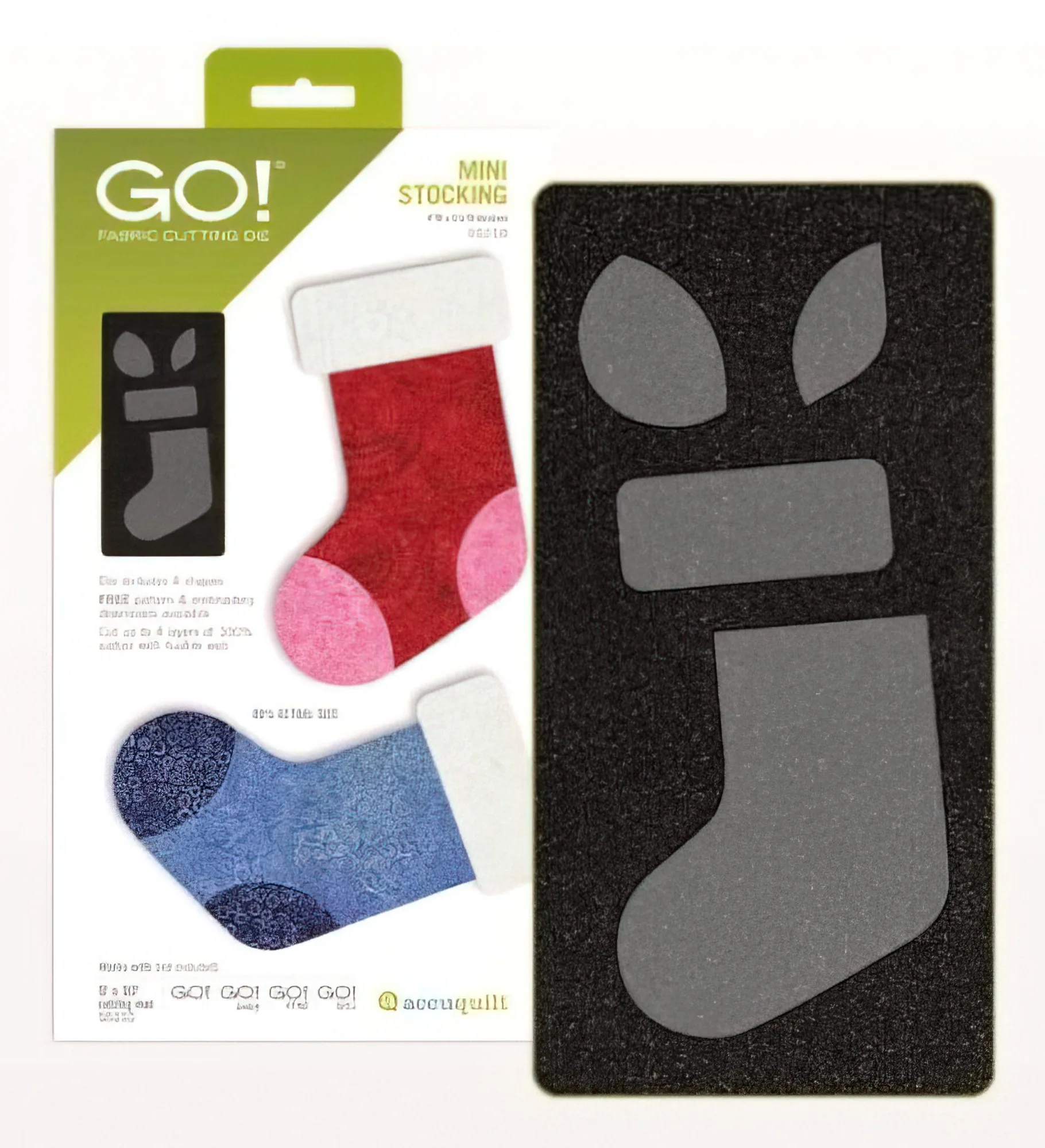
- Accuquilt 55218 GO! Mini Stocking Die: This die is perfect for making holiday projects all year long. Toe, heel, and cuff pieces are separate to let your creativity run wild. Having a variety of dies lets you switch projects without overworking a single die, and the separate pieces reduce the need for intricate trimming.
- Evergreen Pattern by Kiley's Quilt Room: The Evergreen pattern is a beginner friendly scrap busting pattern! The instructions are written so that you can choose to make either the background or the trees scrappy! Make it your own with all your favorite scraps! Using a pattern designed for scrap fabrics can help you avoid overloading your die with thick stacks, as you'll be cutting smaller pieces from a variety of fabrics.
Troubleshooting your Accuquilt GO! die cutter doesn't have to be intimidating. Start with the simplest checks—clean the mat, reduce fabric layers, and inspect the die. Most issues resolve with these steps. When problems persist, don't hesitate to contact Accuquilt customer service or invest in a replacement die or mat. Keeping your cutter in top shape ensures you can focus on the fun part: creating beautiful quilts.