Quick Answer
Upgrade your AA Mini Maglite with the Nite Ize LED Upgrade Combo II to get a brighter, more efficient 30-lumen beam and a convenient push-button tail cap switch.
Why Upgrade Instead of Buying New?
If you already own a AA Mini Maglite, upgrading it with the LED Upgrade Combo II is a cost-effective way to modernize your flashlight without replacing the entire body. You'll keep the durable aluminum housing you trust while gaining the benefits of LED technology.
The combo includes both a replacement LED bulb module and a push-button tail cap switch. This means you get two upgrades in one kit: a brighter, more efficient light source and a more convenient way to turn it on and off.
What to Expect from 30 Lumens
30 lumens may not sound like a lot compared to modern EDC lights, but it's a significant improvement over the original incandescent bulb. You'll get a whiter, more focused beam that's sufficient for everyday tasks like finding keys, reading a map, or navigating a dark hallway.
The LED also draws less power, so you'll get longer runtime from the same AA batteries. This makes the upgrade a practical choice for emergency kits or glovebox flashlights.
Step-by-Step Upgrade Process
- Gather Tools and Parts: You'll need the Nite Ize LED Upgrade Combo II kit, a small Phillips screwdriver, and your AA Mini Maglite. Make sure the flashlight is turned off and the batteries are removed before starting. Check that the kit is compatible with your Mini Maglite model (AA size).
- Remove the Old Bulb Module: Unscrew the flashlight head from the body. Gently pull out the old incandescent bulb module. If it's stuck, use a twisting motion while pulling. Avoid touching the glass of the new LED with your fingers. If the old bulb is broken, use pliers to remove remaining glass shards carefully.
- Install the LED Module: Insert the new LED module into the same slot where the old bulb was. Push it in firmly until it seats properly. Do not force it; if it doesn't fit, double-check the orientation. Ensure the LED module is fully seated to avoid flickering.
- Replace the Tail Cap: Unscrew the existing tail cap from the flashlight body. Remove the old rubber boot and switch assembly if present. Install the new push-button tail cap switch from the kit, ensuring the button protrudes correctly. Screw it back on securely. If the button feels stiff, check that the rubber boot is aligned properly.
- Reinsert Batteries and Test: Insert fresh AA batteries (check polarity) and screw the head back on. Press the new tail cap button to test the light. If it doesn't turn on, recheck battery orientation and module seating. If the light still doesn't work, try a different set of batteries to rule out battery issues.
Product Facts
-
LED Upgrade Combo II fits AA Mini Maglite - 30 Lumens: This kit replaces the incandescent bulb of a AA Mini Maglite with an efficient LED and swaps in a simple push-button tail cap switch. You get both a brighter, longer-lasting beam and an easier way to operate the flashlight, all in one upgrade.
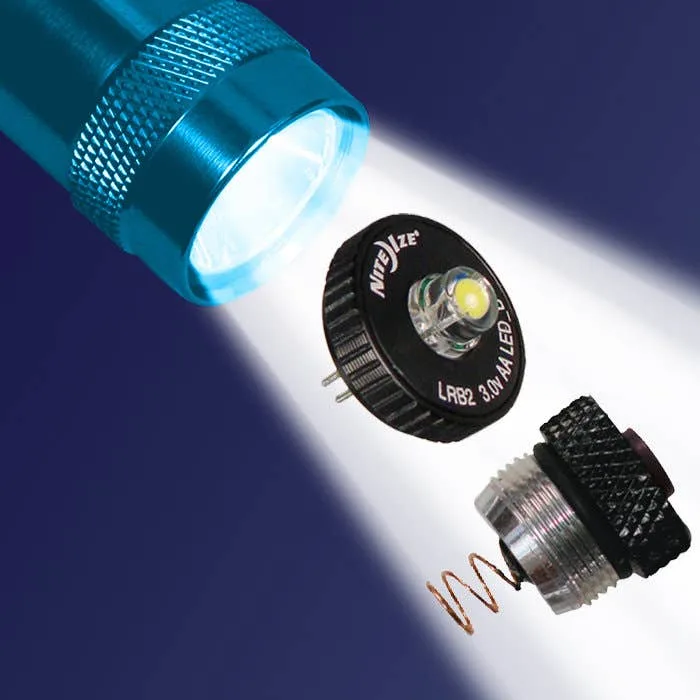
LED Upgrade Combo II fits AA Mini Maglite - 30 Lumens
Once your Mini Maglite is upgraded, you'll enjoy a brighter, more efficient light. For best performance, keep spare batteries on hand and store the flashlight in an accessible spot.