Quick answer
Use 1/8″ tool collars to preset the depth stop on router bits, saving time and ensuring repeatable cuts across multiple tool changes.
When to use tool collars
Tool collars are ideal when you frequently switch between router bits that need the same depth setting—like when running production batches or repeating a profile on several workpieces. They also help when you want to avoid re-measuring depth each time you change bits.
Choosing the right collar
Make sure the collar fits a 1/8″ shank. The 1/8″ Tool Collars – 12 pack includes six colors (two each), which helps you quickly identify which collar belongs to which bit or depth setting. They are also called stop collars and are preset on the tool so you do not have to re-set each tool every run.
How to install and use a 1/8″ tool collar
- 1. Insert the bit into the collet: Loosen the collet nut and slide the 1/8″ shank router bit in until the shank bottoms out. Tighten the collet nut by hand until snug, then use a wrench for the final quarter turn. Common mistake: overtightening can damage the shank or collet. Stop as soon as the bit is secure.
- 2. Set the desired depth: With the router bit installed in the router, lower the bit until the cutting edge extends the required depth below the router base. Lock the depth adjustment mechanism. Check depth with a depth gauge or a test cut in scrap material before committing to the workpiece.
- 3. Slide the collar onto the shank: While the collet is still loose enough to allow the collar to slide, push the 1/8″ tool collar down the shank until it contacts the collet nut or the router base plate (depending on your setup). The collar acts as a physical stop that prevents the bit from going deeper. If the collar does not sit flush against the collet nut, the depth stop will be inaccurate. Ensure it is fully seated.
- 4. Tighten the collet nut: Hold the collar in place with one hand and tighten the collet nut with the other. The collar is now locked in position on the shank. Common mistake: the collar can rotate or shift during tightening. Keep firm pressure on it until the nut is tight.
- 5. Mark the collar for future use: Use a permanent marker or the color of the collar (if using the 12-pack) to label which bit and depth setting it corresponds to. Store the collar on the bit or in a labeled bag. This step saves time on the next setup—you can grab the pre-set collar and bit combination and go straight to cutting.
Product facts
-
1/8″ Tool Collars – 12 pack: Also called a stop collar, used for 1/8 shank tools. Preset them on your tools so you do not have to re-set each tool every tool run. They come as a 12 pack, 2 each per color. Color-coding lets you quickly match collars to specific bits or jobs, and the pack covers multiple tools at a low cost.
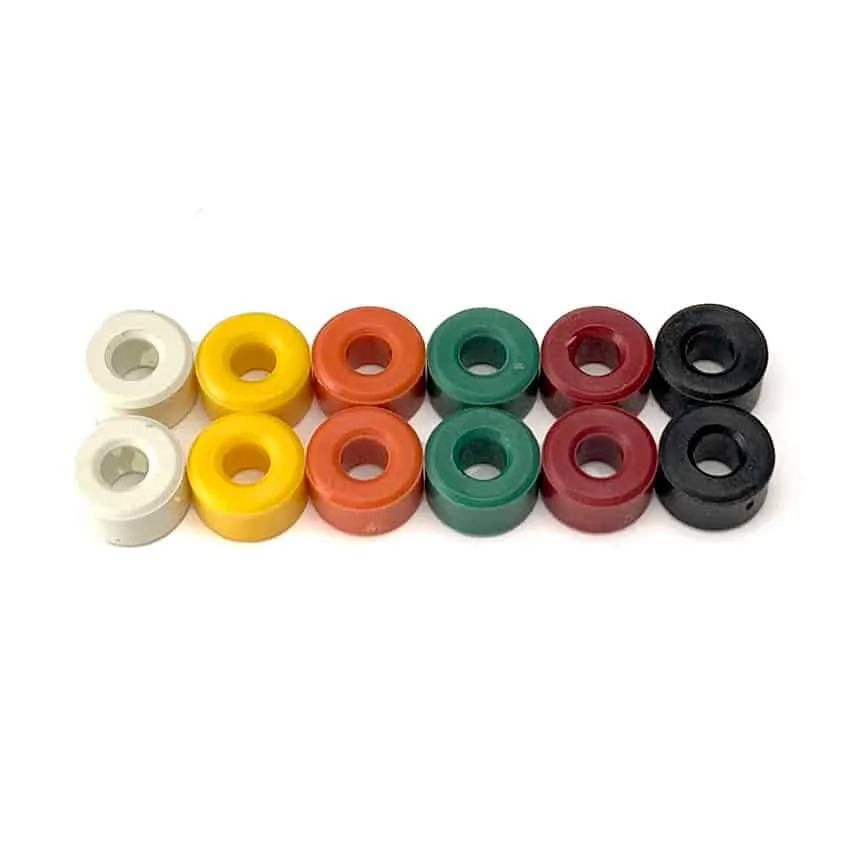
1/8″ Tool Collars – 12 pack