Quick answer
Connect the level shifter's low-voltage reference to 3.3V and its high-voltage reference to 5V, then route each signal through one channel. The module is bidirectional, so the same wiring works for 3.3V-to-5V and 5V-to-3.3V. Never connect a 5V signal directly to a 3.3V input without checking the device's tolerance.
What a 2-channel level shifter actually does
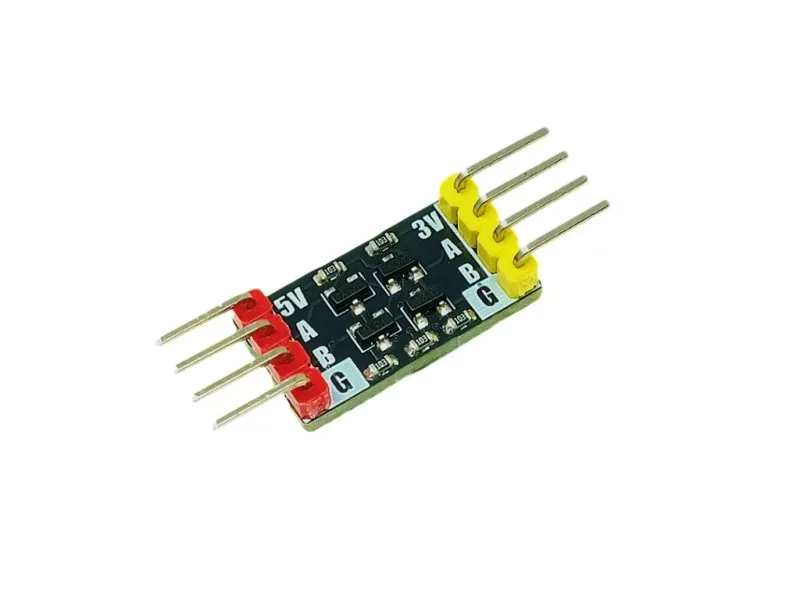
A level shifter translates digital logic levels between two voltage domains so a 5V microcontroller can talk to a 3.3V device, or the other way around, without exposing the lower-voltage part to a damaging 5V signal. The Hobby Components 2 Channel Level Shifter uses transistors with pullup resistors to provide bidirectional conversion on two independent channels. It is intended mainly for 3.3V and 5V logic, which covers most hobby projects involving an Arduino Uno and an ESP32 or ESP8266 board.
- Two channels means you can shift two separate signals, such as TX and RX, or SDA and SCL.
- Bidirectional operation means you do not need to configure a direction pin.
- The module is for digital logic signals, not analog voltages or high-current loads.
Before you wire anything: check voltage and current limits
Confirm the logic levels on both sides of your link. A classic Arduino Uno runs at 5V logic, while an ESP32 or ESP8266 runs at 3.3V. If both devices are already 3.3V, you do not need a shifter at all. If one side is 5V and the other is 3.3V, a level shifter is the safe choice.
The shifter handles signal-level translation only. It does not power your sensors or modules, and it does not replace a proper power supply. Keep the 3.3V and 5V rails separate and make sure both devices share a common ground, otherwise the shifted signals have no reference.
- Do not use a level shifter to drive motors, relays, or LED strips directly.
- Check whether your 3.3V device is 5V-tolerant before assuming you can skip the shifter.
- If you are unsure of a board's logic level, measure it or check its documentation rather than guessing.
Choosing a board and mounting the shifter
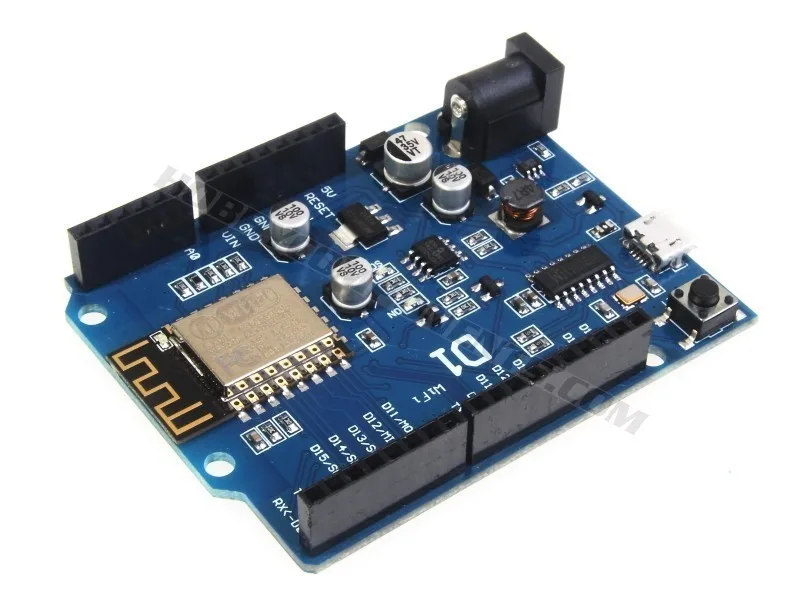
The ESP8266-D1 is a wireless development board compatible with the Arduino IDE and laid out with standard Arduino headers, which makes it a practical 3.3V counterpart to a 5V Uno. Pairing it with a level shifter lets you connect 5V peripherals without risking the ESP8266's 3.3V pins.
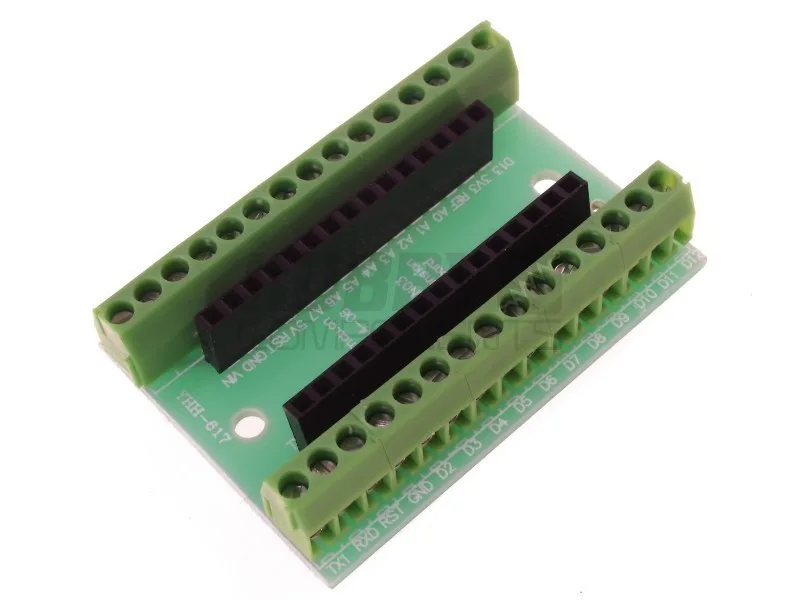
The shifter is a small module, so plan your wiring before soldering. If you are building a permanent setup, the Terminal Expansion Adapter for Arduino Nano gives you screw terminals for a Nano-based project, but note that it is designed for boards conforming to the Arduino Nano open source specification and requires soldering to assemble.
- Label your low-voltage (LV) and high-voltage (HV) sides before connecting anything.
- Keep signal wires short to reduce noise, especially at higher signal speeds.
- Use a breadboard for testing before committing to a soldered build.
Step-by-step: wiring and testing a 2-channel level shifter
- 1. Power down and identify both voltage rails: Turn off both devices. Locate the 3.3V and 5V supply pins on each board. On the shifter, the low-voltage (LV) pin goes to the 3.3V rail and the high-voltage (HV) pin goes to the 5V rail. Connect the ground pins of both boards and the shifter together. Checkpoint: with a multimeter, confirm 3.3V on LV and 5V on HV before connecting any signal wires. A swapped rail is the most common way to destroy a shifter or a sensor.
- 2. Connect the low-voltage side to the 3.3V device: Pick one channel. Connect the LV1 pin to the 3.3V device's signal pin. If you are linking an ESP8266-D1 to a 5V sensor, this is the ESP8266 side. Common mistake: assuming every pin on a 3.3V board is 5V-tolerant. Use the shifter on any pin you are unsure about.
- 3. Connect the high-voltage side to the 5V device: Connect the HV1 pin to the 5V device's signal pin. The shifter is bidirectional, so you do not need to decide which device is transmitting. Repeat for channel 2 if you need a second signal, such as TX and RX or SDA and SCL. Checkpoint: double-check that LV1 pairs with HV1 and LV2 pairs with HV2. Crossing channels is easy to do and produces confusing, intermittent results.
- 4. Power up and measure the shifted signal: Power both devices and measure the signal on the 5V side with a multimeter or logic analyzer while the 3.3V side is toggling. You should see the signal swing between roughly 0V and 5V. Common mistake: forgetting the common ground. Without it, the shifter has no reference and the output will float or behave erratically.
- 5. Test communication and watch for speed limits: Run a simple sketch that sends data across the link, such as a serial echo or an I2C scan. If the link works at low speed but fails at high speed, the transistor-based design may be the limiting factor for your bus speed. Checkpoint: if I2C fails, try lowering the clock speed or adding external pullups appropriate for your bus. If it still fails, the shifter may not suit that particular bus speed.
Products used in this guide
- Hobby Components 2 Channel Level Shifter: This module uses a set of transistors with pullup resistors to provide a 2 channel bi-directional voltage level conversion (level shifting) for digital logic signals. Intended mainly for the conversion of signals between 3.3V and 5V logic levels this module provides a way of safely interfacing a 5V microcontroller to a 3.3V device or conversely 3.3V microcontroller to a 5V device without risking damage to both. Bidirectional operation means you wire it the same way regardless of which side is transmitting, and two channels cover a basic TX/RX or I2C pair.
- ESP8266-D1 Arduino Compatible Development Board: The ESP8266-D1 is a wireless 802.11 (Wifi) microcontroller development board compatible with the Arduino IDE. It turns the very popular ESP8266 wireless (WiFi) module into a fully fledged development board. The layout of this board is based on a standard Arduino hardware design with similar proportions to the Arduino Uno and Leonardo. It also includes a set of standard Arduino headers. Its 3.3V logic and Arduino-style headers make it a natural low-voltage side for a level shifter when you want to add 5V sensors or peripherals.
- Terminal Expansion Adapter for Arduino Nano: This terminal expansion kit (HCARDU0101) is designed for any version of Nano that conforms to the Arduino open source specification. The kit comprises of a circuit board measuring approximately 54mm x 36mm, 2x 15 pin o.1" pitch sockets, and 10x 3 pin screw terminal blocks. Once constructed (soldering required) the completed kit will allow you to... If your project uses a Nano, this adapter gives you screw terminals for reliable connections to your level shifter and sensors, but it requires soldering and is specific to Nano-spec boards.