Quick Answer
A 60 degree ruler lets you cut equilateral triangles and diamonds for hexagon and star blocks without math. Align the ruler's marked lines with your fabric strip, cut, and rotate to create repeated shapes.
Why Use a Dedicated 60 Degree Ruler
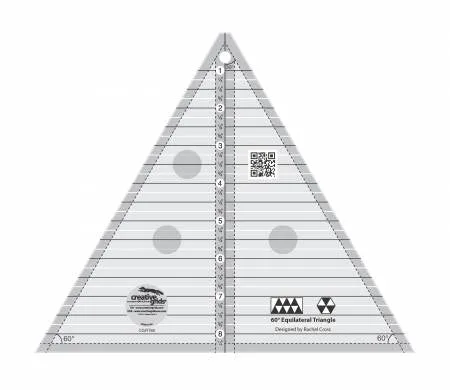
Standard square rulers can cut 60-degree angles, but they require extra measuring and rotating. A dedicated 60 degree ruler, like the Creative Grids 60 degree ruler, has pre-printed angle lines and a 1/4-inch dashed seam allowance line built in. This reduces errors and speeds up cutting for repeat blocks.
Choosing the Right Size Ruler
The Creative Grids 60 degree ruler 8-1/2" CGRT60 cuts triangles up to a finished height of 8 inches. If your block pattern calls for larger triangles, you will need a bigger ruler. For most quilt blocks like hexagons and 8-pointed stars, this size works well.
Step-by-Step Guide
- 1. Prepare Your Fabric Strip: Cut a strip of fabric the width you want your triangle height to be. For a 4-inch finished triangle, cut a 4-1/2 inch strip (includes 1/4 inch seam allowance on top and bottom). Press the strip flat. Common mistake: cutting the strip too narrow. Always add 1/2 inch to your desired finished height for seam allowances.
- 2. Align the Ruler on the Strip: Place the ruler on the fabric strip with the bottom edge of the ruler aligned with the bottom cut edge of the strip. The vertical center line should be parallel to the fabric's selvage. For the first cut, position the ruler so the left tip of the triangle aligns with the left edge of the strip. Checkpoint: Ensure the ruler's bottom edge is flush with the fabric edge to avoid angled first cuts.
- 3. Make the First Cut: Hold the ruler firmly and cut along the right angled edge of the ruler with a rotary cutter. This creates your first 60-degree triangle edge. Remove the cut piece. Common mistake: letting the ruler slip. Use a non-slip ruler like Creative Grids which has a gripper backing to stay in place.
- 4. Rotate the Ruler for the Next Triangle: Rotate the ruler 180 degrees so the left angled edge now faces right. Align the ruler's bottom edge with the bottom of the strip and the left tip of the ruler with the point of the fabric where you just cut. The angled edge should line up with the cut edge. Checkpoint: The ruler's tip must touch the fabric point exactly; otherwise triangles will be uneven.
- 5. Cut and Repeat: Cut along the right angled edge again. This produces a perfect equilateral triangle. Continue rotating and cutting across the strip to create as many triangles as needed. Common mistake: forgetting to rotate the ruler consistently. Mark the top of the ruler with a small sticker to remind yourself which direction faces up.
- 6. Cutting Diamonds for Star Blocks: To cut 60-degree diamonds, start with a strip and cut the first triangle as above. Instead of rotating the ruler, slide it along the strip so the left tip aligns with the previous cut point, but keep the ruler facing the same direction. Cut again. You will get a diamond shape. Checkpoint: Diamonds require the ruler to stay in the same orientation; rotating creates triangles instead.
Product Facts
-
Creative Grids 60 degree ruler 8-1/2" CGRT60: Cut 30 and 60 degree angles up to a finished height of 8in. Features easy to read black and white markings with a 1/4in dashed line printed on each side of the center vertical line for seam allowance. You can cut both 60-degree equilateral triangles and 30-degree triangles with seam allowance included, saving time and reducing waste.
Creative Grids 60 degree ruler 8-1/2" CGRT60