Quick answer
Attach the L bracket to your light stand, mount your speedlight on the flash shoe, then add a Bowens mount modifier such as a softbox or beauty dish for directional off-camera light.
Why use an L bracket instead of a regular flash mount?
A standard hot shoe mount holds your speedlight but offers no way to attach light modifiers. An L bracket solves this by providing a Bowens-compatible front plate, so you can use studio softboxes, strip boxes, beauty dishes, or snoots with a portable flash. It turns a small speedlight into a much more versatile off-camera light source.
What to watch for with flash power and modifier size
Speedlights have lower output than studio strobes. A large softbox will spread that limited power over a big area, reducing effective brightness. Stick with smaller modifiers (e.g., 24–36 inch softboxes or a beauty dish) for better light-to-shadow ratio. The L bracket itself adds about 4–6 inches of height; make sure your light stand is stable and counterweighted if needed.
Step-by-step setup guide
- Attach the L bracket to the light stand: Slide the metal bracket onto the top of your light stand and tighten the thumbscrew. The bracket should sit level and not wobble. Common mistake: Over-tightening can strip the screw; just snug it by hand. Double-check that the bracket is parallel to the ground before mounting anything else.
- Mount your speedlight on the flash shoe: Slide your Canon or Nikon speedlight into the shoe on the bracket arm until it clicks or locks. Tighten the locking knob if present. Common mistake: Forgetting to lock the flash can cause it to tilt or fall when you add a modifier. Test that the flash is secure by gently tugging it before proceeding.
- Attach the Bowens mount modifier: Align the modifier’s mount ring with the bracket’s front plate and twist clockwise to lock. Use both hands to support the modifier until it clicks. Common mistake: Trying to attach a heavy softbox without first locking the bracket arm can cause the whole assembly to tip over. If the modifier feels loose, remove it and check that the mount ring is fully seated before twisting.
- Position and trigger the flash: Tilt or rotate the bracket arm to aim the light where you need it, then tighten the arm lock. Use a wireless trigger or a sync cable to fire the speedlight. Common mistake: Leaving the flash in TTL mode when you want manual control; switch to manual mode for consistent output in off-camera setups. Take a test shot and adjust flash power (start at 1/4 power) before the real shoot.
Product facts
-
Photography Speed light Flash Mount L Bracket Adapter for Canon Nikon Speedlight: This L Flash bracket adapter allows you to mount your flash on top of a light stand and attach a Bowens Calument travelite light modifier such as softbox, beauty dish, strip box, or snoot to the T bracket for your portable flash (Nikon or Canon). It converts a standard speedlight into a modifier-ready studio light, so you can shape and soften the flash without buying a dedicated strobe.
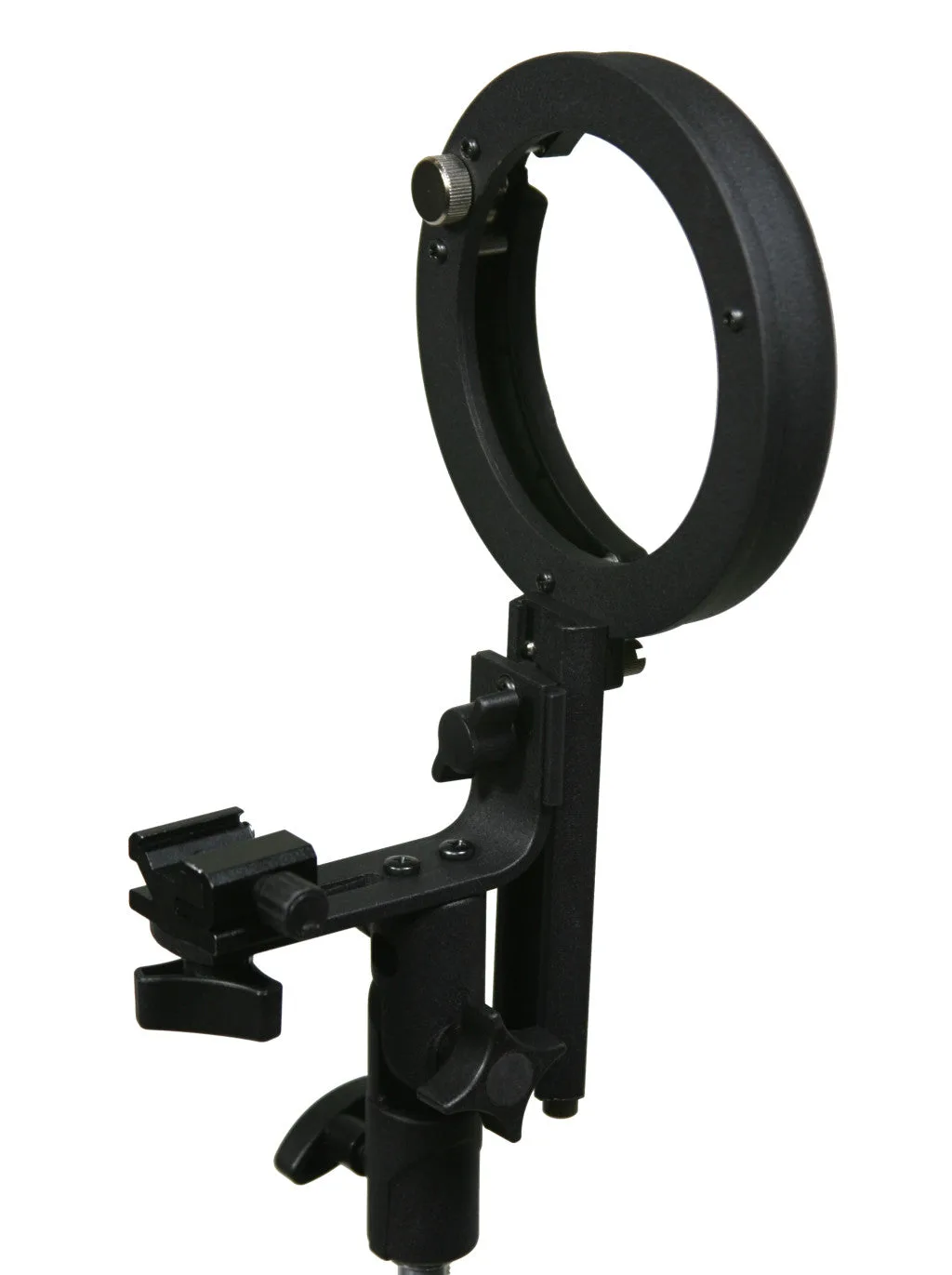
Photography Speed light Flash Mount L Bracket Adapter for Canon Nikon Speedlight