Quick Answer
To use a planisphere, set the date and time dial, hold it overhead facing the correct direction, and match the printed stars to what you see. This simple tool is the fastest way to learn the night sky and find deep-sky objects.
Why a Planisphere Beats a Phone App
A planisphere shows the entire visible sky at a glance, with no battery, screen glare, or wait for an app to load. It works perfectly under red light, preserving your night vision for better observing.
The main trade-off is that a planisphere only shows the sky for your latitude. If you travel far north or south, the view will be inaccurate. For most backyard observers, this is a non-issue.
Planisphere vs. Star Atlas: Which to Choose
A planisphere is ideal for getting oriented and finding bright constellations and Messier objects quickly. A star atlas provides more detail, with dozens of charts that zoom into small regions for serious deep-sky hunting.
Many beginners start with a planisphere to learn the sky, then add a star atlas like the Jumbo Pocket Sky Atlas when they want more magnification and finer detail. The two tools complement each other well.
Step-by-Step Planisphere Navigation
- Set the date and time: Rotate the outer dial so your current date aligns with the current time on the inner ring. Double-check that you're using the correct time (e.g., daylight saving vs. standard) for your location. If the sky doesn't match, the date-time alignment is the first thing to recheck.
- Orient the map to your direction: Hold the planisphere overhead with the printed direction labels matching your actual compass directions. For example, if you face south, the 'South' label should point away from you, toward the horizon. A common mistake is holding the map flat in front of you; it must be overhead to match the sky.
- Match bright stars and constellations: Look for a bright star or recognizable constellation on the map, then find it in the sky. Use it as an anchor to orient the rest of the chart. Start with one bright star (like Vega or Sirius) to build confidence before moving to fainter objects.
- Find a deep-sky object: Locate a galaxy, nebula, or cluster on the planisphere, then trace a path from your anchor star to it using the relative positions and shapes on the map. If you can't see it, check that the object is actually above the horizon for your date and time—the planisphere edge marks the horizon.
Tools That Help You Navigate
-
Messier Planisphere: The Messier Planisphere shows galaxies, nebulae, star clusters, and asterisms on its map. You can target Messier objects directly, which is perfect for planning a night of deep-sky observing.
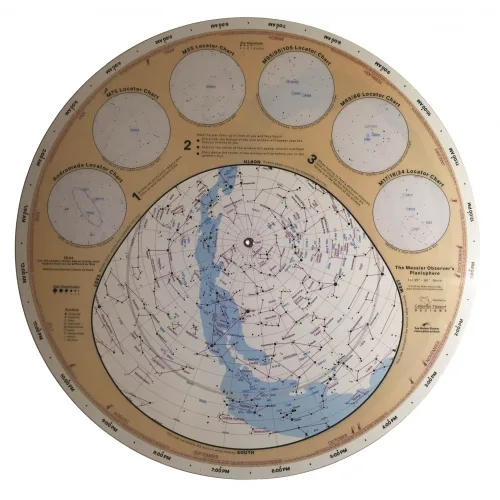
Messier Planisphere
-
Jumbo Pocket Sky Atlas: The Jumbo Pocket Sky Atlas enlarges all 80 charts by 25% and adds six more close-up regions. The larger charts and extra close-ups make it easier to find faint objects when you're ready to go beyond the naked-eye sky.

Jumbo Pocket Sky Atlas


