Quick answer
Use diamond files with a light, consistent stroke at a low angle to shave plastic or resin without gouging. Clean the file surface frequently to maintain cutting speed.
Why diamond files beat sandpaper for tight spots
Diamond files cut faster and last longer than abrasive paper on small details like panel lines, seam removal, or flash cleanup. Their rigid shape lets you reach corners that sandpaper wraps cannot access without rounding off edges.
The trade-off is feel: diamond files remove material aggressively if pressed too hard. You need a lighter touch than with a metal file. Practice on scrap sprue before touching a visible surface.
Choosing the right grit for your material
Coarse diamond files (around #200-#400) work well for removing large seam lines or shaping resin. Fine grits (#600-#1200) are better for smoothing putty or final surface prep on plastic. A single medium file can handle most detailing if you vary pressure.
For the ZM PRO-ZETSU Diamonds Yasuri, the nickel electrodeposition plating keeps the diamond layer sharp even on hard materials. That means you can use it on metal parts without worrying about rapid wear, but the same sharpness demands a steady hand on softer plastic.
How to file model parts with a diamond file
- 1. Secure the part and choose your angle: Clamp the part in a vise or hold it against a cutting mat. Tilt the file so its flat face contacts the material at roughly 10-15 degrees. A steeper angle digs in; a flatter angle skims. A shallow angle gives you control and avoids scratching adjacent detail.
- 2. Use short, light strokes in one direction: Push the file forward with light pressure—about the weight of the file itself. Lift it on the return stroke. Sawing back and forth clogs the diamond surface and can snap thin plastic parts. If you hear a grinding sound, you are pressing too hard. Back off until you feel a smooth scrape.
- 3. Clean the file every few strokes: Wipe the file face with a stiff brush or a piece of stiff cardboard. Embedded swarf (plastic or resin dust) reduces cutting speed. For sticky resin, use a drop of lighter fluid on a cloth. A dirty file skips and leaves uneven scratches. Clean it before it looks loaded.
- 4. Check progress often and switch to finer grit: Stop every 5-10 strokes to wipe the part and inspect the surface. Once you have removed the seam or shaped the detail, switch to a finer file or sandpaper to blend the scratch pattern. Do not try to polish with a coarse diamond file—it will leave deep scratches that are hard to remove.
Product in focus
-
ZM PRO-ZETSU Diamonds Yasuri: Nickel electrodeposition plating holds diamond grit for sustained sharpness. You get consistent cut on both plastic and metal without frequent replacement, making it a single-file solution for mixed-material builds.
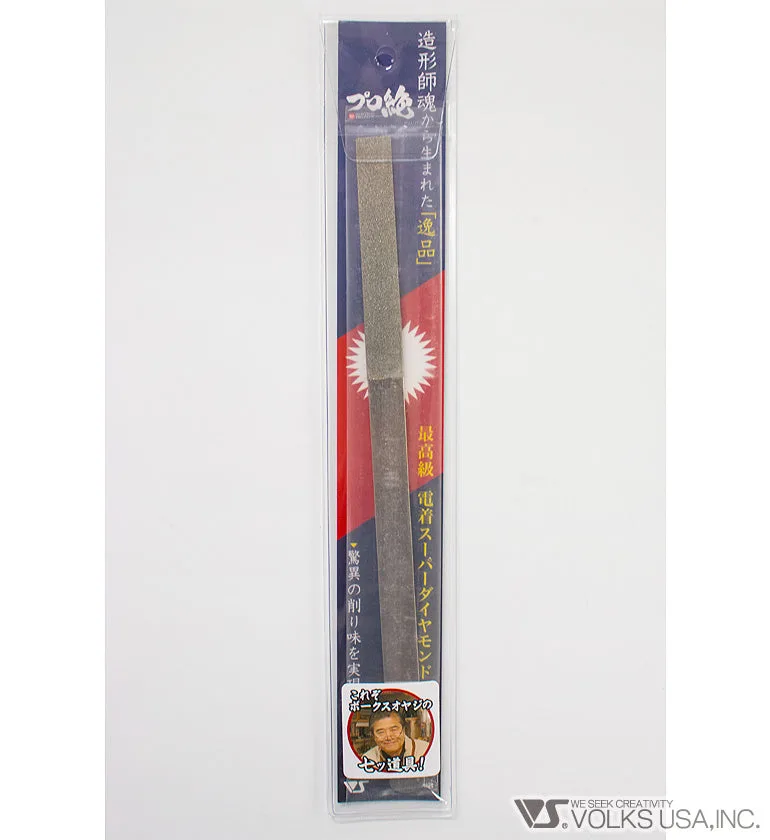
ZM PRO-ZETSU Diamonds Yasuri