Quick Answer
Start with soft, diffused natural light—shoot near a window or during golden hour. Use your iPhone's built-in exposure control and Portrait mode to shape light on your subject. For more control, add an external light or a lens accessory like the SANDMARC Drama Filter to create cinematic contrast.
Choosing the Best Natural Light for iPhone Portraits
The easiest way to improve your iPhone portraits is to find the right natural light. Soft, diffused light—like what you get near a north-facing window or under an overcast sky—flatters skin tones and reduces harsh shadows. Avoid direct midday sun unless you want dramatic contrast, which can be harder to manage.
Golden hour (the first and last hour of sunlight) gives you warm, directional light that wraps around your subject. Position your subject so the light hits their face at a 45-degree angle for a classic portrait look. If the light is too harsh, use a white sheet or a piece of paper as a diffuser.
Using Your iPhone's Built-in Exposure and Portrait Mode
Your iPhone's camera app has powerful tools to control light. Tap the screen to set focus, then swipe down to lower exposure if the scene is too bright. This preserves highlights and keeps skin detail. Portrait mode adds a depth-of-field effect, but it works best when your subject is 2-6 feet away with good lighting.
A common mistake is relying on Portrait mode in low light. The camera needs enough light to separate the subject from the background. If the room is dim, turn on a nearby lamp or move closer to a window. You can also use the flash as a fill light, but be aware it can create harsh, flat results.
Adding External Light and Lens Accessories
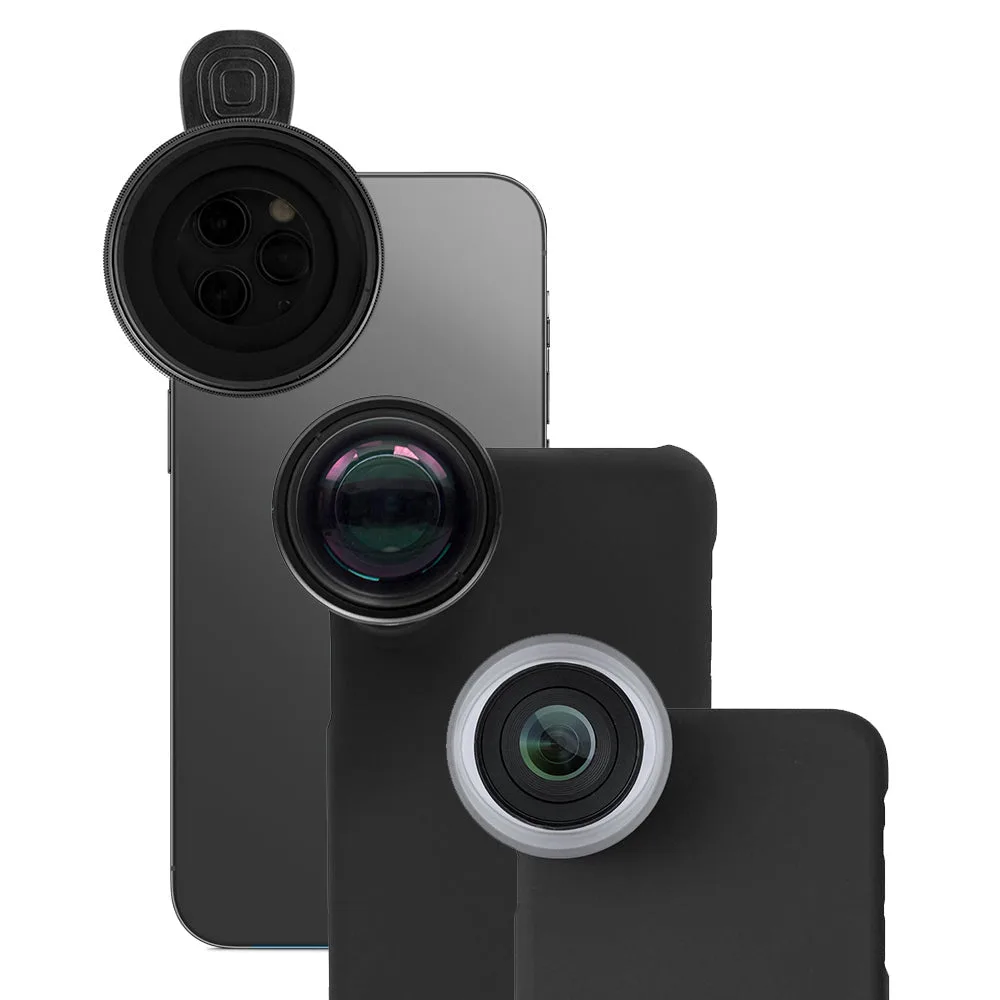
For consistent results, consider a small LED panel or ring light that attaches to your iPhone. These provide even, adjustable light that works indoors and at night. If you prefer a more dramatic look, the SANDMARC Drama Filter attaches to the Telephoto Lens and adds contrast and color grading directly in-camera, reducing the need for heavy editing.
The SANDMARC Photography Edition for iPhone 14 includes a Drama Filter, Macro, and Telephoto lens. The Telephoto lens lets you shoot portraits from farther away, giving you more natural facial proportions. The Drama Filter can be stacked on the Telephoto lens for a cinematic look without extra lighting gear.
Step-by-Step: Set Up iPhone Portrait Lighting
- Find or create soft light: Position your subject near a window or in open shade. If the light is harsh, hold a white diffuser (or even a sheet of paper) between the light source and your subject. Checkpoint: The light should wrap around the face without creating deep shadows under the eyes or nose.
- Adjust exposure and focus: Tap your subject's face on the screen to set focus. Then swipe down on the sun icon to lower exposure slightly—this preserves highlight detail and prevents blown-out skin. Common mistake: Overexposing the face. A slightly darker image retains more detail and can be brightened later.
- Use Portrait mode with the right distance: Stand 2-6 feet from your subject. Make sure there's enough light for the depth effect to work. If the background looks unnatural, try standard Photo mode instead. Checkpoint: If the depth effect looks fake, move closer or increase light on the subject.
- Add a lens or filter for more control: Attach the SANDMARC Telephoto Lens to shoot from farther away for natural proportions. Add the Drama Filter for a cinematic look without editing. Verdict: This combo gives you professional-looking portraits with minimal gear and no post-processing.
Gear That Helps with iPhone Portrait Lighting
- Photography Edition - iPhone 14: The Photography Edition for iPhone 14 includes a Drama Filter, Macro and Telephoto lens. Made from premium multi-coated optics, each lens delivers sharp and stunning images. Each lens comes with a dedicated case and clip mount for your iPhone. The Drama Filter is also directly attachable onto the Telephoto Lens, adding versatility to your photography. If each item is purchased separately, the total cost is $369.97. This kit gives you three tools in one: the Telephoto lens lets you shoot flattering portraits from a distance, and the Drama Filter adds cinematic contrast without extra lighting or editing. It's a practical all-in-one solution for portrait photographers.