Quick Answer
To use a metal knob on your NJ80 or NJ98, simply pull off the stock plastic knob and press the aluminum replacement firmly onto the encoder shaft. No tools are required, but you should check the fit to avoid wobble or damage.
Why Upgrade to a Metal Knob?
The stock plastic knob on many Keydous boards works fine, but a metal knob adds a heavier, more solid feel when you adjust volume or other functions. The aluminum alloy construction in the Metal Knob for NJ80/NJ98 gives a premium touch that can also improve grip, especially if your fingers tend to slip on smooth plastic.
Compatibility and Finish Options
Before you start, confirm your keyboard model. This knob is designed specifically for the Keydous NJ80 and NJ98, so it won't fit other boards with different shaft sizes. The knob comes in White, Black, Silver, Gold, Pink, Navy Blue, and Red, letting you match your keycaps or desk setup. Choose a finish that complements your board's color scheme for a cohesive look.
Step-by-Step Installation and Use
- Remove the Existing Knob: Grip the current plastic knob firmly and pull straight up with even pressure. If it's tight, gently rock it side to side while pulling. Avoid using tools like pliers, which can scratch the shaft or the surrounding case. Check that the encoder shaft is clean and free of debris before fitting the new knob.
- Align and Press the Metal Knob: Line up the metal knob's set screw (if present) with the flat side of the shaft, then press it down firmly until it sits flush. For a press-fit knob, apply even pressure from the top. Make sure it's fully seated to prevent wobble. If the knob feels loose after pressing, it may not be fully seated—push down a bit more or check alignment.
- Test and Adjust: Rotate the knob to ensure it turns smoothly and activates the function (volume, etc.). If it rubs against the case or feels tight, lift it slightly and re-seat it. If it's too loose, consider a tiny piece of tape on the shaft as a temporary shim, but avoid permanent adhesives. A properly fitted knob should rotate without friction and stay in place during normal use.
Product Facts
-
Metal Knob for NJ80/NJ98: This metal knob is crafted from aluminum alloy and is compatible with Keydous NJ80 and NJ98 keyboards. The aluminum build provides a sturdier, more premium feel compared to the stock plastic knob, and the compatibility ensures a direct fit without modifications.
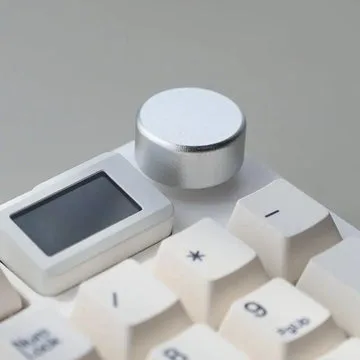
Metal Knob for NJ80/NJ98