Quick Answer
Set the Sekonic Flashmate L-308X to incident flash mode, place it at the subject position with the dome facing the light, and fire the studio flash to read the aperture. Use this reading to set your camera for consistent exposures.
Why Incident Metering Matters for Studio Flash
Studio flash is unpredictable because its output varies with distance, power settings, and modifiers. The Sekonic L-308X measures light falling on the subject (incident) rather than light reflecting off it, giving you a direct aperture reading that ignores subject brightness. This is essential for consistent results when using multiple lights or changing setups.
Step-by-Step: Metering Studio Flash with the L-308X
- Set the Meter to Flash Mode: Press the MODE button until the display shows a lightning bolt icon (flash mode). The meter is now ready to measure flash output, not ambient light. Common mistake: Leaving the meter in ambient mode will give you a reading of the modelling lamp, not the flash.
- Select ISO and Shutter Speed: Press the ISO button to set your film or camera ISO (e.g., 100 or 200). Use the up/down arrows to set the shutter speed to your camera's sync speed (usually 1/125 or 1/200 sec). This ensures the reading matches your camera's flash sync. Checkpoint: The L-308X only measures flash up to 1/500 sec, so ensure your shutter speed is within that range.
- Position the Meter at the Subject: Hold the meter with the white domed diffuser (lumisphere) facing the light source. Stand at the subject's position, pointing the dome toward the main light. This measures the light falling on the subject, not the light bouncing off it. Common mistake: Pointing the dome at the camera instead of the light source gives a reflected reading, which varies with subject brightness.
- Fire the Studio Flash: Press the measurement button on the side of the meter while triggering the flash (using a sync cable, radio trigger, or test button). The meter will display the aperture (f-stop) reading. For multiple lights, fire them one at a time to check each ratio. Checkpoint: If the display shows 'LO' or 'HI', the flash is too weak or too strong. Adjust the flash power or ISO setting.
- Adjust Flash Power and Re-Meter: Change the flash power until the aperture reading matches your desired f-stop (e.g., f/8 for a standard portrait). Fire the meter again to confirm. For multiple lights, meter each separately and adjust ratios. Common mistake: Not re-metering after moving a light or changing a modifier, as even small changes affect output.
Product Facts
-
Sekonic Flashmate L-308X Light Meter: The Sekonic Flashmate L-308X measures both ambient light and flash light in direct and reflective modes, with a flash measurement range of F1.4 to F90.9 at ISO 100. It covers the full output range of most studio strobes, so you can meter any lighting setup without switching equipment.
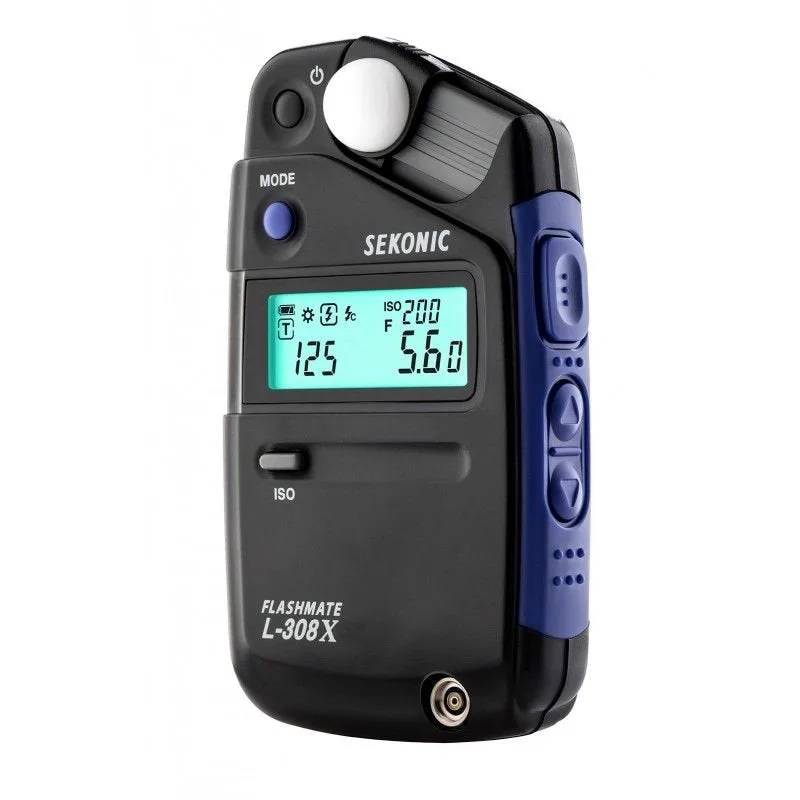
Sekonic Flashmate L-308X Light Meter