Quick Answer
Use the Tamashii Effect Wind (White Ver.) to add a swirling gust around your figure, creating a dynamic flying or leaping pose. Attach the parts to a Tamashii STAGE for a floating effect.
Why Use Effect Parts in Your Display
Effect parts like the Tamashii Effect Wind (White Ver.) transform a static figure into a scene with motion. Instead of a simple standing pose, you can suggest speed, power, or a dramatic moment.
The white color works well with many characters, especially those with light or neutral color schemes, and it stands out against darker backgrounds. It's a versatile accessory for both S.H.Figuarts and other 6-inch scale figures.
Trade-Off: Effect Parts vs. Dioramas
While dioramas provide a full environment, effect parts are more flexible and take up less shelf space. You can easily switch effects between figures or rearrange them for a new look. However, effect parts don't hide the stand as effectively as a diorama might.
If you want a minimalistic setup, the wind effect alone can create a strong visual. If you prefer a richer scene, combine it with a simple backdrop or other effect parts.
Step-by-Step Setup Guide
- Choose Your Figure and Pose: Select an action figure that suits a wind or motion theme—like a character leaping, flying, or charging. Pose the figure in a dynamic stance that suggests movement, such as a running or jumping pose. Avoid static poses; the effect works best when the figure's body language matches the wind.
- Attach the Wind Effect Parts: Start with the largest wind part and position it around the figure, then add smaller parts to fill gaps and create a swirling look. The parts can be combined in various ways, so experiment with different arrangements. Check that the parts don't obstruct the figure's face or key details; adjust for visibility.
- Use a Tamashii STAGE for Floating Poses: If you want the figure to appear to float, attach the effect parts to a Tamashii STAGE (sold separately) using the holes in each part. This will hold the effect and figure in mid-air, enhancing the illusion of being lifted by the wind. Ensure the STAGE is stable and the figure is securely attached to avoid falls.
- Adjust Lighting and Background: Place your display under a light source that highlights the white wind effect. A dark or contrasting background can make the white parts pop and emphasize the motion. Test different angles; sometimes a slight tilt of the effect parts adds more drama.
Product Spotlight
-
Tamashii Effect Wind (White Ver.): The Tamashii Effect Wind (White Ver.) includes various large and small parts that can be combined to enhance scenes. This means you can customize the size and intensity of the wind effect to match your figure's pose and the story you want to tell.
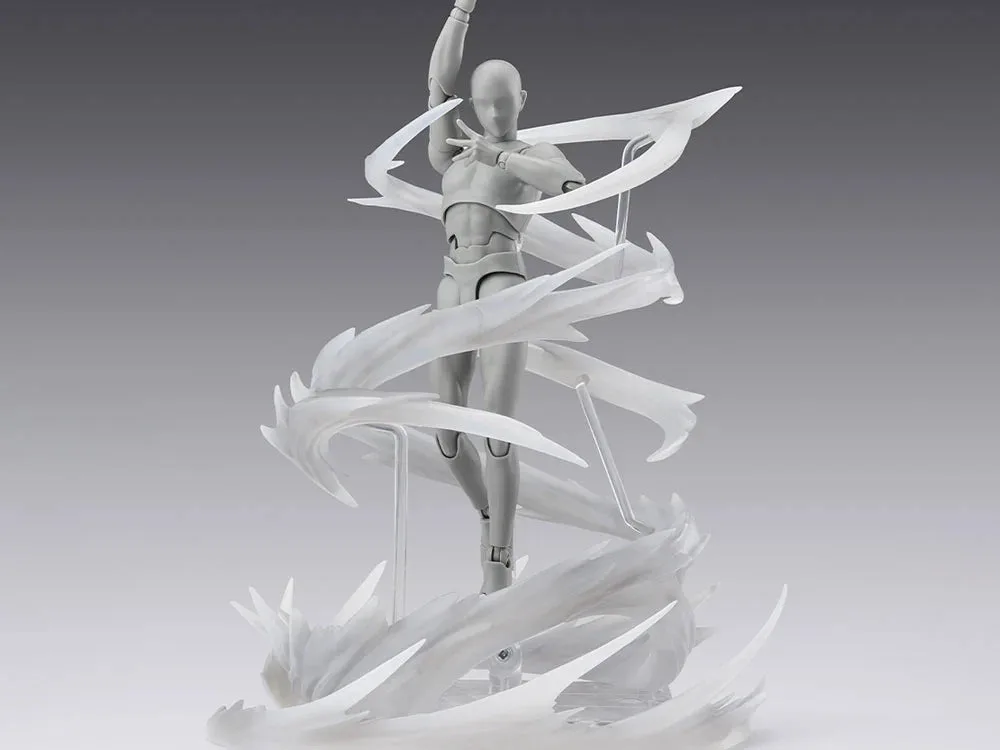
Tamashii Effect Wind (White Ver.)
-
Tamashii Effect Wind (White Ver.): Each part has a hole that allows it to be displayed in a floating pose using a Tamashii STAGE (sold separately). You can create a dynamic floating effect for your figure, making it look like it's being lifted by the wind.