Quick Answer
Set up your Iwata cleaning mat on a flat, stable surface and attach the moisture filter directly to your airbrush inlet for clean, dry air. This simple combo keeps your parts organized and prevents moisture from ruining your finish.
Why Use a Cleaning Mat and Moisture Filter Together?
A dedicated cleaning mat protects your work surface and keeps small airbrush parts from rolling away. The Iwata Raised Ridge Cleaning Mat has raised edges that trap tiny components like nozzles and needles, so you don't lose them mid-disassembly. Meanwhile, the moisture filter acts as a final defense against water and oil in your air line, which can cause sputtering or fisheyes in your paint. Using both together means fewer interruptions and better paint jobs.
Where to Place Each Item in Your Workspace
Place the cleaning mat in front of your airbrush station, within easy reach of your spray booth or compressor. The non-skid backing keeps it from sliding around when you're handling wet parts. Attach the moisture filter directly to the airbrush's air inlet—not to the hose—so it catches contaminants right before they enter the brush. This placement gives you the most protection and makes it easy to drain the filter without disconnecting the hose.
Step-by-Step Setup Guide
- Prepare the Cleaning Mat: Unroll the Iwata cleaning mat on a flat, stable surface near your airbrush station. Ensure the non-skid backing is facing down so it doesn't shift during use. The raised ridge should be facing up to catch rolling parts. Common mistake: Placing the mat on an uneven surface or under clutter. Keep the mat clear so you have room to work.
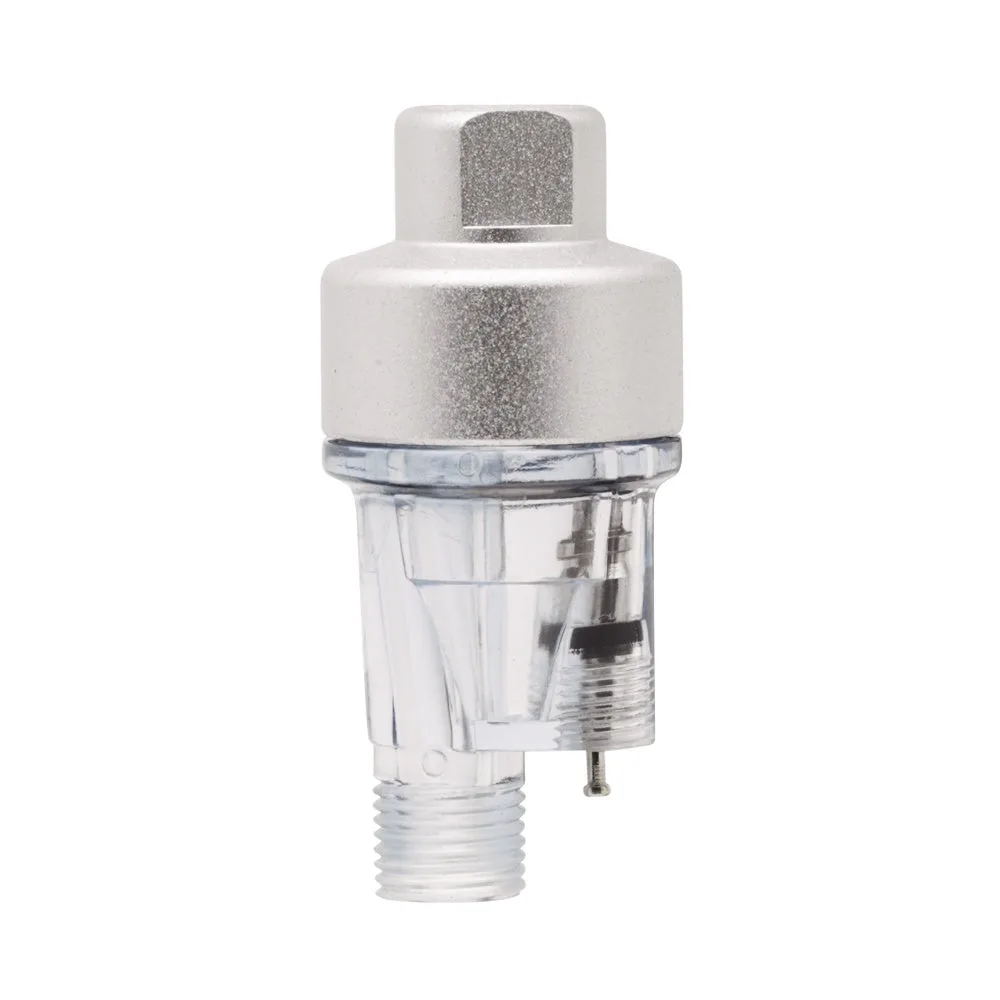
- Attach the Moisture Filter to the Airbrush: Screw the Iwata Pistol-Grip Moisture Filter directly onto the airbrush's air inlet (the brass fitting at the bottom of the handle). Hand-tighten only—over-tightening can damage the threads. Then connect your air hose to the filter's other end. Checkpoint: Make sure the filter's clear bowl is facing outward so you can see moisture buildup. If the bowl is hidden, you'll forget to drain it.
- Test the Airflow and Drain the Filter: Turn on your compressor and press the airbrush trigger. Listen for a steady, even airflow. If you hear sputtering, stop and press the spring-loaded release valve on the filter to drain any trapped moisture. Repeat until the air is dry. Common mistake: Forgetting to drain the filter before each session. Moisture builds up even in dry climates, so make it a habit to check the bowl.
- Use the Mat for Disassembly and Cleaning: Place your airbrush on the mat and use the cutaway diagram to identify parts as you disassemble. The raised ridges will keep needles, nozzles, and springs from rolling off. Clean each part with solvent on the fabric surface, then reassemble on the mat. Checkpoint: After cleaning, inspect the mat for any leftover solvent or debris. Wipe it clean with a dry cloth to keep it ready for next time.
Products Used in This Guide
-
Iwata Raised Ridge Airbrush Cleaning Mat CL200: The Iwata Raised Ridge Airbrush Cleaning Mat has raised ridges that prevent small parts from rolling away and a soft fabric surface that handles most solvent-based cleaners. You can safely disassemble and clean your airbrush without losing tiny parts or damaging your work surface.

Iwata Raised Ridge Airbrush Cleaning Mat CL200
-
Iwata Pistol-Grip Mousture Filter FA450: The Iwata Pistol-Grip Moisture Filter attaches directly to the airbrush and uses a 5-micron filter element to deliver clean, dry air. It has a clear bowl for visual inspection and a spring-loaded release valve for draining. Installing this filter prevents moisture from reaching your paint, reducing sputtering and improving finish quality.
Iwata Pistol-Grip Mousture Filter FA450