Why Choose the Keychron V3 in ISO Layout?
If you're used to European keyboard layouts—Swiss, German, French—the ISO layout is more than a preference; it's a necessity for comfortable daily typing. The Keychron V3 brings a fully assembled, hot-swap mechanical keyboard with an ISO option, making it a practical choice for users who want to customize without starting from scratch.
The V3 uses an ABS plastic housing, a steel plate, and OSA profile keycaps that include both Mac and Windows keycaps. You can choose between fully assembled versions with ABS (backlight shine-through) or PBT (non-shine-through) keycaps, and pick your preferred Keychron K Pro switch—Red or Brown—depending on the layout.
Keychron V3 ISO Variants at a Glance
-
Keychron V3 QMK Custom Mechanical Keyboard ISO Layout Collection: The Keychron V3 is available in Swiss-ISO, DE-ISO, and FR-ISO layout versions. These cover the most common European keyboard standards, so you can pick the one that matches your regional keycap legends and physical key arrangement.
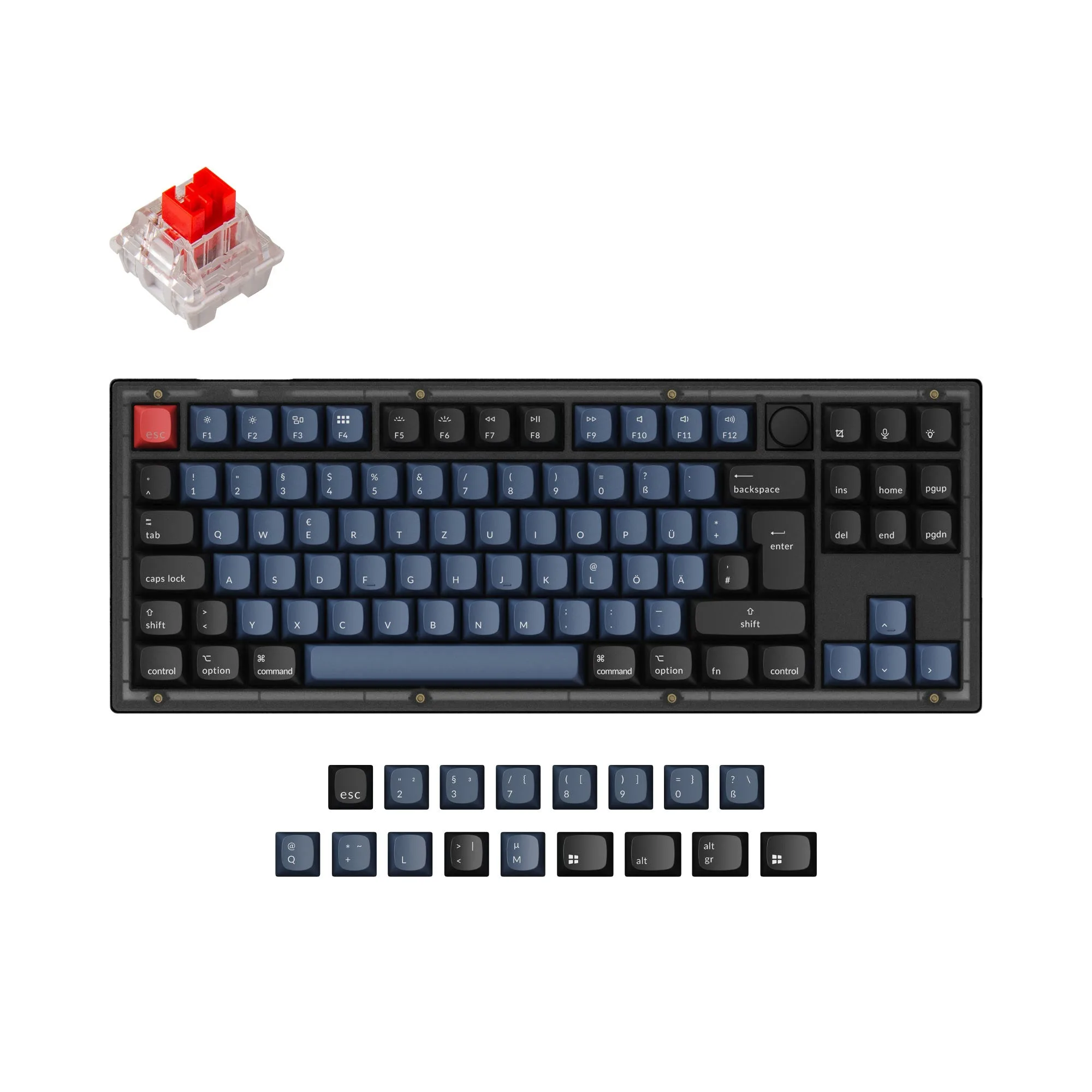
Keychron V3 QMK Custom Mechanical Keyboard ISO Layout Collection
-
Keychron V3 QMK Custom Mechanical Keyboard ISO Layout Collection: Fully Assembled Knob versions come with either ABS shine-through keycaps or PBT non-shine-through keycaps. ABS keycaps let RGB backlighting show through, while PBT keycaps are more resistant to shine over time. Your choice depends on whether lighting or durability matters more to you.
-
Keychron V3 QMK Custom Mechanical Keyboard ISO Layout Collection: The V3 uses Keychron K Pro switches (Red or Brown) and supports hot-swap. You can swap switches without soldering, making it easy to try different feels later. The included K Pro switches are a solid starting point for linear or tactile typing.
What You Get in the Box
The fully assembled Keychron V3 ISO includes: an ABS plastic housing, the keyboard PCB with screw-in stabilizers, a steel plate, OSA profile keycaps (with separate Mac and Windows keycaps), and Keychron K Pro switches. A rotary knob is also included on the versions labeled "Knob."
One thing to note: no discount codes can be used for the V3, so the listed price is the final one. The catalog shows a price of USD 71.24 (compared to USD 94.99), but always check the current store for availability—some models may show "Notify Me When Available" if out of stock.
Setting Up Your Keychron V3 ISO Keyboard
The V3 is fully assembled, so you can start typing right away. But to get the most out of it, follow these steps for configuration and customization.
- Connect and test the keyboard: Plug the USB-C cable into your computer. The keyboard should work immediately with your OS. Check that all ISO keys register correctly—especially the extra key to the left of Enter and the shorter left Shift.
- Install QMK or VIA for programming: The V3 supports QMK and VIA, meaning you can remap any key, create macros, or adjust lighting. Download VIA (the easiest option) from its official site, then open the app—it should detect your V3 automatically.
- Customize your keymap: In VIA, you can reassign keys, set up layers, and create shortcuts. For example, you might map the rotary knob to volume control or zoom. Changes are saved to the keyboard's onboard memory, so they persist even when you switch computers.
- Swap switches (optional): If you want a different feel, the hot-swap sockets let you pull out the K Pro switches with a switch puller and insert any compatible 3- or 5-pin mechanical switch. No soldering required.
- Swap keycaps (optional): The OSA profile keycaps are standard MX-compatible. You can replace them with any aftermarket set. If you chose the ABS version and prefer a more textured feel, consider picking up a PBT set later.
ABS vs PBT Keycaps: Which Should You Choose?
The V3 ISO is offered in two keycap materials: ABS (shine-through) and PBT (non-shine-through). ABS keycaps allow RGB backlighting to shine through the legends, which is great for low-light typing. However, ABS can develop a shiny appearance over time with heavy use. PBT keycaps are more textured and resistant to shine, but they block backlighting—so if you want to see the RGB through the legends, go with ABS.
Both versions come with OSA profile keycaps, which are a sculpted spherical shape that many typists find comfortable. The choice really comes down to whether backlight visibility or long-term keycap feel is your priority.
Trade-offs to Keep in Mind
The V3 uses an ABS plastic housing, which is lighter and more affordable than aluminum but may not feel as premium. The steel plate adds weight and rigidity, which some users prefer for a solid typing feel. If you want a fully metal case, you might look at the Keychron Q series, though that comes at a higher price.
Also, the V3 is a wired-only keyboard—no Bluetooth or wireless option. If you need a wireless setup, consider the Keychron K or V Max series. The V3's strength is its straightforward wired connection with zero latency and full QMK/VIA support.