Quick answer
For a brighter ride on your Sprite Neochrome, swap in a genuine 120mm LED wheel from Micro Kickboard—it's a direct replacement that keeps your scooter rolling smoothly and adds visibility.
Why upgrade to an LED wheel?
An LED wheel isn't just about looks—it makes you more visible to drivers and pedestrians, especially during dusk or cloudy days. The Micro Kickboard 120mm LED wheel for the Sprite Neochrome is designed as a direct replacement, so you don't need to modify the scooter or buy extra adapters.
Because it's the same 120mm size as the original wheel, your scooter's ride height and handling stay unchanged. That means you get the glow without sacrificing stability or comfort.
Compatibility check: not all Sprite models match
Before you order, confirm that your scooter is a Sprite Neochrome model. The 120mm LED wheel is specifically listed as a replacement part for that line. Other Micro Sprite models may use different wheel sizes or axle designs, so a wheel that fits one model might not fit another.
If you're unsure whether your scooter is a Neochrome, check the model name printed on the deck or the original packaging. When in doubt, contact Micro Kickboard support with your scooter's model number—they can confirm compatibility before you buy.
How to upgrade to a 120mm LED wheel
- Confirm your scooter model: Check that your scooter is a Sprite Neochrome. Look for the model name on the deck or the original box. If you're not sure, contact Micro Kickboard support with your scooter's serial number. Mistake: ordering a wheel without verifying compatibility can result in a part that doesn't fit.
- Gather the right tools: You'll need a 5mm Allen key (or the size that fits your scooter's axle bolts) and a clean, flat work surface. Some models may require a wrench to hold the axle in place while loosening the bolt. Checkpoint: Have a towel or rag handy to wipe off dirt from the axle before you start.
- Remove the old wheel: Loosen the axle bolt on the side of the wheel you're replacing. Slide the wheel off the axle, keeping any washers or spacers in the order they came off. If the wheel is stuck, gently tap the axle with a rubber mallet—don't force it. Mistake: losing washers or spacers can cause wheel wobble or poor alignment.
- Install the new LED wheel: Slide the new 120mm LED wheel onto the axle, making sure the LED side faces outward. Replace any washers or spacers in the original order, then tighten the axle bolt firmly but not over-tightened—you don't want to crush the bearings. Checkpoint: Spin the wheel by hand to ensure it rotates freely and doesn't rub against the frame.
- Test the LED function: After installation, spin the wheel to see if the LEDs light up. If they don't, check that the wheel is properly seated and the axle isn't pinching the internal generator. If the LED still doesn't work, the wheel may be defective—contact Micro Kickboard for a replacement. Mistake: assuming the LED is broken when it's actually a loose axle or misaligned wheel.
- Maintain your LED wheel: Keep the wheel clean and dry. Avoid riding through deep puddles or mud, which can damage the LED components. Periodically check the axle bolt for tightness, as vibration can loosen it over time. Checkpoint: Add a monthly wheel inspection to your scooter maintenance routine.
Product facts
-
Parts: 120mm LED wheel for Sprite Neochrome: This is a single 120mm LED wheel replacement part designed for the Micro Kickboard Sprite Neochrome scooter. You can replace a worn or damaged wheel with a genuine part that matches the original size, keeping your ride smooth and your scooter in top condition.
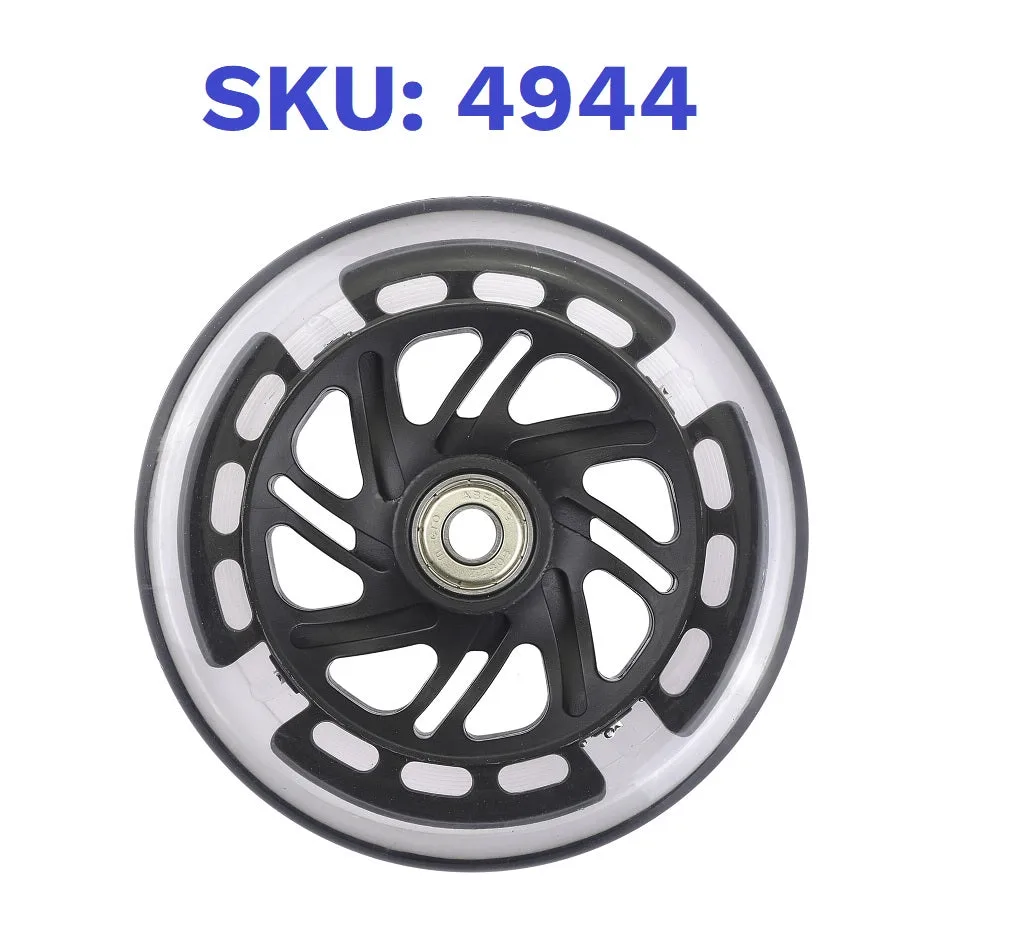
Parts: 120mm LED wheel for Sprite Neochrome