Quick Answer
Unbox your Litter-Robot 5 and LitterHopper, place them on a level surface, connect the LitterHopper to the unit, fill with clumping litter, and run the initial cycle using the Litter-Robot app. Check for proper alignment and litter flow before regular use.
Before You Start: What's in the Box
The Litter-Robot 5 LitterHopper Bundle includes the Litter-Robot 5 unit, the LitterHopper attachment, a power adapter, a waste drawer liner, and a quick-start guide. The LitterHopper connects directly to the top of the Litter-Robot 5, automating litter refills so you don't have to scoop or refill manually.
Make sure you have a level, sturdy surface near a power outlet. Avoid placing the unit on carpet or uneven flooring, as this can affect the weight sensor accuracy. Also, keep the area clear of obstacles so the LitterHopper can dispense litter freely.
Common Setup Mistakes to Avoid
One frequent error is overfilling the LitterHopper with litter that is too heavy or dusty, which can clog the dispenser. Use only clumping, low-dust litter for best results. Another mistake is not seating the LitterHopper firmly onto the Litter-Robot 5—if it's loose, the dispenser may not align properly and litter can spill.
Also, remember to remove the shipping tape and foam inserts inside the Litter-Robot 5 globe before first use. Forgetting this can cause the unit to malfunction or make unusual noises during the initial cycle.
Step-by-Step Setup Instructions
- Unbox and Inspect: Remove the Litter-Robot 5 and LitterHopper from the box. Check that all components are present: the main unit, LitterHopper, power adapter, waste drawer liner, and quick-start guide. Remove all shipping tape and foam inserts from the globe and drawer. A missing foam insert can cause the globe to jam—double-check inside the waste drawer and globe cavity.
- Position the Litter-Robot 5: Place the Litter-Robot 5 on a level, hard surface near a power outlet. Ensure at least 6 inches of clearance on all sides for ventilation and movement. Do not place it on carpet or an uneven floor. An uneven surface can trigger false weight readings, causing unnecessary cycles or errors.
- Attach the LitterHopper: Align the LitterHopper's mounting bracket with the top of the Litter-Robot 5. Press down firmly until you hear a click. Ensure the LitterHopper is seated securely and does not wobble. Connect the LitterHopper's power cable to the port on the back of the Litter-Robot 5. If the LitterHopper is loose, it may not dispense litter correctly—test by gently pushing it from the side.
- Fill the LitterHopper with Litter: Open the LitterHopper lid and pour in clumping, low-dust litter up to the MAX fill line. Do not overfill. Use only litter recommended for automatic dispensers to avoid clogging. Close the lid securely. Overfilling or using heavy, non-clumping litter can clog the dispenser and void the warranty.
- Connect Power and Download the App: Plug the power adapter into the Litter-Robot 5 and then into a wall outlet. Download the Litter-Robot app from your device's app store. Create an account or log in, then follow the in-app prompts to pair your unit via Bluetooth or Wi-Fi. Keep your phone near the unit during pairing—if the connection fails, restart the app and try again.
- Run the Initial Cycle: In the app, select 'Run Cycle' to start the first automatic cleaning cycle. Observe the globe rotation and listen for unusual noises. After the cycle completes, check that the LitterHopper dispensed fresh litter into the globe. The unit should show a green light indicating normal operation. If the LitterHopper did not dispense litter, check that the LitterHopper is properly connected and the litter level is above the sensor.
- Adjust Settings for Your Cat: Use the app to set the cycle delay (3, 7, or 15 minutes after your cat exits), night mode (to disable lights and cycles during sleep hours), and litter level preferences. For multi-cat households, consider a shorter delay to keep the box clean between uses. A shorter cycle delay may be more convenient for multiple cats, but can increase noise—adjust based on your cat's comfort.
Product Details
-
Litter-Robot® 5 LitterHopper Bundle: Cross two chores off your list with one bundle. Litter-Robot 5, the most advanced self-cleaning litter box, comes paired with LitterHopper, so you can say goodbye to scooping and refilling the litter. This bundle saves you time by automating both waste removal and litter replenishment, reducing daily maintenance to just emptying the drawer every few weeks.
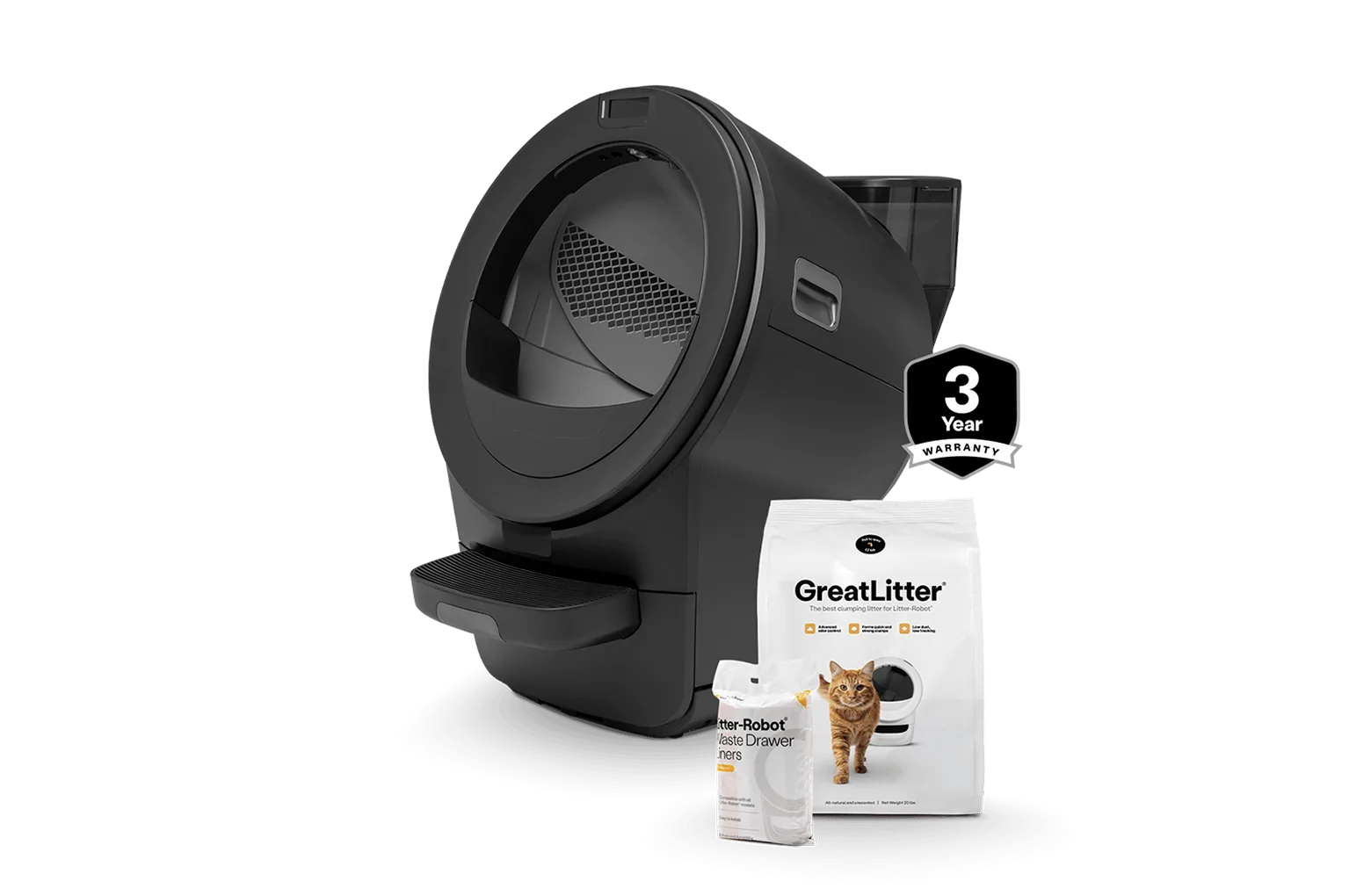
Litter-Robot® 5 LitterHopper Bundle