What to Expect from a Factory Renewed MacBook Pro 14 M1 Pro
A factory renewed MacBook Pro 14 with the M1 Pro chip offers the same core hardware and performance as a new unit, often at a lower price. The key difference is that it has been inspected, tested, and restored to like-new condition by the manufacturer or an authorized refurbisher. This guide focuses on what to check when you receive yours and how to set it up for daily use.
First-Day Setup Order for Your Renewed MacBook Pro 14
- Inspect the exterior and ports: Examine the aluminum chassis, display, keyboard, and trackpad for any dents, scratches, or signs of wear. Check the Thunderbolt 4 (USB-C) ports, headphone jack, and HDMI port for damage. Factory renewed units should be cosmetically clean, but it's worth confirming.
- Power on and run the initial setup: Connect the charger (USB-C) and press the power button. Follow the on-screen macOS setup assistant to select your language, connect to Wi-Fi, and sign in with your Apple ID. If the system prompts you to update macOS, do so to ensure you have the latest security patches and features.
- Verify system information: Open 'About This Mac' from the Apple menu. Confirm the model shows 'MacBook Pro (14-inch)', the processor is 'M1 Pro', and the memory and storage match the listing — for the factory renewed unit described here, that means 16GB RAM and a 512GB SSD.
- Check battery health and cycle count: Hold the Option key and click the battery icon in the menu bar, then select 'Battery'. The status should show 'Good' or 'Normal'. A cycle count under 300 is typical for a renewed unit. The M1 Pro chip's all-day battery claim (up to 17 hours) is based on typical video playback; real-world usage will vary.
- Test essential hardware: Open the built-in keyboard test (or type in a text document) to ensure all keys respond. Play a video to confirm the speakers and display work. Connect to a Wi-Fi network and browse a few sites to verify wireless performance. If you have a USB-C hub or external monitor, test those ports as well.
Understanding M1 Pro Chip Performance
The M1 Pro chip in this MacBook Pro 14 delivers what Apple calls 'blazing-fast performance for demanding tasks.' It features a 10-core CPU (8 performance cores and 2 efficiency cores) and a 14-core GPU, making it capable of handling professional video editing, coding, and 3D rendering without breaking a sweat. The integrated 16-core Neural Engine accelerates machine learning tasks, though the supplied information does not specify exact benchmarks or software compatibility. For everyday productivity, web browsing, and office work, the M1 Pro is more than sufficient.
What the Listing Confirms About This Renewed Model
-
Apple MacBook Pro (14-inch, M1 Pro chip with 8‑core CPU and 14‑core GPU, 16GB RAM, 512GB SSD) - Silver (factory renewed): M1 Pro chip : Blazing-fast performance for demanding tasks. Supercharged Speed : Up to 10-core CPU & 32-core GPU for pro apps & gaming. Next-Level AI: 16-core Neural Engine for advanced machine learning. This confirms the processor's capability for intensive workloads like video editing, 3D modeling, and development. The 14-core GPU in the specific unit (the listing mentions a 14-core GPU variant) still handles most creative tasks well.
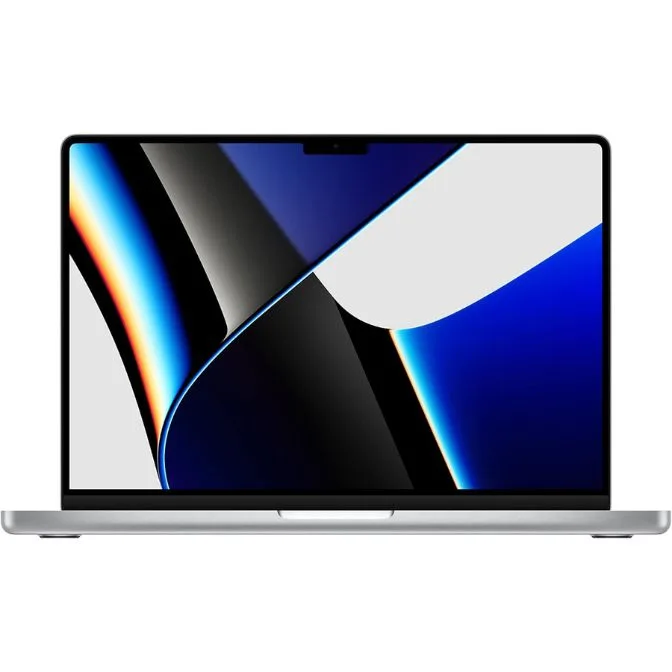
Apple MacBook Pro (14-inch, M1 Pro chip with 8‑core CPU and 14‑core GPU, 16GB RAM, 512GB SSD) - Silver (factory renewed)
-
Apple MacBook Pro (14-inch, M1 Pro chip with 8‑core CPU and 14‑core GPU, 16GB RAM, 512GB SSD) - Silver (factory renewed): All-Day Battery : Up to 17 hours of use. Battery life is a key consideration for mobile professionals. The 17-hour figure is based on local video playback; real-world usage with Wi-Fi, brightness, and multiple apps will be lower, but the M1 Pro's efficiency is a genuine advantage.
-
Apple MacBook Pro (14-inch, M1 Pro chip with 8‑core CPU and 14‑core GPU, 16GB RAM, 512GB SSD) - Silver (factory renewed): Massive Memory & Storage : Up to 64GB RAM & 8TB SSD for seamless multitasking. This indicates the platform's maximum capabilities. The specific unit comes with 16GB RAM and a 512GB SSD, which is adequate for most users. If you need more, check the listing carefully before purchasing.
What the Supplied Information Does Not Settle
The catalog does not specify the exact condition grade (e.g., Grade A, B) or warranty terms for this factory renewed unit. It also does not confirm whether the original charger, cable, or box are included. If these details matter to you, contact the seller before buying. Additionally, the listing does not state whether the SSD is user-upgradeable — the M1 Pro's storage is soldered, so choose your capacity at purchase.
Final Tips for Your Renewed MacBook Pro 14
Once you're satisfied with the initial checks, set up Time Machine backups to an external drive or cloud service. Install essential software from trusted sources only. The M1 Pro is ARM-based, so verify that any legacy x86 apps you rely on have Apple Silicon-native versions. Enjoy the combination of a compact 14-inch chassis and workstation-class performance.