Quick answer
A machinist square gives you a reliable 90° reference only if you first confirm it is true, then seat it firmly against a known straight edge and read the gap against light. For most benches, an 8 inch machinist square is the practical size: long enough to catch errors, short enough to control one-handed. Check it before every critical layout, not just when it is new.
What a machinist square is actually for
A machinist square, also called an engineer square, is a rigid L-shaped reference tool. The stock sits against a known edge and the blade projects at 90°, so you can check perpendicularity, transfer a right angle, or set up a machine or fixture. It is not a try square with a wooden or plastic handle, and it is not a combination square with a sliding rule; those have different flex and wear points.
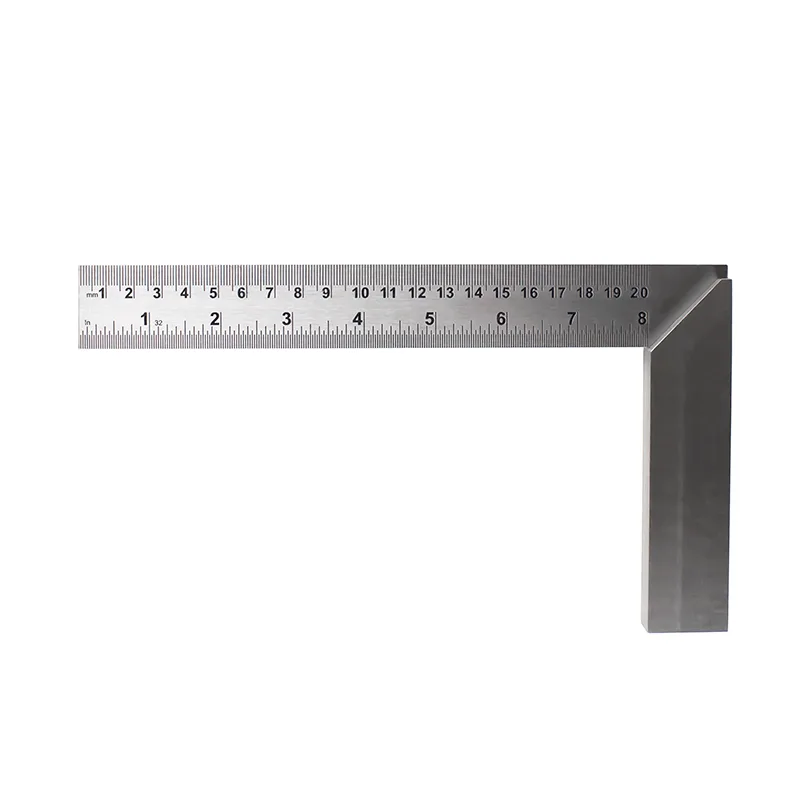
The Excel Blades 8" Machinist Square is built for engineers, machinists, woodworkers, and metalworkers who need accurate 90° angles for setting up machinery, aligning tools, checking perpendicularity, and marking precise right-angle lines. That is the whole job: a trustworthy reference you can hold against a surface and read.
Match the square size to the task
Blade length controls how much error you can see. A short square is handy in tight joinery but magnifies small gaps less, so a slightly out-of-square corner can pass unnoticed. A long blade exaggerates any gap, which is why cabinetmakers and machine setup work often use a larger square.
For general bench work, an 8 inch machinist square is a good middle ground. It reaches across most drawer parts, small panels, and machine tables while staying light enough to hold flat. If your work is mostly miniature or model-scale, a smaller square is easier to control; if you are checking large assemblies, you will want a longer reference or a different method entirely.
How to check square for accuracy
Never assume a square is true because it is new or because it feels rigid. A drop, a vise crush, or a burr on the stock can bend or lift it. The test below takes under a minute and catches most problems before they reach your project.
You need a known straight edge, such as the factory edge of a machined plate, a granite surface plate, or a verified straightedge. If you do not have one, you can still compare the square against itself, but a known reference is better because it separates squareness from straightness.
Marking 90 degree angles without creeping error
When marking, the square is a guide, not a clamp. Hold the stock tight to the reference edge with your non-dominant hand, then draw the line with a sharp pencil, scribe, or marking knife held against the blade. Keep the point of the tool in the same corner where the blade meets the stock; sliding it along the blade introduces wobble.
For woodworking layout, score the line lightly first, then deepen it. A single heavy pass pushes the blade and rounds the corner. On metal, use a scribe and a light pass, then check the line against a second reference if the part is critical.
Setup uses: machine tables, fences, and fixtures
A machinist square setup is mostly about bringing two surfaces into agreement. Stand the square on the table and bring the blade against the fence, vise jaw, or workpiece. Look for light gaps, then adjust one side at a time. Do not tap the square itself; move the part or the machine component.
On a table saw or router table, check the fence against the miter slot rather than the table edge, because the slot is the reference the cut actually follows. On a drill press or mill, check the quill or spindle against the table. Recheck after tightening, since clamps and bolts can pull a setup out of square.
Step-by-step: check, set up, and mark
- 1. Verify the square against a known straight edge: Seat the stock against a verified straight edge, hold the assembly up to a light source, and look for a gap along the blade. Flip the square over and repeat. If the gap appears on the same side both times, the square is out; if it flips sides, your reference edge is the problem. Checkpoint: no light gap on either orientation before you use it on a project.
- 2. Clean the stock and the reference edge: Wipe the stock and the edge you are referencing. A single chip or burr under the stock tilts the blade and throws off the reading, especially on a long 8 inch blade. Common mistake: checking squareness on a dirty surface and blaming the tool.
- 3. Seat the stock fully against the reference: Press the full length of the stock against the edge with light, even pressure. Do not rock it or hold it by the blade, which flexes the tool and lifts the stock. Checkpoint: the stock should feel flat and immobile before you read or mark.
- 4. Read the gap against light, not by eye alone: Hold the square and part up to a light source and look along the blade. A visible sliver of light means the corner is not 90°. For critical work, slide a feeler gauge or a thin shim into the gap to judge how far off it is. Common mistake: trusting a shadowed gap that looks closed but is not.
- 5. Mark with the tool held still: Keep the stock tight to the edge and draw against the blade with a sharp pencil, scribe, or marking knife. Start at the corner where the blade meets the stock and make one light pass before deepening. Checkpoint: the line should start exactly at the reference edge with no hook or curve.
- 6. Recheck after any adjustment: When you move a fence, vise jaw, or machine component, re-seat the square and read the gap again. Tightening clamps and bolts can pull a setup out of square after you have already checked it. Common mistake: checking once, then tightening and cutting without a second look.
Tool facts worth knowing
- 8" Machinist Square: Excel Blades 8" Machinist Square is an engineer's square precision measuring tool for metalworking and woodworking, designed for accurate 90° angles. It is sized for bench and machine setup work where you need a longer blade to reveal gaps that a short square would hide.