Quick Answer
Using a MagSafe card holder wallet daily is straightforward: attach it to your MagSafe-compatible case, load a few essential cards, and detach it when you need wireless charging.
Why a MagSafe Card Holder Wallet Works for Daily Carry
A MagSafe card holder wallet eliminates the need for a separate wallet when you're out with just your phone. It attaches magnetically to the back of a MagSafe-compatible case, keeping your ID, transit card, or one credit card within reach. The slim profile means it adds minimal bulk, so your phone still slides into most pockets. The trade-off is capacity: you can carry only two or three cards, so this isn't a replacement for a full wallet on longer trips.
Choosing the Right Cards for Your Wallet
Not all cards work equally well with a magnetic wallet. Most modern credit cards and IDs have a chip or magnetic stripe that is unaffected by the magnets in a MagSafe holder. However, hotel key cards or some older magnetic-stripe cards can become demagnetized if placed directly against the magnet array. Stick to chip-enabled credit cards, debit cards, and your driver's license. Avoid carrying more than three cards, as overstuffing weakens the magnetic hold and makes the wallet bulge.
How to Use Your MagSafe Card Holder Wallet Daily
- Step 1: Attach the Wallet to Your Case: Place the MagSafe card holder wallet against the back of your MagSafe-compatible phone case. The magnets will snap it into place. Center it so the wallet aligns with the phone's magnet ring for the strongest hold. Common mistake: attaching it to a non-MagSafe case or bare phone—it won't hold securely.
- Step 2: Load Your Cards: Slide one or two cards into the wallet's slot with the card's chip facing outward. Avoid overstuffing; three cards is the maximum. Press down gently to ensure the cards sit flat inside the pocket. Checkpoint: If the wallet bulges or feels loose, remove one card.
- Step 3: Detach for Wireless Charging: When you need to charge your phone wirelessly, simply pull the wallet off. The magnetic attachment makes it easy to remove and reattach. Store the wallet in a pocket or bag while charging. Common mistake: leaving the wallet on during wireless charging—it blocks the charging coil and prevents charging.
- Step 4: Secure the Wallet During Active Use: If you're running, biking, or moving quickly, place your phone face-up in a pocket or bag so the wallet faces inward. This prevents the wallet from catching on objects and accidentally detaching. Checkpoint: After any vigorous activity, check that the wallet is still fully attached.
Product Facts
-
EXEC MagSafe Card Holder Wallet: Designed for use with MagSafe-compatible cases, this wallet attaches securely for convenient access on the go. You need a MagSafe-compatible case to use this wallet reliably; it won't stick to a standard smooth case.
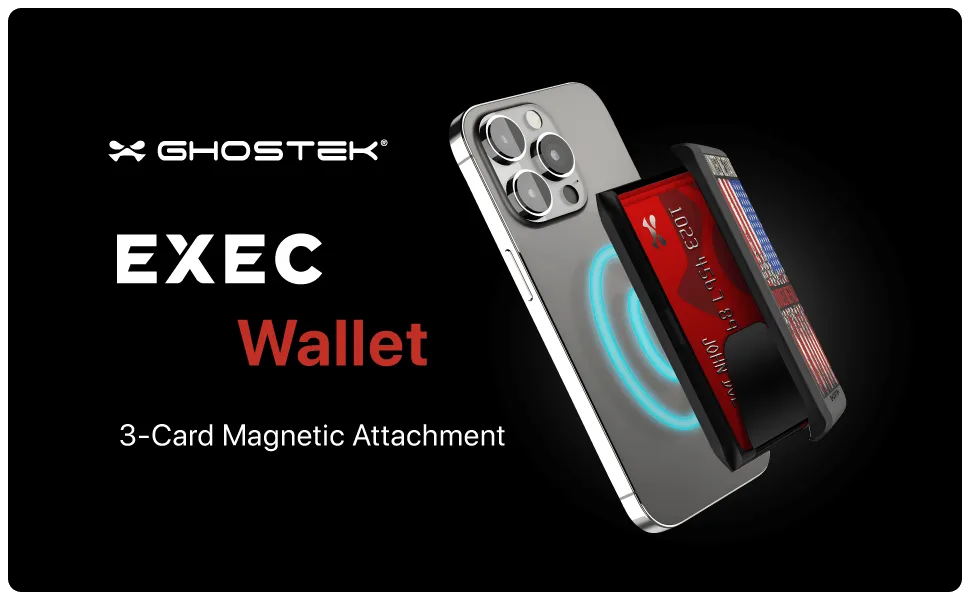
EXEC MagSafe Card Holder Wallet
-
EXEC MagSafe Card Holder Wallet: Holds your cards securely while maintaining a slim profile. You can carry one or two essential cards without adding noticeable thickness to your phone.