Quick answer
Set up the MOZA Flight Take Off Panel by mounting it securely, connecting it to your PC, and configuring it in the MOZA software for your flight sim.
Why the MTLP works well for flight sims
The MOZA Flight MTLP Take Off Panel is modeled after the F/A-18 landing panel, giving you a realistic array of switches for aircraft operations. Its 25-switch layout is designed to be intuitive, so you can find and flip the right switch without looking away from the screen.
Because the panel is built for precision, it suits simmers who want to control gear, flaps, and other systems with dedicated hardware rather than keyboard shortcuts. The trade-off is that it adds a physical panel to your setup, so you need a stable mounting spot within reach.
Step-by-step setup
- Unbox and inspect: Open the box and check that the MOZA Flight Take Off Panel and its cables are free of damage. Confirm you have a USB cable and any mounting hardware included. If anything is missing, contact support before starting.
- Mount the panel: Place the panel on a stable surface or attach it to your rig using the provided mounting points. Ensure it is within easy reach of your throttle or stick position. A loose mount can cause accidental switch toggles during flight.
- Connect to your PC: Plug the USB cable into the panel and then into a free USB port on your computer. Use a direct port rather than a hub if possible to avoid power issues. If the panel isn't detected, try a different USB port or cable.
- Install the MOZA software: Download and install the latest MOZA Flight software from the official site. Open it and confirm the panel appears in the device list. Keep the software updated to get the latest profiles and fixes.
- Configure switch assignments: In the software, assign each of the 25 switches to the functions you want, such as landing gear, flaps, or lights. Save your profile and test each switch in the sim. Start with the most-used functions and expand as you get comfortable.
- Test in your flight sim: Launch your flight simulator and verify that each switch performs the assigned action. Adjust any assignments that don't feel natural. If a switch doesn't respond, check the assignment in the software and re-test.
Product fact
-
MOZA FLIGHT MTLP Take Off Panel: The MOZA MTLP Panel is a high-fidelity multi-function landing panel, designed for precision control and immersive flight simulation. Modeled after the F/A-18 landing panel, it features an intuitive 25-switch signal layout for seamless aircraft operation. This panel gives you a realistic switch layout that mimics a real fighter jet, so you can control key aircraft systems without memorizing keyboard commands.
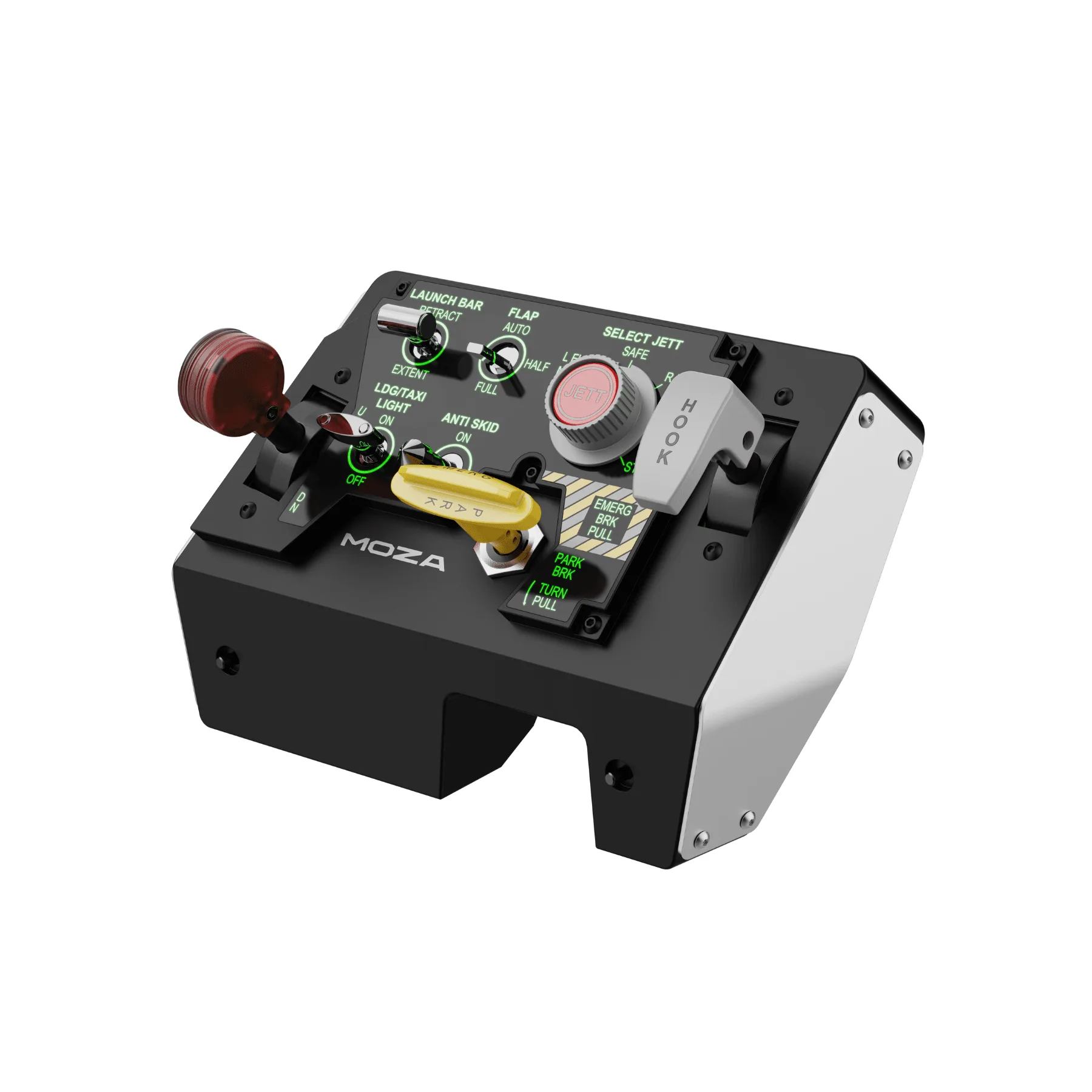
MOZA FLIGHT MTLP Take Off Panel